mmWave Radar Modules
Hi-Link HLK-LD2410 Series
24 GHz presence radar reporting occupancy and per-gate energy over UART, published in two documented hardware variants.
Capabilities below are vendor-documented. We have not tested this device or its integrations.
Sources checked:
Also known as: LD2410, LD2410-AA, LD2410D-B
Suitable projects
- Room occupancy where a stationary person must keep a light or HVAC zone on.
- Per-gate energy tuning to exclude a doorway or a corridor.
Before you buy
- It reports presence and gate energy, not target coordinates or a person count.
- The two variants differ in supply, sweep bandwidth and range; read the part marking first.
- Hi-Link says the design can pass FCC and CE spectrum rules, but publishes no grant number on these pages.
Official resources
Related guides
- Presence and distance-gate radar: the LD2410 type
- From radar UART frames to Home Assistant entities
- Tuning distance gates to remove radar false triggers
- 24 GHz or 60 GHz radar: what the band actually changes
- Power and UART bring-up for mmWave radar modules
- Serial frames and configuration commands on radar modules
- Radar boundary bleed: capping range at the room edge
- Reading a mmWave radar datasheet: what each number actually allows
- Test a radar UART parser without the radar
- From radar presence to a room occupancy state machine
- Band
- 24.01-24.18 GHz
- Sweep bandwidth
- 0.17 GHz
- Modulation
- FMCW
- Supply
- 4.5-5.5 V
- Average current
- 80 mA
- UART default
- 115200 8N1
- Detection angle
- ±60°
- Size
- 24 x 24 mm
- Moving range (vendor claim)
- 9 m
- Still range (vendor claim)
- 6 m
Choosing an HLK-LD2410 Presence Radar
This profile is based on official documentation, not our own device testing.
The LD2410 name covers two Hi-Link modules that share a presence job but not a specification. Both use a 24 GHz FMCW front end and report occupancy plus per-gate energy over UART. Neither reports target coordinates or a person count. The part marking decides which datasheet applies.
The two variants
| Item | LD2410-AA | LD2410D-B |
|---|---|---|
| Operating frequency | 24.01-24.18 GHz | 24-24.25 GHz |
| Sweep bandwidth | 0.17 GHz | 0.25 GHz |
| Supply | 4.5-5.5 V | 3.0-3.6 V or 4.5-5.5 V |
| Average current | 80 mA | 100 mA |
| UART default | 115200 8N1 | 115200 8N1 |
| Moving range (vendor claim) | 9 m wall mounted | 10 m wall mounted |
| Still range (vendor claim) | 6 m wall mounted | 5 m seated |
| Detection angle | ±60° | ±60° |
| Size | 24 x 24 mm | not stated on the page |
What leaves the module
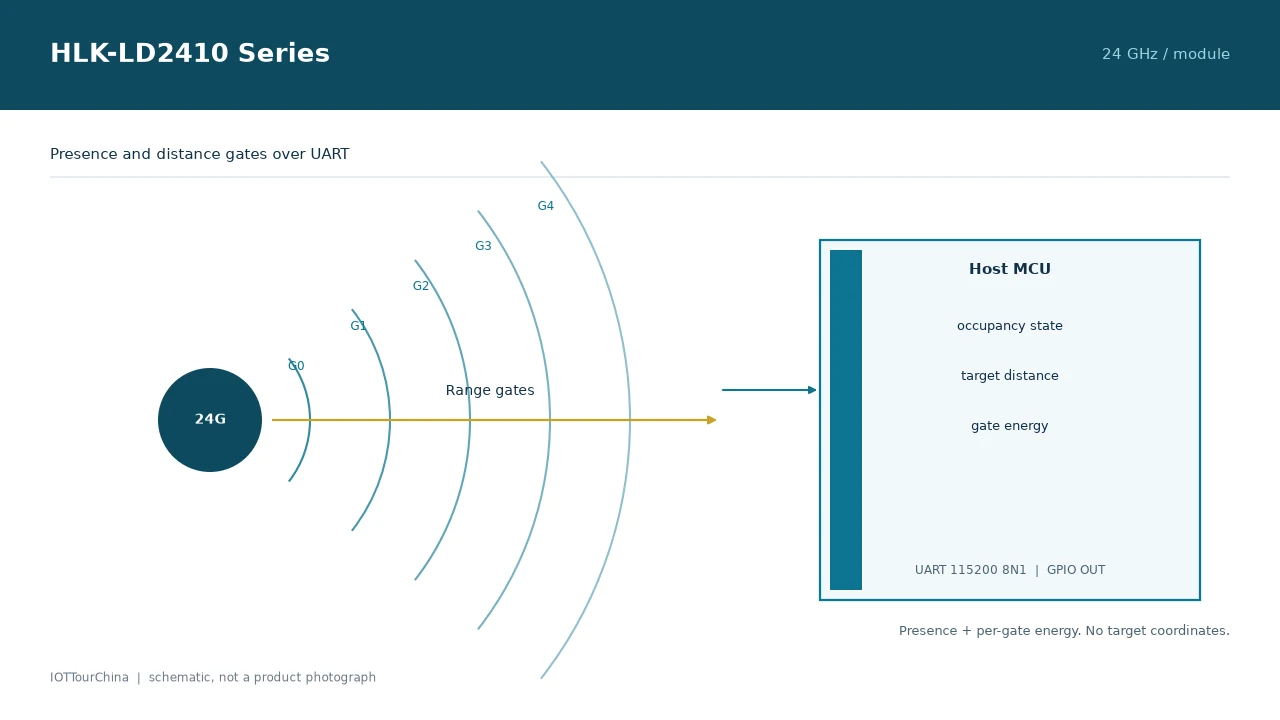
The serial stream carries an occupancy state, a target distance and the energy value of each distance gate. A gate is a fixed slice of range; the firmware compares moving and still energy in each gate with the threshold you configure.
That answers whether somebody is in the room and which part of it is active. It does not answer how many people are present or where each one stands, because one gate can hold several people and the module has no angular resolution. For coordinates, use the LD2450 instead.
When this is the right part
- A stationary occupant must keep an automation on after they stop moving.
- The host has one UART and one GPIO line and no spare compute budget.
- The installation can be tuned once with a PC tool and then left alone.
What to check first
- Ceiling mounting reduces the quoted ranges; Hi-Link publishes separate figures for 3 m and 6 m heights.
- The AA variant adds BLE configuration through a phone app, so the UART can stay free for the host.
- Both pages say the design can pass FCC and CE spectrum rules. That is a design statement, not a published grant number.
Quick Start — HLK-LD2410
This profile is based on official documentation, not our own device testing.
This sequence brings one module to a readable UART stream. It assumes a host with 3.3 V logic and a USB-to-serial adapter for the first pass.
1. Read the part marking
Check whether the board is the AA or the D-B variant. The supply range, sweep bandwidth and current differ, and the AA variant supports BLE configuration while the D-B variant supports an automatically generated threshold.
2. Bring up power
- AA: 4.5-5.5 V, 80 mA average.
- D-B: 3.0-3.6 V, or 4.5-5.5 V with the fitted LDO, 100 mA average.
Give the supply headroom above the average current. A marginal rail shows up as phantom targets rather than as a clean failure.
3. Wire the serial link
Cross the data lines: module TX to host RX, module RX to host TX, and join the grounds. The IO level is 3.3 V. The OUT pin gives a simple occupied or empty level if the host does not need the full stream.
4. Set the port
Use 115200 baud, one stop bit and no parity. The vendor publishes a 100 ms reporting cycle at this rate. Note that the ESPHome LD2410 component documents a 256000 baud factory default, so check your firmware version before assuming either number.
5. Read engineering data before setting thresholds
Enable the engineering report and look at the moving and still energy of every gate with the room empty, then with a fan running, then with a person sitting still. Set the gate thresholds and the no-person delay from those three observations.
6. Move to the host firmware
Point the ESPHome LD2410 component at the same UART. It exposes presence as binary sensors and distance or gate energy as sensors inside Home Assistant.
FAQ — HLK-LD2410
This profile is based on official documentation, not our own device testing.
Can it count the people in a room?
No. The module reports presence, a distance and per-gate energy. It has one transmit and one receive antenna and no angular resolution, so several people in one gate look like a single stronger return.
Does it detect a person who is completely still?
Yes, that is the point of the design. The firmware looks for micro-motion in the still-energy gates. This is a vendor-documented capability, not a measurement we have reproduced on a bench.
Do the AA and D-B variants use the same baud rate?
Both official pages state 115200 with one stop bit and no parity. Do not carry that figure over to the ESPHome component without checking the firmware, because the component documents 256000 as its factory default.
Is the module certified?
The Hi-Link pages say the 24 GHz design can pass FCC, CE and national spectrum rules. No grant number or certificate is published there, so treat certification as open until the vendor supplies the document for your exact variant.