Hiwonder NexArm: a $225 six-axis arm that arrives with a working LeRobot pipeline
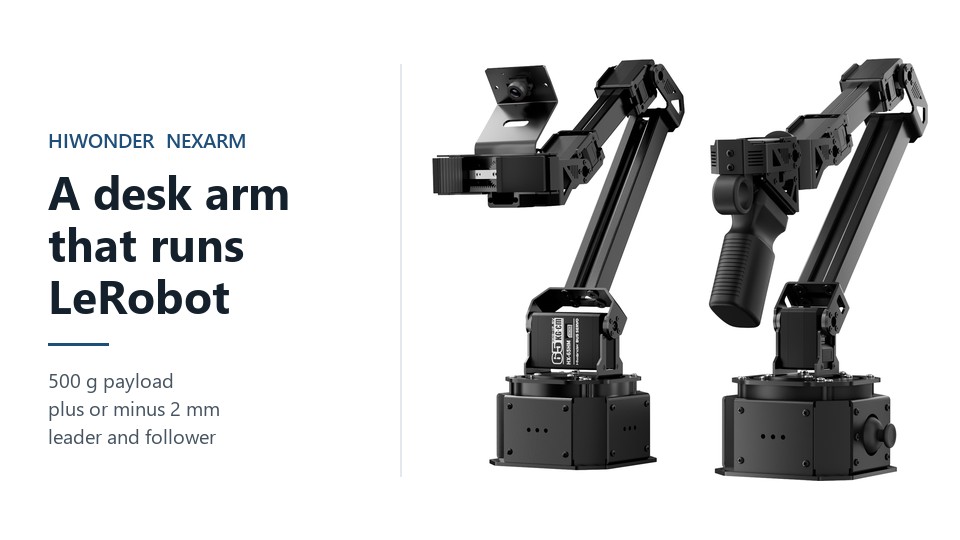
A six-axis arm that carries half a kilogram is either a few thousand dollars of industrial hardware or a weekend of printed parts. Hiwonder's NexArm sits in neither camp: it is a metal-framed desk arm sold as a follower for 251.99 dollars or a leader for 224.99 dollars, and its control software exists for one reason, which is to hand Hugging Face LeRobot clean demonstration data.
The arm on its own is not the story. Servo-driven desk arms have been around since the SO-ARM100, and nothing about a six-axis linkage with magnetic encoders will surprise anyone who has built one. What is worth reading about is the stack underneath it: a ten-file addition to LeRobot, a five-command serial protocol between Python and the arm, and a servo bus whose register map is published down to the checksum. Those three layers are what decide whether a 225-dollar arm is a platform you can debug or a black box you can only obey.
Two arms that are not the same arm
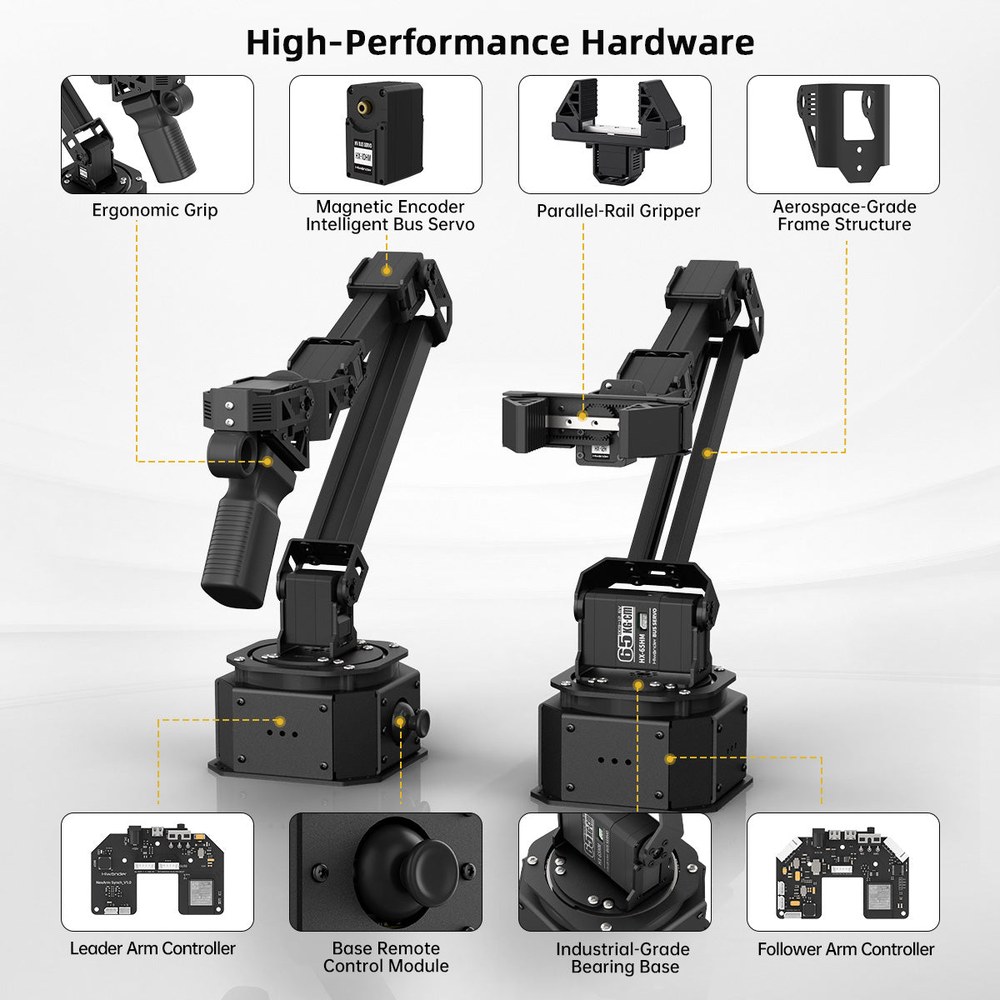
The kit is a leader-follower pair, and the two halves are built from different parts. The leader is the one a human drags around, so it is geared and loaded for feel rather than force. The follower is the one that has to hit a position, so it gets the heavier servo at the base.
| Leader arm | Follower arm | |
|---|---|---|
| Servos | HX-10HM x5 and HX-12H x1 | HX-12H x2, HX-30HM x3, HX-65HM x1 |
| Gear ratio | 1:147 | 1:345 |
| Body | 111 x 216 x 619 mm | 111 x 111 x 614 mm |
| Weight | 1.2 kg | 1.3 kg |
| End effector | Ergonomic grip | Parallel-rail gripper |
| Job | Reads a human hand | Executes positions |
That bill of materials is worth pausing on, because Hiwonder's own README describes the joints as 65 kg·cm servos and the product renders make the 65 kg·cm label the most visible thing in the picture. In the published specification only one servo is an HX-65HM. The rest of the follower is a mix of 30 kg·cm and 12 kg·cm units, and the leader runs on 10 and 12 kg·cm servos. Those figures are not guesswork, since the servo model numbers match their published torque and each unit is sold separately: the HX-65HM lists at 49.99 dollars, the HX-30HM at 19.99, the HX-12H at 16.99 and the HX-10HM at 17.99. A burnt base servo costs a base servo, not an arm. If you are planning a payload experiment, the table above is the one that constrains you, not the label.
Shared between both arms: 500 g rated payload, plus or minus 2 mm repeatability, 0.5 m of workspace, 4096-step magnetic encoders on every joint, and a base bearing that the product imagery labels at 270 degrees of rotation. The follower also carries a small OLED display on its base showing arm status, temperature, voltage and joint speed, which is a cheap feature that saves a surprising amount of time during bring-up.
Perception is two USB cameras at 640 x 480 and 30 frames per second, one looking down at the workspace and one mounted on the wrist. There is no depth sensor and no tracking rig. For imitation learning that is the correct minimum: the policy needs to see what the human saw, from the angles the human's hand occupied, and nothing more.
Five commands between Python and the metal
Everything the host sends to either arm goes through one frame layout: two 0xFF header bytes, a device ID, a length, a command byte, up to twelve bytes of arguments and a checksum, all over USB serial at 1 Mbps.
The command set is deliberately small. CMD 96 reads all six joint positions in one 12-byte reply. CMD 97 writes all six positions in one 12-byte packet and expects no answer. CMD 98 switches torque on or off, which is how the leader becomes draggable. CMD 68 puts the follower into a bridge mode where its own firmware stops interpreting motion and simply streams what Python asks for. CMD 56 sets the motion profile once at connect time, with a default speed of 2000 raw units per second and an acceleration value of 100 on a 0 to 254 scale.
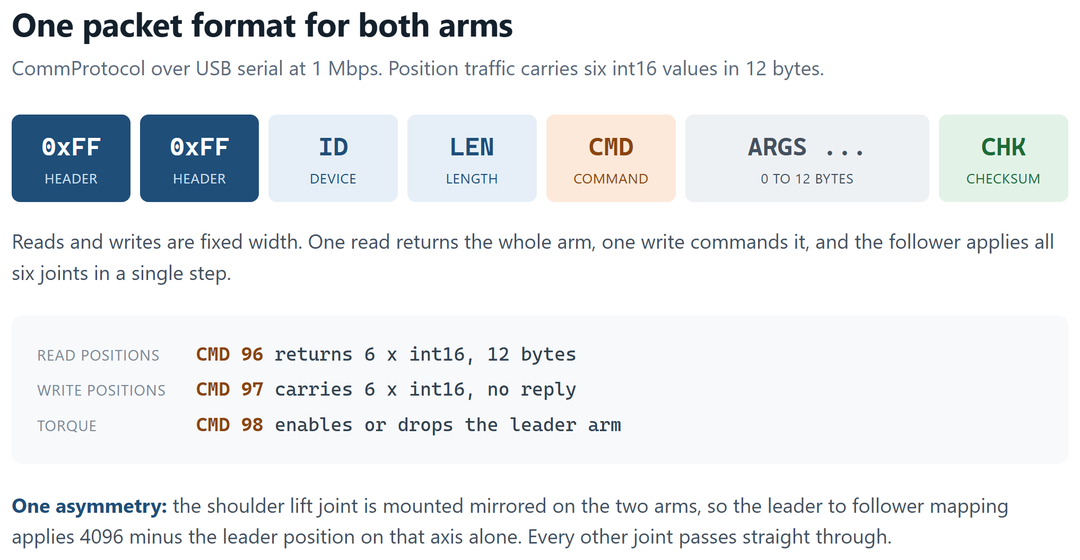
There are two details in that design worth stealing for your own hardware. First, the arm is addressed as a whole rather than joint by joint, so a full state read is one round trip and a full command is one write. At 30 frames per second the timing budget is not tight enough for that to matter, but it means there is no per-joint scheduling code to get wrong. Second, the only asymmetry between the two arms is handled in Python rather than in firmware, which matters more than it sounds: the mirroring is a line you can read in the code you installed, not a behaviour locked inside a binary you cannot inspect.
One level down, an ordinary bus servo
The servos are not exotic either, and that is the point. HX-30HM contains a 32-bit ARM controller and a 12-bit magnetic encoder, and talks over a single-wire half-duplex UART at 1 Mbps by default. Servo IDs run from 0 to 253 with 254 as broadcast, multi-byte values are little-endian, and the checksum is the bitwise inverse of the byte sum.
The instruction set will look familiar to anyone who has driven a Dynamixel: PING at 0x01, READ DATA at 0x02, WRITE DATA at 0x03, REG WRITE at 0x04, ACTION at 0x05, RESET at 0x06, plus SYNC READ at 0x82 and SYNC WRITE at 0x83. The opcodes match protocol 1.0; the register map does not, so existing serial tooling is a starting point rather than a drop-in replacement.
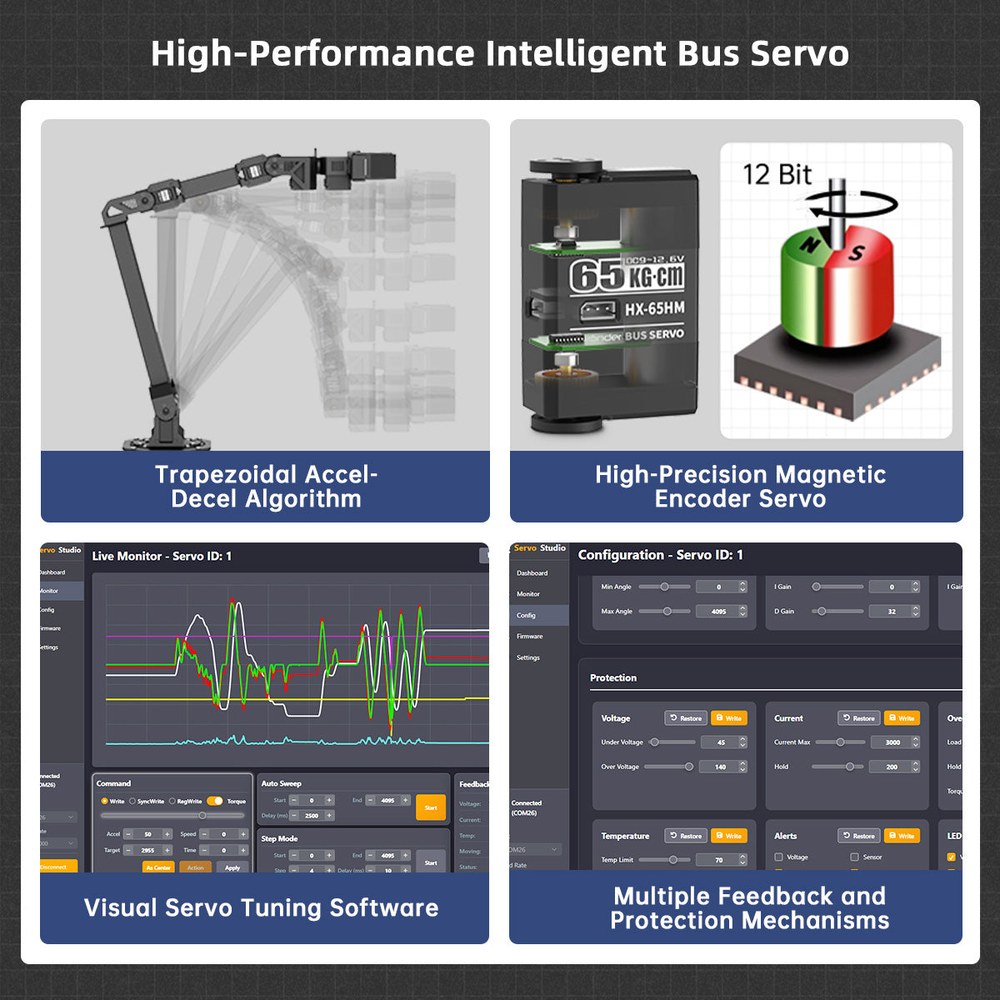
The register map is where the useful detail lives. Address 0x2A starts a contiguous six-byte block holding target position, run time and run speed, and the documentation is explicit that these three must be written in one instruction. Write position and time separately through 0x28 and 0x29 instead and the servo can begin moving between the two writes with stale parameters, which is exactly the kind of race that shows up as an intermittent twitch and takes a day to find. Address 0x38 returns eight bytes covering position, speed, load and supply voltage in a single read. Address 0x37 is the write-protect lock for the persistent area, and it has to be cleared before you can change an ID or a baud rate.
Electrically the servo is rated at 11.1 V and 6000 mA maximum, with 4096 steps per revolution, which is about 0.088 degrees per step. The arm itself is fed by a 12 V 5 A brick.
Hiwonder also publishes the servo SDK separately, with an ESP32 C++ library, a Python package and a Raspberry Pi driver, plus a register spreadsheet. That is the escape hatch. If the LeRobot path ever stops being what you need, you are not stuck with the arm firmware: a microcontroller can drive the six servos directly with a ten-byte packet per joint, or one broadcast SYNC WRITE for all six at once.
What the LeRobot side actually adds
The repository people install is a fork of LeRobot, not a plugin. Its pyproject declares version 0.6.1, the tree holds 1,190 files, and ten of them are NexArm material: a motor bus driver of about 9 KB, a follower robot class, a leader teleoperator class, and three example scripts for teleoperation, recording and rollout.
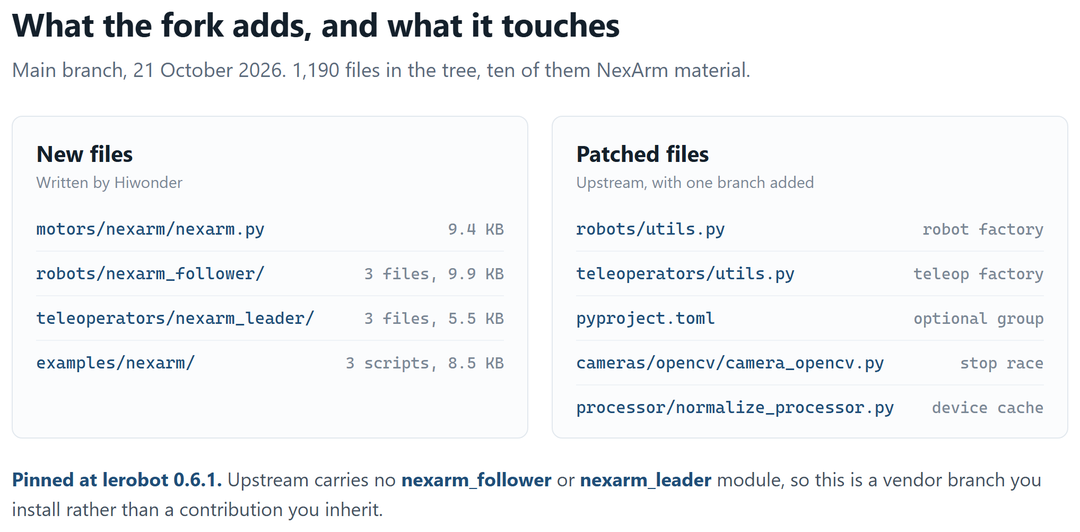
The patch is minimal and honest about itself. It adds a branch to make_robot_from_config and another to make_teleoperator_from_config, so the NexArm appears as just another robot type inside an unmodified LeRobot pipeline. It also carries two upstream fixes unrelated to the arm, one for a stop-event race in the OpenCV camera backend on Linux and one adding device and dtype caching to the normalisation processor.
There is a second route, and it is less mature. Later the same month, Hiwonder published lerobot-robot-nexarm-follower and lerobot-teleoperator-nexarm-leader as separate packages, which is the modern way to add hardware to LeRobot without forking it. Their READMEs advertise installation from PyPI. Neither package resolves there; both return 404. Neither repository declares a licence either, despite one README stating Apache-2.0 in its text. For now the fork is the route that works.
The loop, in numbers
The reason to buy this rather than a bare arm is that the four stages are already joined up, with defaults that the vendor has actually run.
| Stage | Script | Defaults worth knowing |
|---|---|---|
| Teleoperate | teleoperate.py | 30 fps, leader torque off, both cameras attached |
| Record | record.py | 50 episodes minimum, 10 s per episode, 10 s reset, optional push to the Hub |
| Train | lerobot_train | ACT policy, 100,000 steps, batch 32, checkpoint every 25,000, RTX 3090 or better |
| Roll out | rollout.py | chunk size 100, 20 to 30 Hz on CPU alone |
Two of those numbers are the ones that decide whether a beginner finishes. The 50-episode minimum is stated as a floor, not a suggestion, with the advice to keep the start pose identical across episodes because data quality, not model size, is what usually fails first. And the CPU inference figure is real: ACT predicts 100 actions at a time and only runs the network when that queue empties, so a desktop without a GPU can still close the loop at 20 to 30 Hz, which is enough to watch a policy fail in an informative way.
The rollout strategies are the part that suggests the vendor has used its own product. Beyond plain inference there is a sentry mode that records continuously and saves, a highlight mode that keeps a ring buffer and lets you press a key to keep the good runs, and a dagger mode that keeps the leader arm connected so a human can take over mid-episode. The last one turns every failed rollout into more training data, which is the single most useful thing you can add to a cheap arm.
Where it will cost you time
Five things are worth knowing before the box arrives, all of them visible in the vendor's own material.
- The leader firmware prints debug lines over the same serial link it uses for protocol frames, which corrupts them. The driver retries each read three times, which papers over it. The permanent fix is to comment out the serial print calls in the lerobot-mode branch of the arm sketch and reflash, and that requires firmware source the repository does not contain.
- The leader firmware has a known checksum bug, and the driver accepts both correct and incorrect checksums for compatibility. Frames that should be rejected can pass.
- The README states that schematics, firmware and code are all open source. The code is. Across 1,190 files there is not one .ino, .step, .stl or schematic PDF, so the claim covers the Python and stops there.
- The 6 TOPS K230 vision module that the marketing copy leads with belongs to the separate NexArm kit, not to the LeRobot arm. The LeRobot SKU specification lists no vision module, and the integration contains no camera path other than two USB feeds through OpenCV.
- The fork was last pushed on 16 July 2026 and sits at ten stars. Upstream LeRobot has 28,343 stars and was pushed to on the day this was checked. Every month you wait makes the merge of upstream changes more expensive, and the port does not exist upstream.
Which of the two to buy
Follower alone is 251.99 dollars, leader alone is 224.99, and the imitation learning kits are 503.99 for the standard version and 539.99 for the advanced one. Teleoperation needs both arms, so the entry point for the loop described above is a kit rather than a single arm. The store does not publish a packing list for either kit, so confirm what is inside before ordering.
For comparison, the SO-ARM101 it benchmarks against is 200 g payload at plus or minus 3 mm in a printed body, and the open reBot B601 we covered earlier is 1.5 to 2.5 kg at 0.2 mm for a kit price starting near 829 dollars. NexArm lands between them: metal instead of printed plastic, exactly one base servo with real torque, and a documented control stack at both the arm and servo level.
That is the honest description of what five hundred dollars buys. Not a small industrial arm. A desk arm whose every layer, from checksum to ACT chunk size, is written down, with a leader half included in the same family so you can start collecting data on the day it arrives.