EasyDuck: an open-source desktop biped on Microduck software and RK3566 ONNX policies
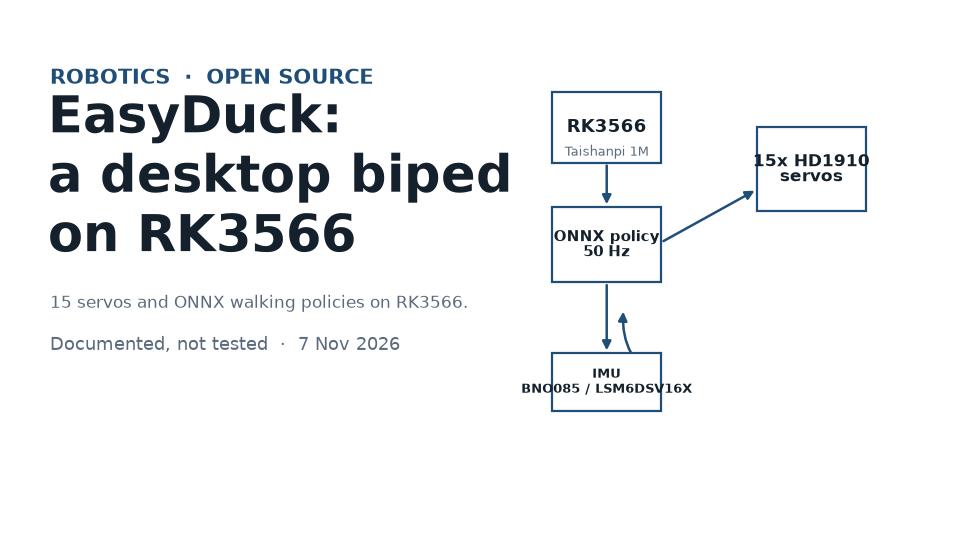
EasyDuck is a domestic open-source desktop biped built on Microduck's software and XgoDuck's strategy and motion flow. It takes a duck shape, stands about 25 cm tall, and runs on the Taishanpi 1M board carrying a Rockchip RK3566. It uses 15 HD1910 servos and an independent I2C IMU.
Walking is produced by an ONNX policy running on the board. The model reads joint feedback, the IMU, the previous action and the command, and the controller converts the output into servo targets. The web interface issues commands and runs calibration, and a 3D view shows the reference pose alongside the measured joint and torso pose.
What EasyDuck does
Motion control covers walking, zero-velocity standing, fall recovery, sit and stand commands, and pick-up. Roll and flip requests are kept as entry points on the gamepad or command line only; the web interface does not expose roll or jump.
The web remote offers a move joystick and a head joystick, separate neck pitch and tilt sliders, a speed control, a status view, and a press-to-quack that links to the mouth.
Gamepad control supports the PS5 DualSense over Bluetooth through BlueZ, and a verified USB or 2.4 GHz receiver that Linux recognises as an Xbox 360 gamepad through xpad. It reuses the existing walk, head, action, mouth and sound controls and hands control to or from the web through a control-rights mechanism. Torso and kick buttons retained on the gamepad should not be read as capabilities of the current XGO control path.
The calibration bench assigns servo IDs, sets the hardware centre and HOME, sets direction and range, shows 3D feedback, records the standing pose, and imports or exports JSON.
Two IMUs are supported, the BNO085 and the LSM6DSV16X. The controller and the calibration bench share the hardware configuration and store mount orientation and static bias per model.
Connection settings use NetworkManager for Wi-Fi, BlueZ for PS5 pairing, and attempt reconnection to registered gamepads.
Low-voltage protection is a board-level setting. Once the smoothed bus voltage reaches 6.2 V or below, it preempts normal control, sits down if conditions allow, then cuts torque and locks normal control until the controller reboots. It does not shut down Linux, and it does not auto-energise a robot that was de-energised.
Deployment tooling covers ARM64 builds, install-directory generation, file hashing, preserving existing configuration, install backups and file rollback.
Hardware list
The project supports the Taishanpi 1M board with a Rockchip RK3566 running Linux ARM64 under systemd. The 15 HD1910 servos use the default serial port /dev/ttyS3; the serial link supports half-duplex direction control matched to the device tree, and a serial device node alone is not sufficient. The IMU is limited to the BNO085 and the LSM6DSV16X on the default bus /dev/i2c-2. The gamepad is a PS5 DualSense through BlueZ, or a verified USB or 2.4 GHz receiver through Linux xpad. Audio uses the board's configured output with ALSA aplay and amixer. Running all components needs Python 3.11 or newer, the calibration bench's native library libudev, and ONNX Runtime 1.23 or newer providing libonnxruntime.so.
Software system
EasyDuck uses robotd as the control core. The web interface and gamepad receive user input, the controller runs the model combining servo and pose-sensor feedback, and the model result is converted to servo targets. The duck-ipc-proto module defines the message format between programs, robotd-params parses configuration, and kinematics provides pose geometry.
| Component | Responsibility | Source |
|---|---|---|
| deploy/setup | Configure Wi-Fi, pair Bluetooth gamepad, coordinate page and control service switching | deploy/setup/ |
| web/padd | Receive web joystick and button input, send control requests, return robot state | web/padd/ |
| runtime/padd | Read gamepad input, convert buttons and joysticks to unified control requests | runtime/padd/ |
| runtime/robotctl | Command-line control, status view and diagnostics | runtime/robotctl/ |
| runtime/robotd | Manage control rights and action state, run the model, coordinate hardware read, write and protection logic | runtime/robotd/ |
| runtime/duck-control | Hardware and inference modules: servo communication, IMU handling, model input, output and inference | runtime/duck-control/ |
| calibration | Assign servo IDs, set centre, HOME, direction, range and IMU calibration | calibration/ |
| sounds | Sound program and playback logic with ALSA | runtime/sounds/, runtime/robotd/ |
Flashing the board
The flashing tools and requirements: a Windows 10 PC to run the flash tool and development environment, a Type-C data cable that must support data transfer, the DriverAssistant v5.11 installer for the Rockchip driver, RKDevTool v2.93 to flash firmware to eMMC, and SDDiskTool v1.69 to flash to a TF card. After a successful image flash the RGB LED on the board cycles colours, and you can then enable wireless control: configure Wi-Fi, pair the Bluetooth gamepad if needed, and test the duck.
Key runtime facts
The robot controller is robotd written in Rust with a 50 Hz control loop. Gamepad control is padd reading Linux input devices. The servos are HD1910 communicating over /dev/ttyS3. The IMU module is the LSM6DSV16X read over /dev/i2c-2 at address 0x6B. Sound uses the sounds module with ALSA.
The first-setup page listens on HTTP port 80 and provides Wi-Fi and Bluetooth gamepad setup. The robot control page listens on HTTP port 9527. The calibration bench listens on HTTP port 8766. The system management page listens on HTTP port 8080. USB networking uses the preset entry 192.168.7.1, and after networking you reach the robot through its wireless IP.
Open-source project
EasyDuck uses a motion model trained by reinforcement learning: the robot is made to try repeatedly in simulation, a model that computes joint targets from body state is trained, and the model is then run on the physical robot. During real motion the control program continuously reads pose and joint feedback and updates servo targets.
The repository is published at github.com/jlckfb/easyduck.
A note on relationship to Microduck
EasyDuck is a community project that reuses Microduck's open software and XgoDuck's motion strategy. It is not the commercial Microduck sold by Pollen Robotics, which is a 25 cm, 15-motor biped running learned neural policies on a Rockchip RK3566 with an Apache-2.0 software stack but is not open hardware. EasyDuck is the software-and-strategy reuse applied to a desktop duck build, not a duplicate of that product.
Source: IoT Internet of Things Technology, WeChat, 7 November 2026. Repository: github.com/jlckfb/easyduck.