ZECTRIX NOTE4: an e-paper sticky note with an open demo and a cloud agent
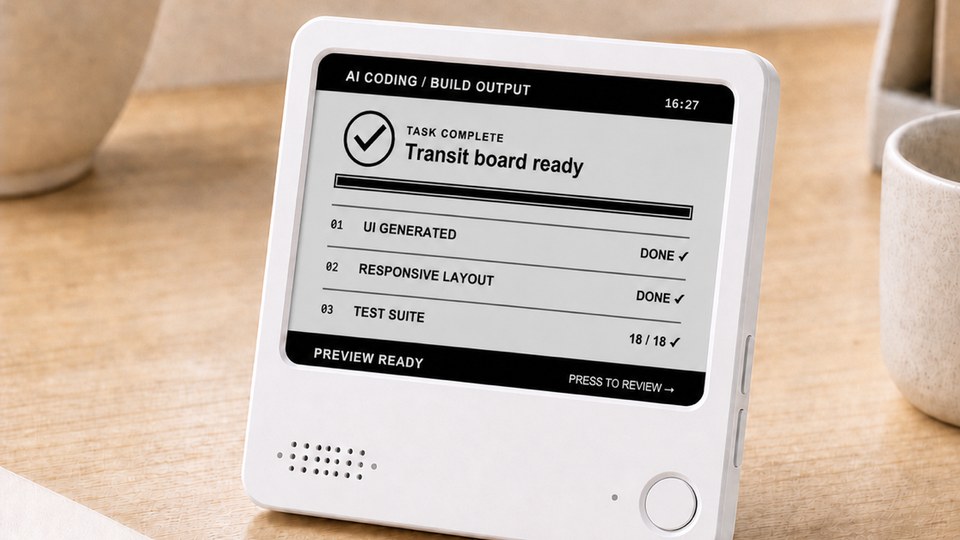
A four-inch square of electronic paper that sits on a desk or sticks to a fridge is not a new idea. Making it do something useful without becoming a small phone is the hard part, and that is the problem ZECTRIX NOTE4 is aimed at. Press one button, say what you need to remember, and the task appears on a panel that draws no power until the picture changes.
The promotional write-ups around this device lean hard on the word "open". The more interesting story is narrower and better documented: the vendor publishes a genuinely useful MIT-licensed e-paper reference project and an Open API, and holds back the firmware that makes the product a product.
The device
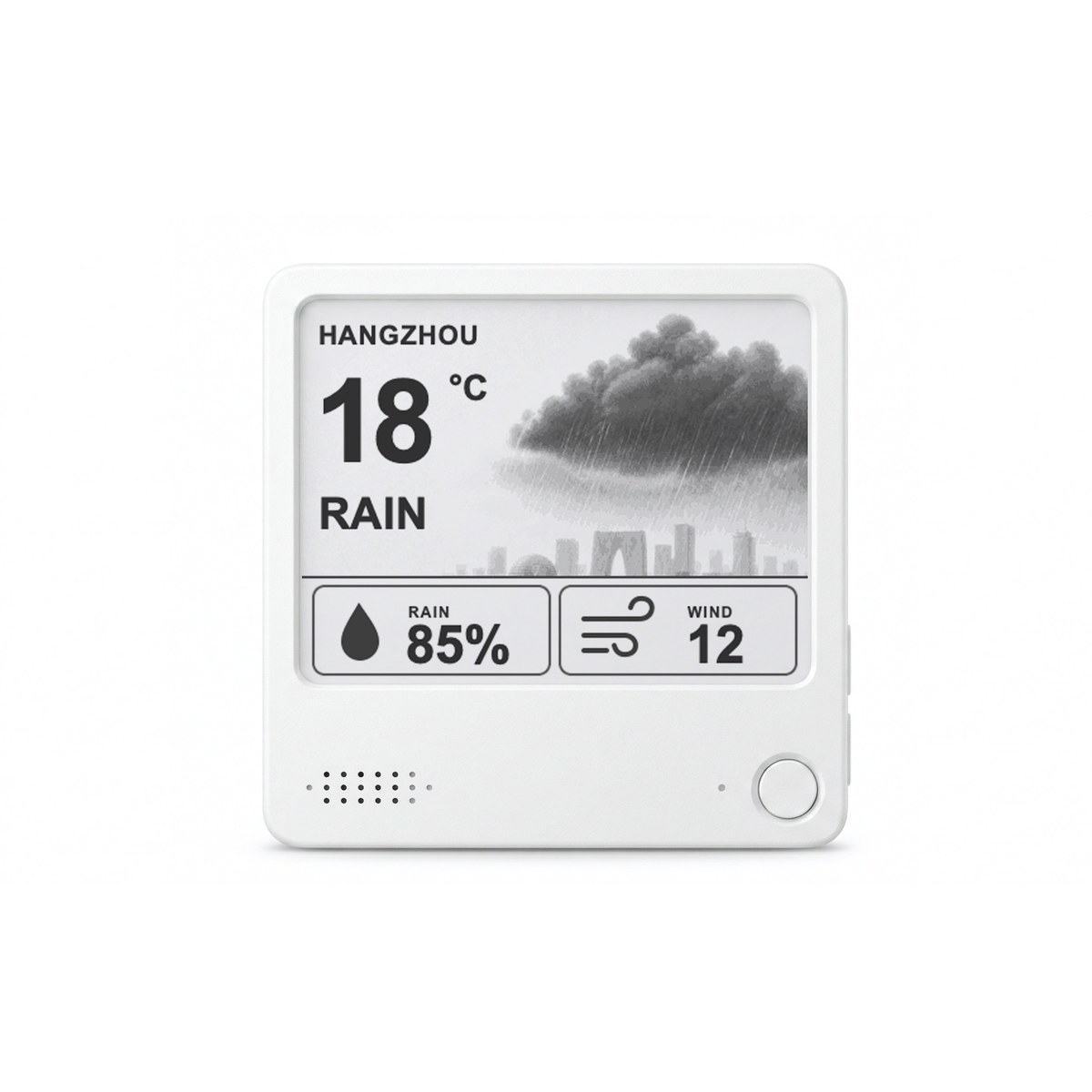
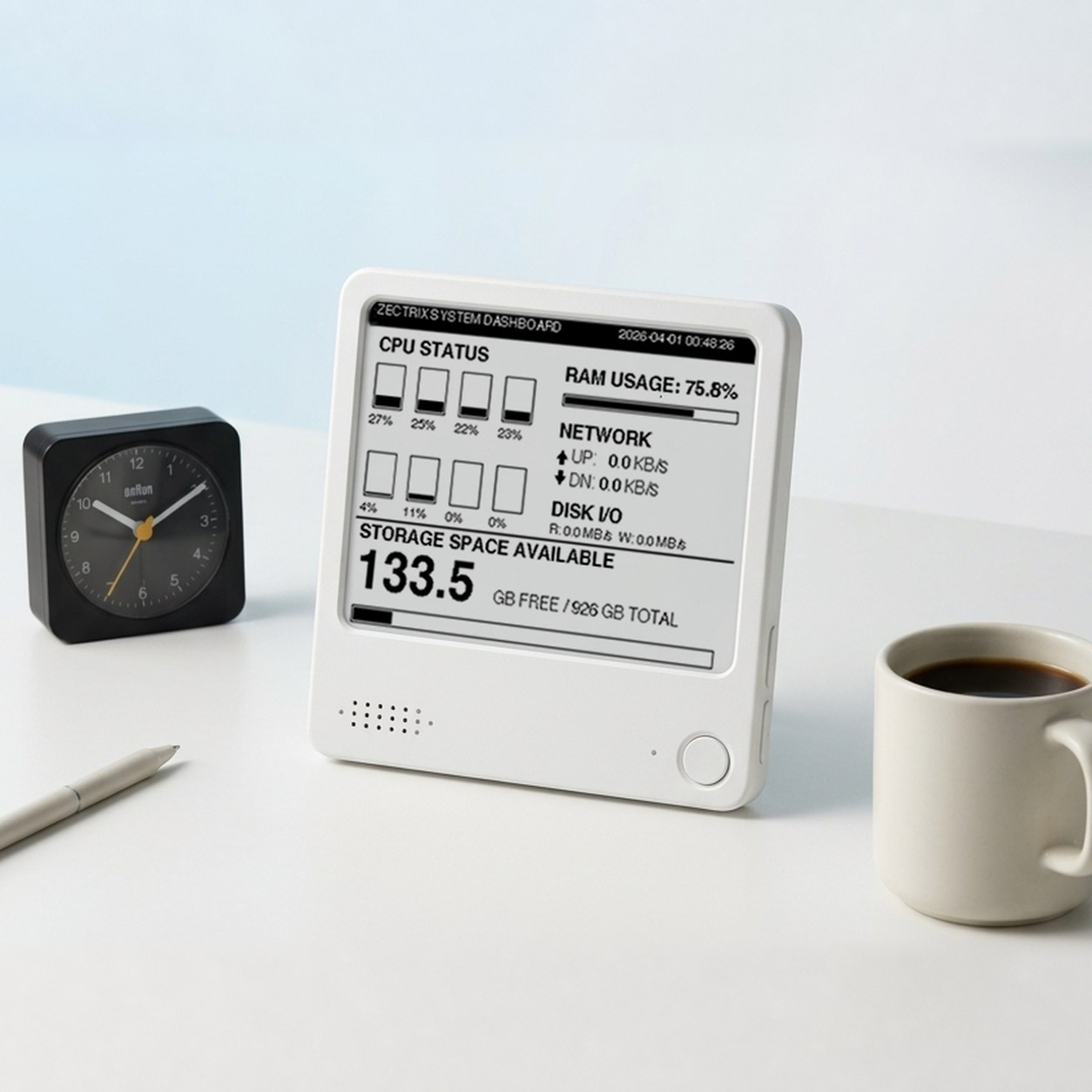
NOTE4 is a 97 mm square, 8.75 mm thick, with a 4.2-inch black-and-white E Ink panel at 400 x 300. The enclosure is ABS with a magnetic back plate, so the same unit stands on a desk or attaches to any suitable metal surface. The main processor is an ESP32-S3 with 16 MB of flash and 8 MB of PSRAM, and the radio is 2.4 GHz Wi-Fi plus Bluetooth Low Energy 5.0.
| Parameter | Published value |
|---|---|
| Display | 4.2 inch black-and-white E Ink, 400 x 300 |
| Panel controller | SSD2683, custom fast-refresh panel with partial refresh |
| Processor | ESP32-S3, dual-core Xtensa LX7 |
| Memory | 16 MB flash, 8 MB PSRAM |
| Wireless | 2.4 GHz Wi-Fi, Bluetooth Low Energy 5.0 |
| Battery | 2,000+ mAh, USB Type-C charging and data |
| Controls | Front voice and confirm button; side function and power buttons |
| Other hardware | Speaker, microphone, NFC, status light, expansion header |
| Body | 97 x 97 x 8.75 mm including the magnetic back, ABS |
Three details separate this from a display module with a battery. The first is the front button: it is the product's primary input, and holding it is how you start a voice capture. The second is the expansion header, six positions wired 3.3 V, ground, transmit, receive and two general-purpose pins at 3.3 V logic. The third is the magnetic back, which is what lets the thing live on a fridge door instead of a charging cradle.
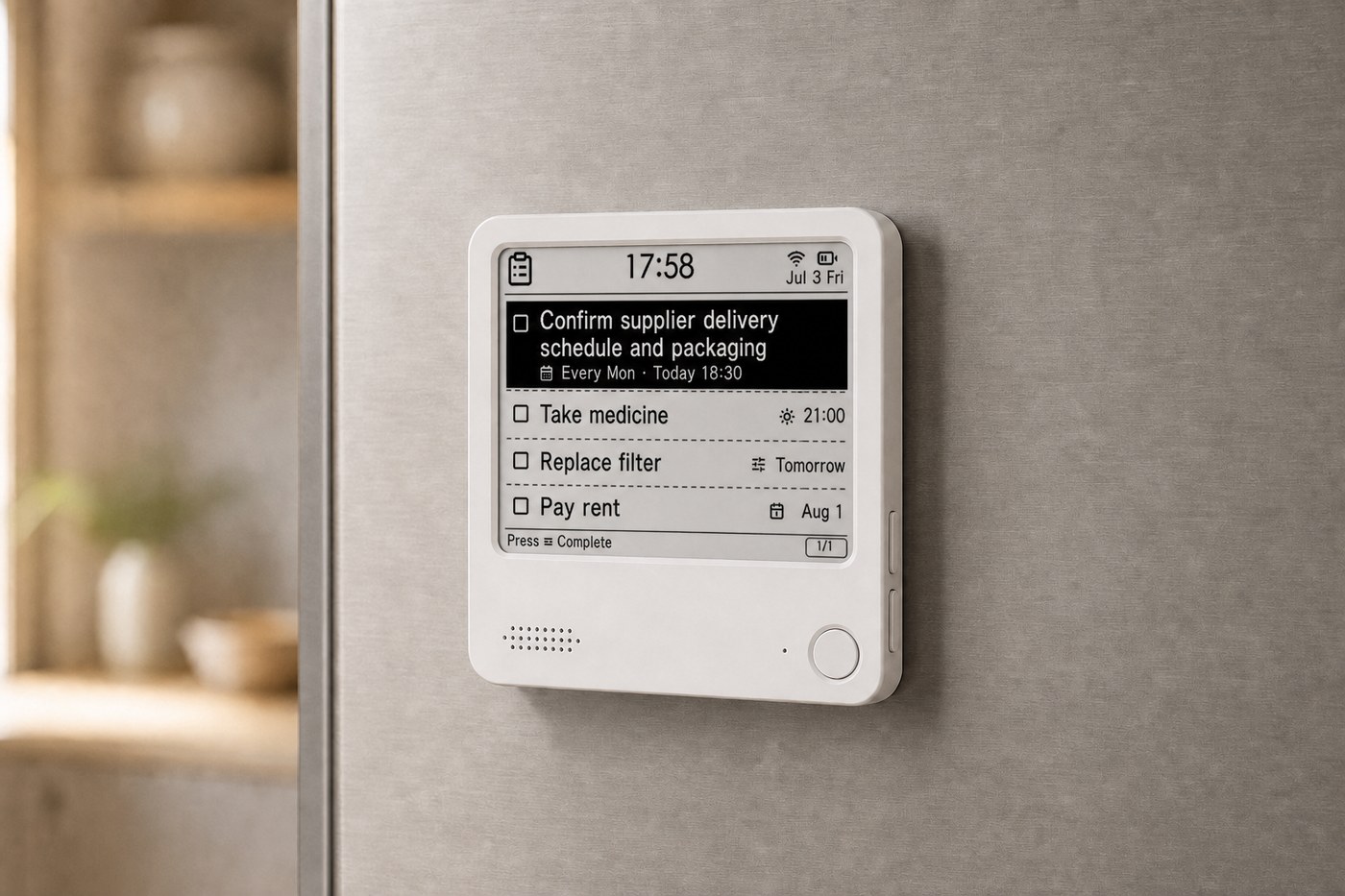
The battery claim deserves a careful reading. The marketing line is up to three months on one charge, and the footnote is that this was tested in static standby with one synchronisation per day. The wiki's own FAQ is looser, saying one to three months at normal use frequency, while the same page advises lengthening the sync interval if the device drains quickly. The panel is not the load here; the Wi-Fi radio is.
What the panel actually does
The interface is four pages: clock, to-dos, images and settings. Long-pressing either side button moves between pages, short presses select within a page, and a short press of the confirm button executes. Long-pressing confirm starts voice input and releasing it ends the capture.
The clock page is the one most owners will leave up. It shows the large time, the date with the day of the week and the lunar calendar, Wi-Fi and battery status, today's weather on the left, and unfinished to-dos on the right. When there are no to-dos it falls back to tomorrow's weather. Two timers live underneath: a countdown that accepts anything from one second to two hours, and a pomodoro timer whose defaults are 25 minutes of work, 5 minutes of rest and four rounds. Both accept spoken instructions, so a 30-minute pomodoro can be started by saying so rather than by navigating a menu.

The NFC radio is not a payment feature. It reads a text record containing a small JSON command, which is how you trigger a sync or point the device at a different over-the-air update address without touching the settings screen. The wiki demonstrates both a sync command and a command that rewrites the update URL, and notes that once a tag has been written the phone can re-trigger the last command by tapping again.
Updates are handled on the device: the settings page carries an online upgrade entry, the panel shows the new version number when one exists, and the firmware refuses to start an upgrade below 50 percent battery unless the charger is connected. That last rule is the kind of detail that comes from having watched an upgrade die halfway.
Where "open" begins and ends
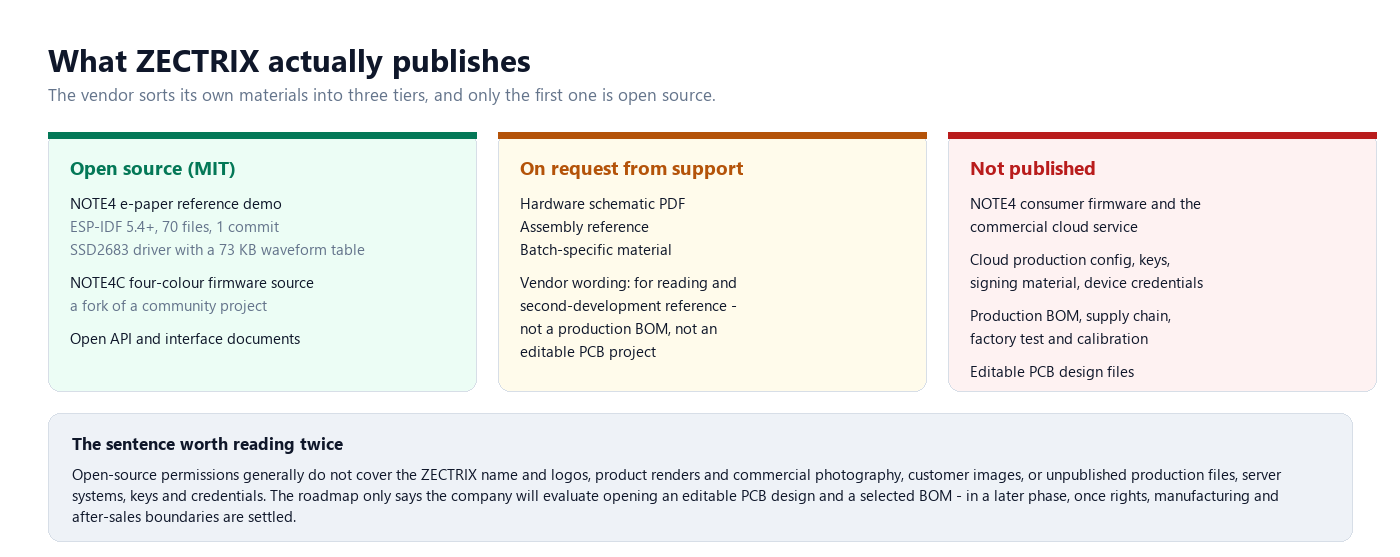
This is where the promotional summaries and the vendor's own documentation diverge, and the vendor's version is the more precise one. ZECTRIX publishes an open-source scope page that divides its material into three tiers.
The first tier is genuinely open. There is an MIT-licensed e-paper reference project for the black-and-white hardware, covering full and partial 1-bit refresh plus full-screen 4-bit greyscale. There is source for the four-colour NOTE4C board. And there is the Open API, documented endpoint by endpoint.
The second tier is on request. Hardware schematics, assembly references and batch-specific material are available from support for development purposes, and the vendor is explicit that this is reading material rather than a production BOM, an editable PCB project or a licence to manufacture.
The third tier is not published at all. That list is the important one: the complete consumer firmware, the official enhanced features, the commercial cloud service source, cloud production configuration, keys, signing material and device credentials, the production BOM and supply chain data, factory test and calibration material, editable PCB files, and anything internal that is not explicitly listed on a repository, the wiki or a model page.
The vendor's own wording on the matter is worth quoting rather than paraphrasing: open-source permissions generally do not cover the ZECTRIX name and logos, product renders and commercial photography, customer images, or unpublished production files, server systems, keys and credentials. There is also a roadmap, and it is honest about being a direction rather than a commitment. The phase that would open an editable PCB design and a selected BOM is described as something the company will evaluate later, once rights, manufacturing and after-sales boundaries are settled.
The reference project, in detail
The repository is called the ZECTRIX NOTE4 E-Paper Reference Demo, and the description is unusually careful about what it is not. It builds under ESP-IDF 5.4 or later, it does not link against the commercial NOTE4 firmware, and it does not need a graphics framework. The README states twice that it is a hardware demonstration and driver reference rather than the complete consumer firmware or cloud service, and it warns that flashing it will replace whatever firmware is installed, and that it targets the black-and-white board rather than the four-colour NOTE4C.
What it does contain is substantial. There is a display driver component with a public C header and an opaque handle, so the panel can be driven from C or C++; the driver carries the panel's waveform table and a documented lifecycle of power-on, refresh and power-off. There is a board layer holding the pin map and peripheral adapters, including the audio codec, the real-time clock, the NFC front end and charger status. There is a self-test component that walks the hardware: a Wi-Fi scan, an audio loopback that plays a generated tone sequence and decodes it back through the microphone, an RTC check, a charging check that rejects a pass when no battery is fitted, an LED check, a button sequence and an NFC round trip that backs up and restores user memory. There is a demo interface built on a canvas with an embedded proportional bitmap font, so the build has no runtime font or filesystem dependency. And there are four Python tools for converting artwork and fonts, including one that generates an animation from frames.
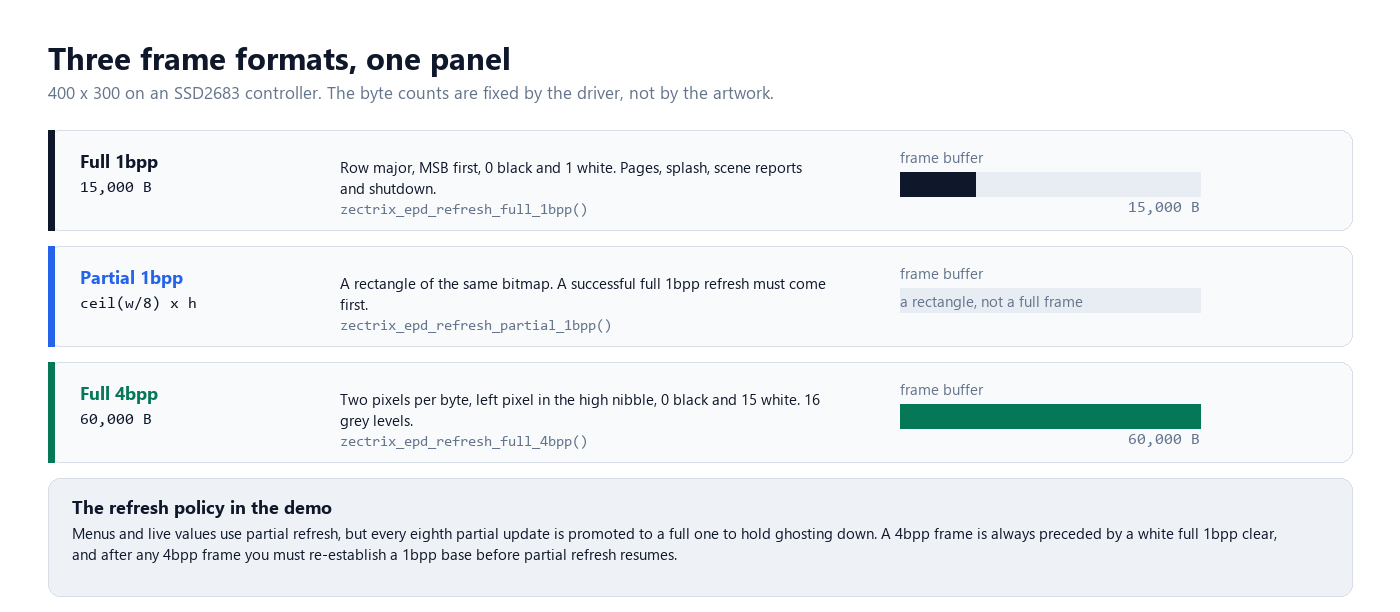
The frame formats are fixed by the driver rather than by the artwork, which is why they are worth stating exactly. A full 1-bit frame is 15,000 bytes: row-major, most significant bit first, zero for black and one for white. A 4-bit greyscale frame is 60,000 bytes with two pixels per byte and the left pixel in the high nibble, from zero for black to fifteen for white. Partial refresh reuses the 1-bit bitmap but takes a rectangle, and it is only valid after a successful full 1-bit refresh has established a base image. The demo's policy is equally specific: menus and live values use partial refresh, but every eighth partial update is promoted to a full refresh to control ghosting, and any 4-bit frame is preceded by a white full clear.
The repository is young. It was created on 7 August 2026 with a single commit and a single v1.0.0 release carrying one 1 MB firmware image, and it has drawn a few dozen stars since. That is a fair picture of a vendor demo: complete enough to be useful, small enough to read in an evening.
The assistant is in the cloud
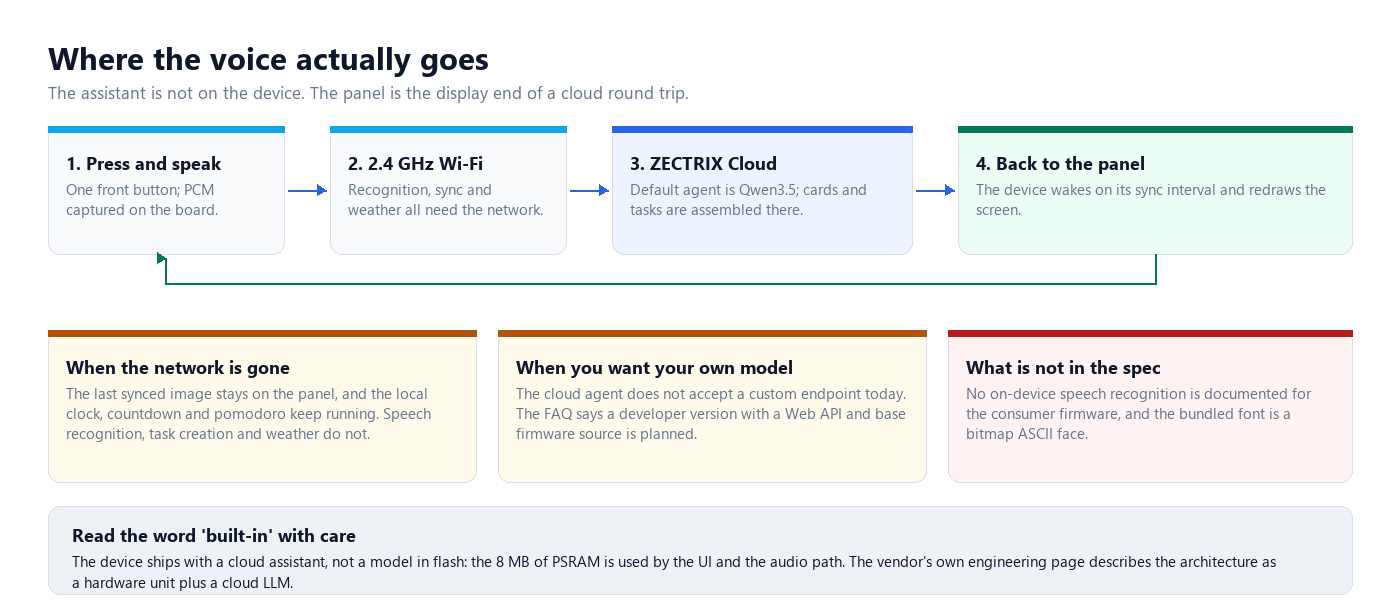
The engineering specification on the wiki describes the architecture as a hardware unit combined with a cloud LLM, and the default agent is named as Qwen3.5. That is the honest version of the feature: the panel captures audio and displays results, and the recognition, the task creation and the weather all happen after a network round trip.
Two consequences follow, and the documentation states both. Without a network the device keeps the last synchronised image, and the local clock, countdown and pomodoro keep running, but speech recognition, task generation and weather do not. And you cannot point the device at your own model: the wiki FAQ says plainly that the platform's servers do not support it today, while a developer version with a Web API and base firmware source is described as planned.
The commercial model differs by market, and this is easy to miss when reading a single regional write-up. In China the consumer NOTE4 is listed at 259 yuan and the listing says the price includes a lifetime AI voice to-do service. Internationally the same consumer product is listed at 54.99 US dollars down from 79, bundled with 500 free credits on activation, top-ups of 5 dollars per 500 credits, and an optional one-time 29.99 dollar Lifetime Core AI upgrade bound to one enrolled device. The hardware is the same either way; what changes is how the assistant is paid for. The vendor also runs a testing programme that grants the lifetime upgrade to participants who complete a review.
The API you can build on
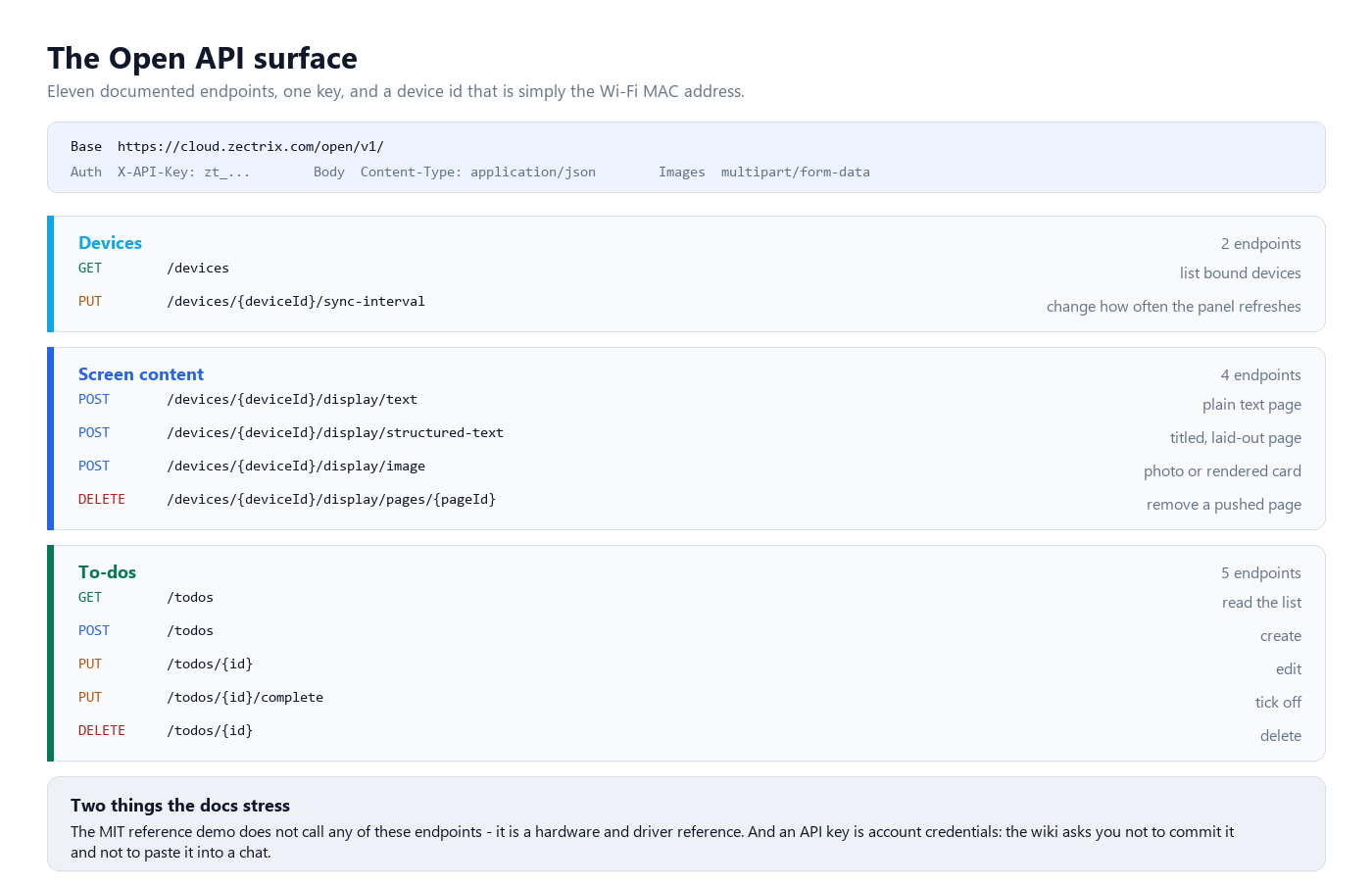
The Open API is the part of this product that is most obviously useful to a developer who does not want to write firmware. It lives under a versioned path on the vendor's cloud host, authenticates with an API key sent in a request header, and identifies a device by its Wi-Fi MAC address.
There are eleven documented endpoints across three areas. Two handle devices: listing what is bound to the account, and changing how often a given panel refreshes. Four handle screen content: pushing plain text, pushing structured text with a title and layout, pushing an image, and deleting a previously pushed page. Five handle to-dos: listing, creating, editing, completing and deleting. Images go up as multipart form data while everything else is JSON.
Keys are treated as credentials. The wiki warns that an API key is equivalent to an account password, that it should not be shared, and that it should never be committed to a public repository; the SDK-style tooling repeats the same instruction. One boundary is worth stating plainly because it is easy to assume otherwise: the MIT reference project does not call any of these endpoints. It is a hardware and driver reference, and the application programming interface for content is a cloud service with its own terms.
Three products with one body
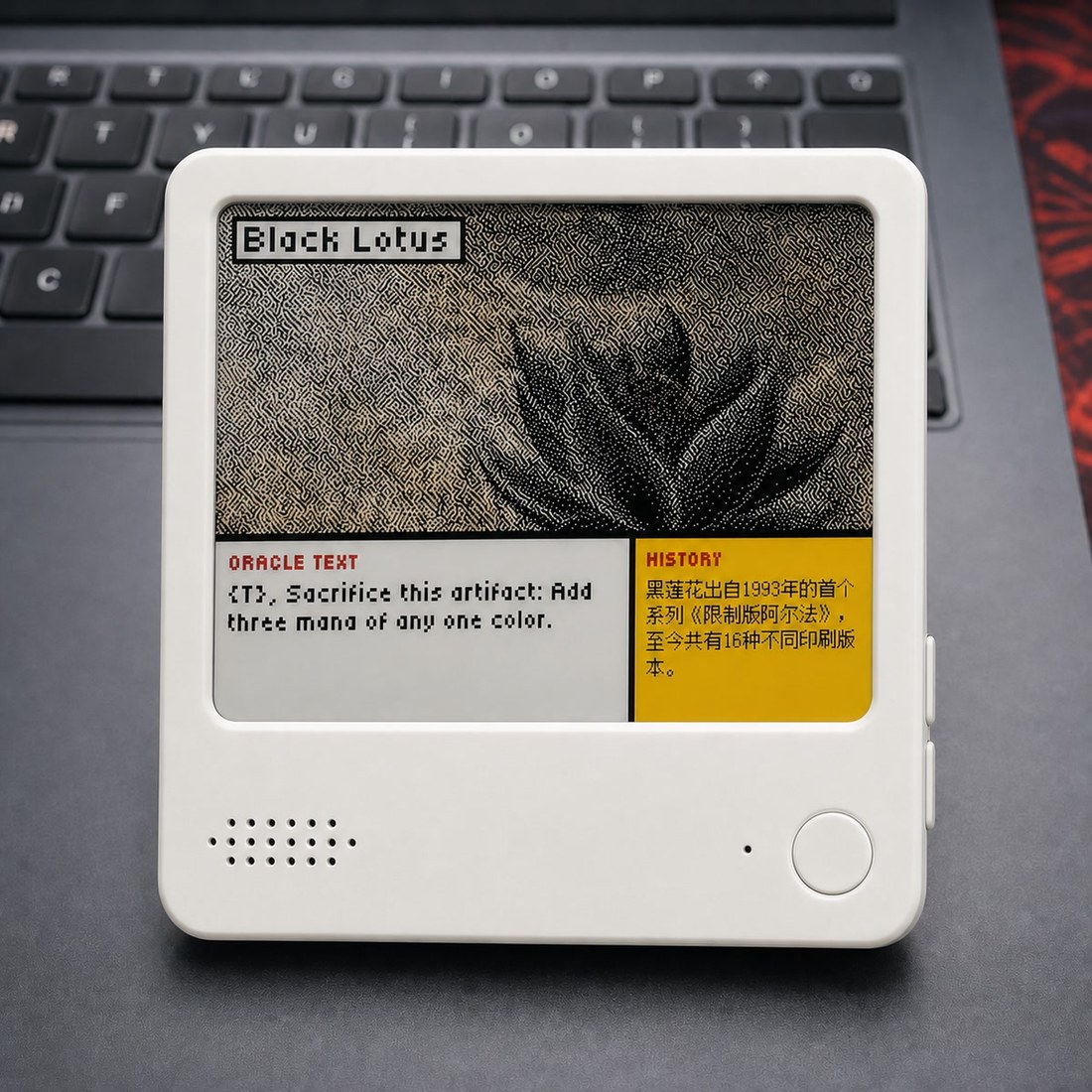
The black-and-white consumer NOTE4, the NOTE4 Devkit and the four-colour NOTE4C Devkit share the same core, storage, wireless and mechanical platform, and differ in firmware, promise and panel. That makes the naming more important than it looks, because the vendor states repeatedly that the firmwares are not interchangeable and that flashing the wrong one is a real risk.
The consumer unit is sold as a finished product, with the assistant configured and a limited warranty of twelve months from activation for product-quality faults. The black-and-white Devkit is sold as a development device: the first batch ships with beta demo firmware rather than the consumer firmware, it comes with a stand, and the vendor states that no commercial product warranty is offered because it is a development device, with manufacturing defects assessed separately and damage from custom firmware, flashing or incompatible accessories excluded.
The four-colour board is the most open of the three in software terms, and also the least suitable for anything interactive. Its panel writes black, white, red and yellow, and a full refresh of a single image typically takes more than ten seconds, with flicker and inversion during the refresh described as normal. The vendor positions it for electronic labels, desk status signs and low-frequency boards. Its firmware source is published, but as a fork of a community project that the vendor describes as still being organised and synchronised, and the fork is a few files behind the upstream repository as this is written. For the Devkit side of that line, the same distinction appears again: it is a starting point, not the consumer firmware.
What the community builds on it
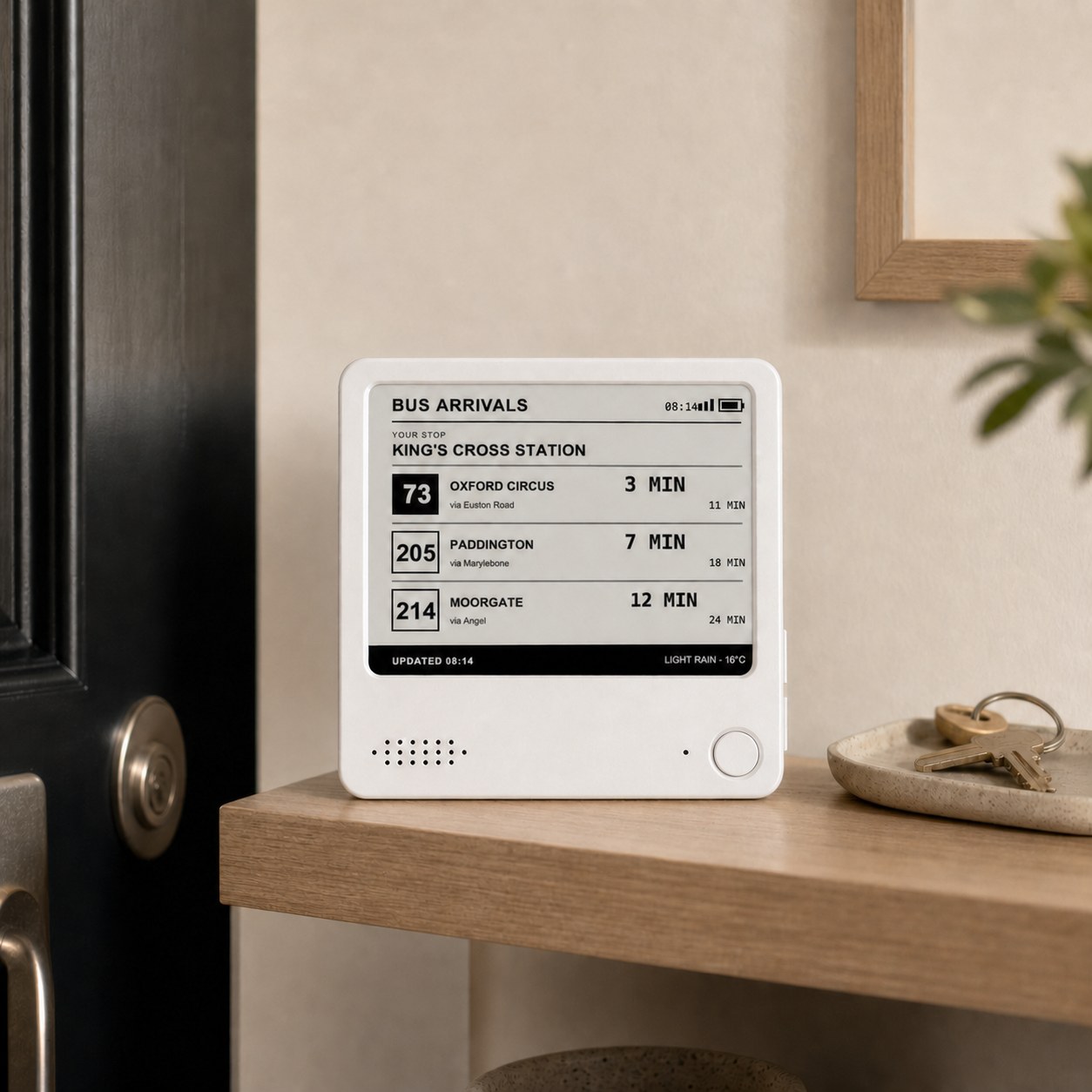
The most convincing evidence that the hardware is genuinely usable by third parties is what has been built on it, and the vendor indexes it. The list mixes desktop clients, task and calendar sync tools, content pushers and complete alternative firmwares, mostly Python with a few Rust and TypeScript projects.
A few stand out for the kind of device they turn NOTE4 into:
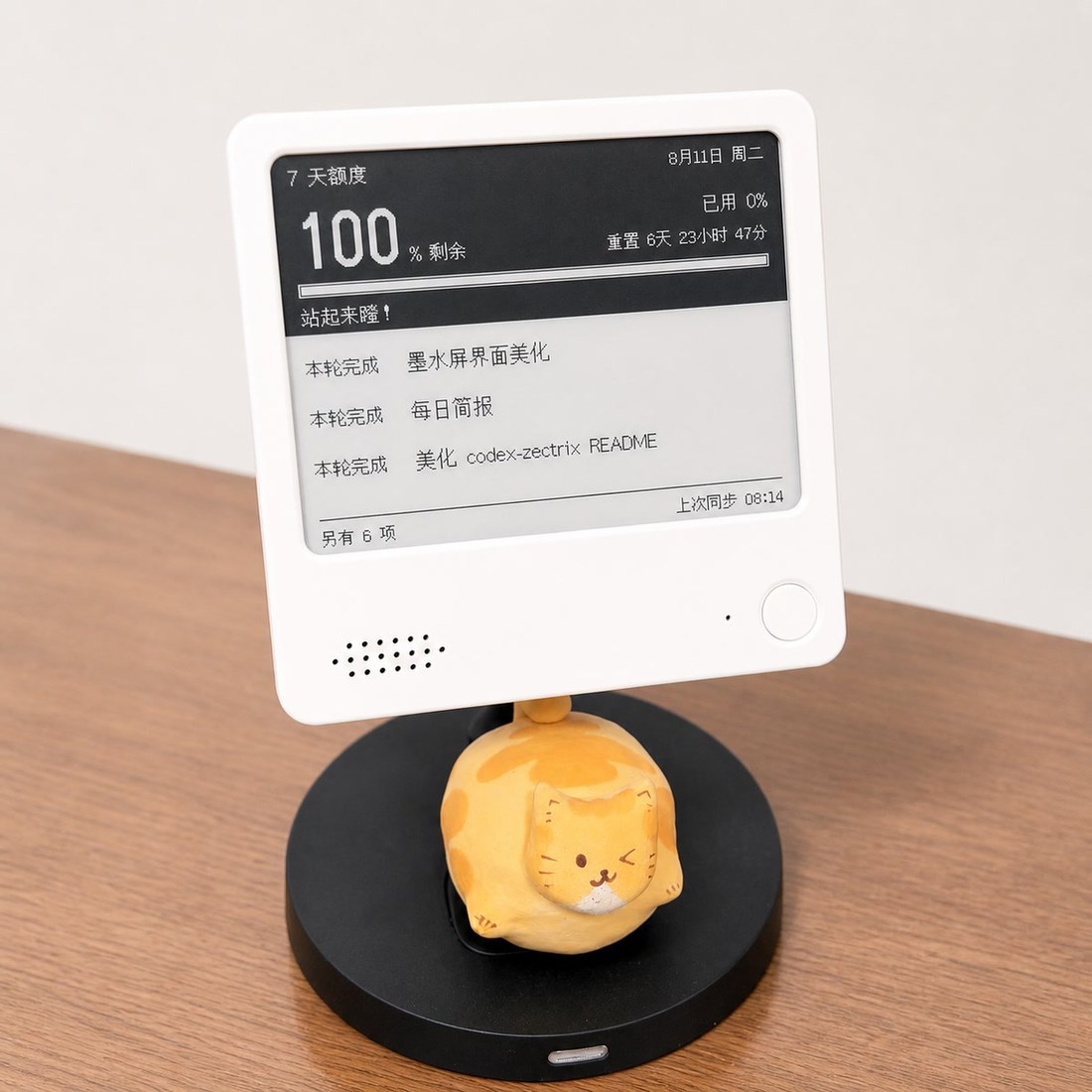
- A quota board for a coding agent. A community project reads a local coding agent's quota, reset time and recent task activity and renders them as a 400 x 300 monochrome board, uploading only when the visible content changes. It is explicitly read-only, does not store prompts or replies, keeps its key in the system keychain, and offers a privacy mode that hides task titles.
- A status bridge for a terminal assistant. A companion tool pushes the live state of a terminal-based coding assistant, including token usage, the current model and context pressure, to the panel, waking when the session starts and tearing down ten minutes after it ends.
- A voice remote for coding agents. Two projects turn the device into a push-to-talk remote that sends spoken instructions into a coding agent or the active input field, and return status to the screen. One runs over the local network with its own desktop client and optional message authentication; the other is a simpler push-to-talk bridge.
- A self-hosted alternative stack. One project replaces the cloud entirely with its own firmware, backend and web management interface, aimed at people who want to point the device at their own model API rather than a vendor service.
- Single-purpose firmwares. A vocabulary trainer with an offline word list, a public transport arrivals board covering several operators, and a household accounting system with a self-hosted server and its own statistics dashboards.
That ecosystem is worth noting for a specific reason. A summary of this product circulating in Chinese also claims compatibility with a desktop AI assistant of the same family as the coding-agent tools above. The coding-agent integrations are real and indexed by the vendor; the additional claim does not appear anywhere in the vendor's own product pages, wiki or community index as of the middle of October 2026. Treat the first as a documented community project and the second as an unverified addition.
Before you buy
- Decide which half you are buying. If you want a finished note display, the consumer unit is the one with the assistant and the warranty. If you want to write firmware, the Devkit is honest about being a development device with beta software and no commercial warranty, and the four-colour board is for static content rather than interaction.
- Assume the assistant needs the network. Recognition, task creation, weather and content sync all require 2.4 GHz Wi-Fi, and there is no documented on-device speech recognition. Without a connection you have a clock, a timer and the last picture, which is genuinely useful but is not the product being advertised.
- Do not plan on your own model. The vendor's FAQ says custom models are not supported by the platform today. The self-hosted community firmware is the current answer to that requirement, and it means running your own backend.
- Read the three-month battery figure with its footnote. It is measured in static standby with one sync per day. Shorter sync intervals, more voice use and weaker Wi-Fi all pull it down, and the FAQ's own advice for a device that drains quickly is to lengthen the interval.
- Check the firmware and the board together before flashing anything. The vendor and the community projects both repeat this, and for good reason: the black-and-white and four-colour firmwares are not interchangeable, and the reference demo replaces the installed firmware.
- Do not expect the schematics to be a manufacturing package. Schematics and assembly references are available on request for development reading. A production BOM, editable PCB files and a manufacturing licence are explicitly outside what is published today.
IOTTourChina covers open-source IoT hardware and the silicon behind it as part of its developer resource. This is editorial coverage, not an endorsement or an advertisement; specifications, availability, licensing and pricing should be confirmed with the vendor before you buy or build.
- ZECTRIX NOTE4 product page
- ZECTRIX NOTE4 Devkit product page
- ZECTRIX open-source and licensing page
- Wiki: open-source scope and roadmap
- Wiki: Note 4 hardware specification
- Wiki: Note 4C hardware specification
- Wiki: ZECTRIX Open API documentation
- Wiki: new feature usage guide
- Wiki: community open-source projects
- Reference demo repository
- Reference demo v1.0.0 release
- NOTE4C firmware source