Security video gateways: converting RTSP to HTTP-FLV and RTMP for the web
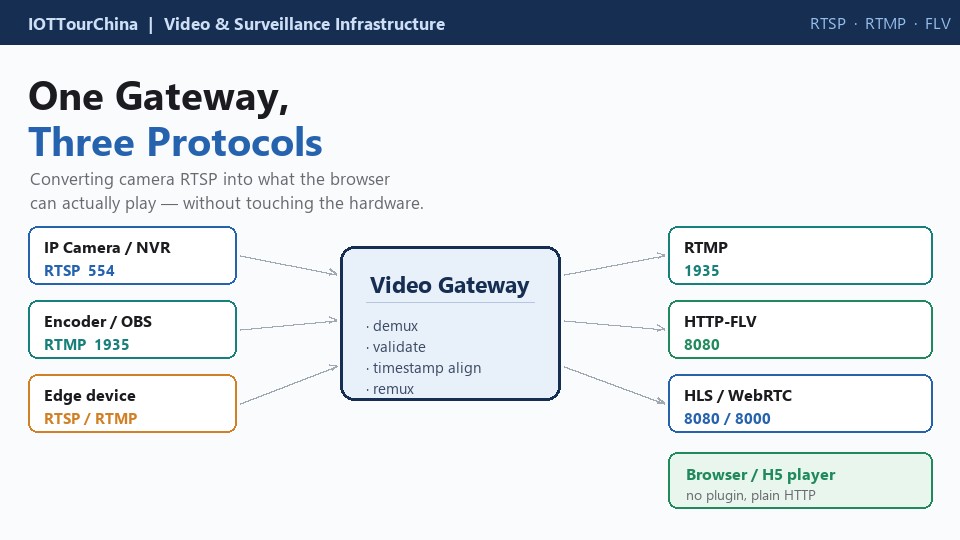
Walk into almost any surveillance project and the same three-way mismatch is waiting. Cameras and NVRs speak RTSP. Encoders and live-production software push RTMP. The web page that is supposed to show the picture accepts neither. A multi-protocol video gateway exists to sit in the middle and close that gap: one box that takes in the streams the hardware already produces and hands out streams a browser can actually play.
The useful thing about the design is what it does not require. No camera is replaced, no NVR is re-flashed, no page is rewritten around a proprietary player. The hardware keeps doing what it already does, and a single gateway absorbs the protocol difference.
The protocol gap, in one picture
RTSP is the native language of IP cameras and NVRs. It is what a Hikvision or Dahua device exposes on port 554 by default, and it is the format the great majority of installed surveillance hardware still emits. RTMP is the live-streaming protocol, the one hardware encoders and software such as OBS use to push a feed to a media server, on port 1935. HTTP-FLV is what a web page consumes: a plain HTTP response, no plugin, compatible with mainstream browsers.
The three cannot talk to each other directly. Writing separate integration code for each device and each scenario means rebuilding the same wheel several times, and it doubles the maintenance surface for every future device added.
What a multi-protocol video gateway is
The plainest definition is that it is a translation and relay station for video streams. It accepts the stream a device already produces, normalises it, and publishes it again in whichever format the consumer needs — without modifying the camera or the recorder.
The work splits into three tiers, and every gateway in this class follows the same shape:
- Input. Actively pulls the native RTSP stream from IPC and NVR devices, and separately accepts RTMP pushes from external encoders.
- Processing. Handles the protocol handshake, demuxes the stream, validates frames, aligns timestamps, and can optionally transcode.
- Output. Publishes stable RTSP, RTMP and HTTP-FLV streams that back-end services, browsers, desktop players and live platforms can all consume directly.
That is the whole value proposition: one standardised video interface in front of a room full of devices that disagree about formats.
The three protocols and where each belongs
| Protocol | Native to | Typical port | Where it fits |
|---|---|---|---|
| RTSP | IP cameras, NVRs | 554 | LAN surveillance, the default output of older hardware |
| RTMP | Encoders, OBS, streaming software | 1935 | pushing a feed into a live-streaming platform |
| HTTP-FLV | Web players | 8080 (configurable) | in-page preview, H5 dashboards, IoT visualisation |
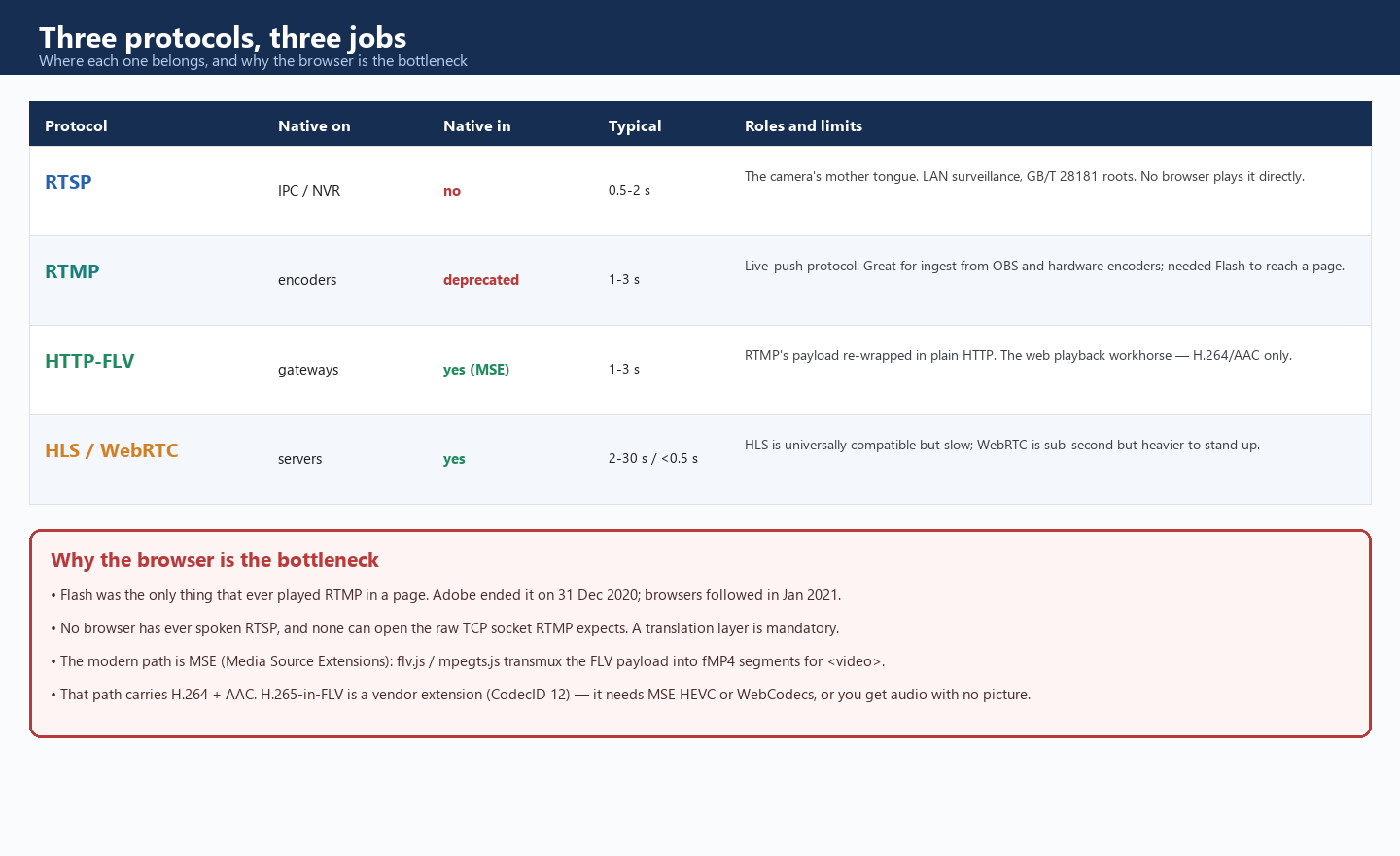
Two facts about this table drive most deployment decisions. First, mainstream browsers have progressively dropped RTMP playback, and none of them will ever play an RTSP stream directly. Second, that leaves HTTP-FLV as the practical answer for anything that has to appear inside a web page — which is precisely the gap a gateway is bought to close.
Why the browser is the real constraint
It is worth being precise about the browser, because "RTMP does not work in a browser" is a symptom and not the explanation.
Flash was the only mechanism that ever played a raw RTMP stream inside a page. Adobe ended support for Flash Player on 31 December 2020, and the browsers removed the plugin in January 2021. Nothing replaced it, because a browser cannot open the raw TCP socket RTMP expects and has never carried an RTSP stack — so a translation layer on the server is not an optimisation, it is mandatory.
The modern path is MSE, the Media Source Extensions API. A JavaScript player such as flv.js or its successor mpegts.js demuxes the FLV payload, transmuxes it into fragmented MP4 segments, and feeds those to a plain HTML5 video element. No plugin, no native protocol support — just JavaScript doing the container work.
There is one important limit on that path. MSE playback of FLV is built around H.264 video and AAC audio. H.265 inside an FLV container is a vendor extension rather than part of the original Adobe specification, and a browser will refuse to decode it. The practical symptom is a stream that produces audio but no picture. The fixes are to transcode that camera back to H.264, or to use a player and platform combination that reaches H.265 through MSE HEVC or the newer WebCodecs API.
Where a gateway is actually required
The pattern fits most surveillance and IoT video projects. Five cases come up repeatedly, and in each one a gateway removes a cost that would otherwise be paid in software:
- Retrofitting an existing site. A floor full of RTSP cameras, and a requirement to preview them in a web or cloud console, without replacing the hardware. A gateway performs the protocol upgrade in software.
- An IoT video platform. Devices from several brands and models feed one platform. A gateway publishes a standardised stream address per camera, which simplifies the platform-side integration.
- Embedded edge hardware. A small board such as an ESP32 or STM32 paired with a streaming component, doing local protocol conversion at the edge.
- Private or intranet-only deployment. When video must not traverse the public internet, an edge gateway performs the conversion locally, cutting public bandwidth and keeping the data inside.
- Back-end integration. A Java service or a Linux application needs to consume many streams in one format and redistribute them to a front end for live view, playback and alarm linkage.
The common benefit is the same in every case: reuse the installed hardware, add one gateway, and adapt to many terminals and scenarios.
Inside the three stages
The flow is straightforward enough that most playback faults can be traced to a specific stage.
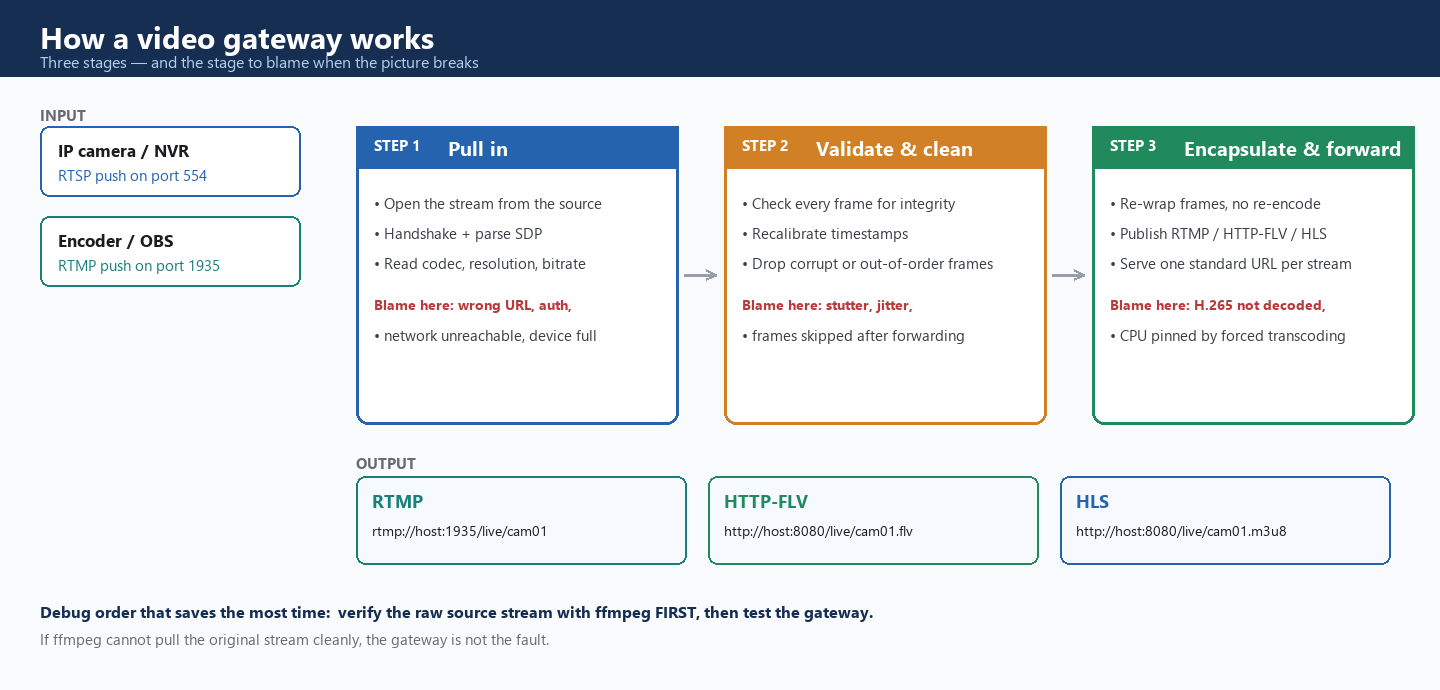
Step 1 — Pull in. The gateway initiates a pull request to the IPC or NVR, completes the protocol handshake, parses the SDP information and reads the core parameters: codec, resolution and bitrate. Failures here show up as a black screen or an outright failure to connect. The usual causes are a wrong device password, an unreachable network, a mistyped RTSP address or a device that has hit its maximum connection count.
Step 2 — Validate and clean. Received frames are checked for integrity and their timestamps recalibrated, with corrupt or abnormal frames dropped before forwarding. This is the stage that decides how smooth playback looks. The precision of timestamp alignment is the single most common reason a hand-rolled gateway stutters.
Step 3 — Encapsulate and forward. Frames are re-wrapped into RTMP or HTTP-FLV without touching the original video encoding, and exposed as standard stream endpoints. There are two modes here, and the difference is the entire cost model:
| Mode | What changes | CPU cost |
|---|---|---|
| Stream-relay only | Protocol container, nothing else | Very low, many concurrent streams |
| Active transcoding | Resolution, bitrate or codec | Heavy, stream count must be planned |
Deploying it on Linux
Production gateways almost always run on a Linux server built on ffmpeg and an open-source streaming component, so the protocol parsing does not have to be written from scratch. Two mature choices cover this ground. ZLMediaKit is a C++11 streaming framework that supports RTSP, RTMP, HLS, HTTP-FLV, WebSocket-FLV, GB/T 28181, SRT and WebRTC, with protocol conversion between them. SRS is a coroutine-based server supporting RTMP, WebRTC, HLS, HTTP-FLV, SRT, MPEG-DASH and GB/T 28181 under an MIT licence. Both bridge the surveillance protocol stack to the live-streaming stack, which is exactly the job in question.
A basic deployment is four steps:
- Open the ports. RTSP on 554, RTMP on 1935, and an HTTP-FLV port such as 8080, with the firewall rules adjusted to match.
- Install the service. Build or unpack the ZLMediaKit or SRS binary and start the streaming service.
- Configure the pull. Register the RTSP addresses of the front-end cameras, and enable automatic pulling plus reconnection on drop.
- Publish the outputs. The server generates the RTMP and HTTP-FLV playback addresses for the front end and the platform to consume.
The resulting addresses follow a predictable shape:
RTSP:     rtsp://user:[email protected]:554/stream1
RTMP:     rtmp://127.0.0.1:1935/live/camera01
HTTP-FLV: http://127.0.0.1:8080/live/camera01.flv
Two failures worth memorising
HTTP-FLV stutters or plays in fits and starts. The causes stack up quickly: jitter on the LAN, a source RTSP stream whose timestamps jump, a gateway buffer configured too small, a server whose CPU is saturated, or background tasks competing for resources. The diagnosis order matters more than the list. Test the original RTSP stream with ffmpeg first, to rule the device out; then check server CPU load; only then capture packets to examine frame intervals and timestamp behaviour. The repairs are to enlarge the gateway buffer, disable non-essential real-time transcoding, prefer gigabit intranet transport and rebalance server resources.
RTSP pulls fine but HTTP-FLV shows a broken or smeared picture. This is almost always an encoding mismatch. The camera is emitting H.265, and the web FLV player cannot decode it, or key frames are being lost. Confirm the camera's codec, then test several players for compatibility. The fix is to switch the camera to the common H.264 profile, or to adopt a player core with H.265 decoding support.
Choosing and sizing
Three checks before deployment avoid most later trouble.
Estimate the compute load honestly. Pure stream-relay operation is cheap, and an ordinary x86 mini-PC or an ARM embedded board can carry many concurrent streams. The moment transcoding is switched on, the number of streams must be matched to the server's CPU capacity, or the result is stutter and dropped connections.
Prefer the intranet. Video consumes bandwidth heavily, so the gateway belongs inside the network rather than behind a public relay. If public access is unavoidable, put an Nginx port proxy in front of it to stabilise delivery.
Standardise the interface to the IoT platform. When connecting to a platform such as JetLinks, the RTMP and HTTP-FLV addresses the gateway publishes can be entered directly into the platform's device point table, giving unified device management and one-click page preview.
The takeaway
A multi-protocol gateway earns its place by erasing the protocol discontinuity in surveillance video — letting legacy RTSP hardware reach modern web platforms and live-streaming services without a hardware replacement programme.
One piece of engineering advice follows from the deployment section. Do not write the protocol parsing from scratch. RTSP and RTMP carry enough detail that a self-built implementation tends to fail on compatibility and stability rather than on features; established components such as ZLMediaKit and SRS are the faster and steadier route.
And keep the debugging order fixed: verify the original video stream first, then debug the gateway's forwarding. Nearly every video anomaly resolves faster along that single line.