Wi-Fi CSI sensing needs an ESP32 node, the router only supplies the signal
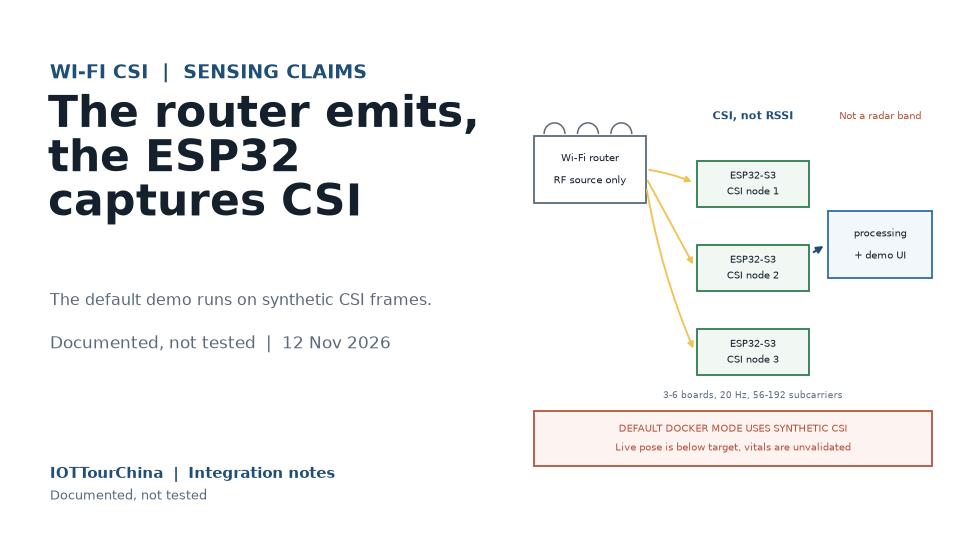
A short video claiming that an ordinary router plus an AI coding tool can see people through a wall in forty minutes is easy to dismiss. The underlying project is real, and the repository is public. The problem is that the demo removes several conditions that the project documentation states plainly. Reading those documents changes the conclusion from fake to constrained.
What the project actually reads
RuView, previously called WiFi-DensePose, works with Channel State Information, usually shortened to CSI. That is not the signal strength number a normal client reports. Received signal strength tells a device roughly how loud a link is; CSI describes the amplitude and phase of many subcarriers, which is what makes fine motion and breathing signatures visible at all.
| Data | Typical source | What it can support |
|---|---|---|
| RSSI | Almost any client or access point | Coarse presence and motion heuristics |
| CSI from ESP32 nodes | Dedicated firmware on ESP32 boards | Presence, motion, breathing and heart rate estimates |
| FMCW radar | A radar front end | Range, angle and velocity of reflectors |
The repository README says the system captures disturbances using CSI from low cost ESP32 sensors. The user guide lists sensing modes through a source setting: auto, esp32 and simulated, with auto probing for ESP32 data on a UDP port before falling back to simulation. Real CSI is described at 20 Hz with 56 to 192 subcarriers, and the documented live setup uses a mesh of three to six ESP32-S3 boards.
That is the first missing condition. A domestic router does not normally expose CSI, and neither does an ordinary laptop radio. The router supplies the radio energy that fills the room; a separate receiver with the right firmware collects the detailed channel data. Calling that turning a router into a radar is a metaphor, not a description of the hardware. It is also not radar in the band sense: this is Wi-Fi sensing in the 2.4 GHz and 5 GHz bands, not a 24 GHz or 60 GHz radar module, so it does not belong in a millimetre wave radar directory.
The demo page is not a measurement
The second condition is the data behind the pictures. The user guide states that with no hardware the system runs in simulated mode with synthetic CSI data, and the Docker quick start in the README is explicitly labelled as simulated data needing no hardware. The online demo carries a DEMO marker and can be driven by generated frames that match the shape of sensor data.
None of that makes the project dishonest. A hardware team often publishes a demo that runs without hardware so people can see the interface. But a confidence value or a heart rate shown on that page is not evidence of a measurement taken in somebody else's house. When a short clip mixes demo frames with real sounding claims, the viewer cannot tell which numbers came from a sensor. The repository itself is the place to check, and it separates the two.
What the maintainers themselves qualify
The strongest evidence for caution comes from the maintainers rather than from critics. The README and the user guide carry explicit qualifications about their own results.
| Claim area | What the official documentation says |
|---|---|
| Early perfect presence result | The older 100 percent presence figure came from a single class recording and has been retracted |
| Live pose estimation | Live 17 keypoint pose remains below target and is not a validated capability |
| On device pose model | It is a first cut model below the internal target, and its runtime path is still a stub returning zero confidence |
| Vital signs | Device reported vitals are labelled as unvalidated |
| Unified RF world model | Accuracy is still synthetic until real data validation |
This is unusual and welcome honesty. It also means the right question for an integrator is not whether the project is impressive, but which of its outputs are documented as validated on real hardware. Presence and motion detection are described as comparatively mature. Fine pose, heart rate, multi person tracking and accurate position through a wall are described as harder, environment dependent, or still below target.
Where the research paper fits
The paper often attached to this topic is arXiv:2301.00250, titled DensePose From WiFi, by Jiaqi Geng, Dong Huang and Fernando De la Torre. It was submitted on 31 December 2022 in the computer vision category. Its comments field lists only page and figure counts, so no conference or journal venue should be attached to it. The work maps the phase and amplitude of Wi-Fi signals to UV coordinates across 24 human body regions using a deep network.
That paper is research background, not a validation certificate for a particular open source repository. It describes WiFi antennas and a network trained for dense pose correspondence. It does not specify an ESP32 CSI board, a Docker container, or the deployment stack shipped in RuView. Conflating the two makes it easy to read a measured research result as a guarantee about a demo page.
What an integrator should take away
The repository does ship a Claude Code integration and a live sensing pane, and an AI coding assistant can speed up interfaces, data plumbing and glue code. It cannot supply channel data that the hardware never captured, calibrate a room, or validate a model against independent measurements. Those remain hardware and measurement tasks.
| Step | Why the short version hides it |
|---|---|
| Flash and position CSI capable nodes | Without them there is no channel data |
| Configure networking and a source guard | Frames arrive over a local UDP path, not from a router login page |
| Calibrate the environment | Furniture, walls, fans, pets and orientation change the signal |
| Handle packet loss and noise | Real streams are not synthetic frames |
| Reproduce results independently | Star counts measure attention, not stability |
The direction is genuine. Wi-Fi sensing is an active research field, and a project that turns papers into something a developer can click through has real value. What does not follow is that a home router already is a through wall sensor, or that the numbers in a demo are clinical or security grade measurements. For an integration project, start from the hardware list and the simulated mode warning, then decide which outputs the documentation says are actually validated.