Self-hosted meeting transcription: the recorder card is the easy half
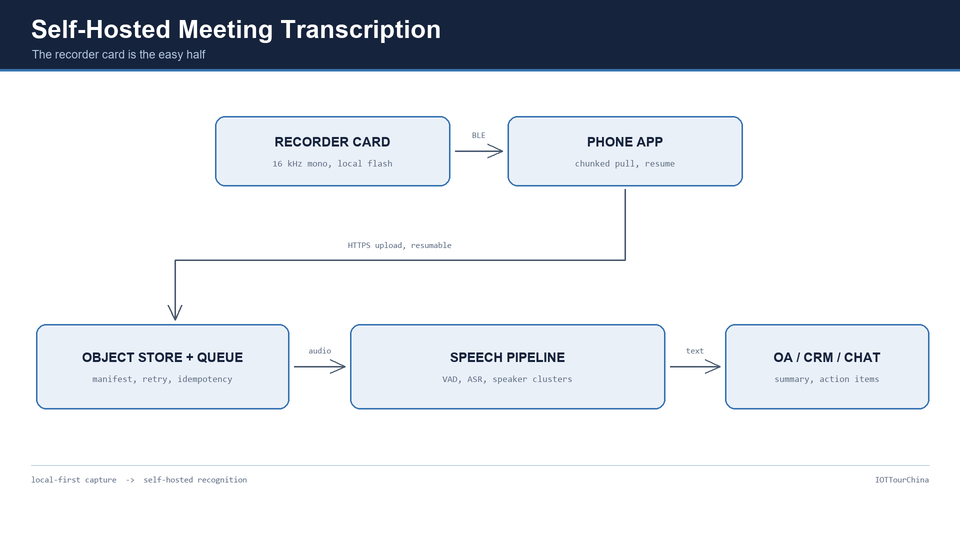
A meeting recorder has two halves, and they fail for different reasons. The first half is a microphone array, a battery, some flash and a Bluetooth radio — a solved problem you can buy off the shelf in several form factors. The second half is speech recognition that a compliance team will allow to run on your own servers, and that half is where schedules actually go.
Card-shaped recorders have colonised the first half. They are small enough to clip to a lanyard, they pair over Bluetooth with a phone app, and the manufacturer usually sells them together with a metered cloud transcription service. That bundle is exactly what an enterprise buyer who cannot send meeting audio to a third party has to unpick — which turns an appliance purchase into an integration project.
This is a walk through what that project contains: what the device has to expose, and what a self-hosted speech stack has to do before a transcript is worth writing into a CRM.
The audio budget decides the firmware
Start with arithmetic, because it fixes the architecture before any vendor conversation. At the usual 16 kHz, 16-bit mono setting, one second of audio is 32 kB, so an hour is about 115 MB and a three-hour negotiation is about 345 MB. Encode with Opus at 16 to 24 kbit/s and the same three hours fit into roughly 20 to 30 MB.
That single line has a consequence worth stating plainly: Bluetooth is not an audio pipe. Whatever the radio can do in ideal conditions, a card cannot stream a multi-hour meeting to the phone in real time and expect the phone to reassemble it reliably. The workable design is the one the good cards already use — record to local flash, then let the phone pull the finished file over Bluetooth in chunks.
Which means the protocol on the device is the real product. Five questions decide whether a card is usable:
- Does a finished recording have an explicit complete state, distinct from "device idle"? A file that is closed but not marked closed is how half-transcribed meetings happen.
- Can the phone read the file in chunks with an offset and resume after a dropped connection, or does an interruption at 80% restart the transfer?
- Does the device carry a wall-clock reference, or at least a monotonic counter plus a sync step, so transcript timestamps can be aligned to a calendar entry?
- Is the audio available as PCM or Opus without a proprietary codec that only the vendor's app can decode?
- Can the app do any of this without the vendor's cloud account? If pairing requires a login to somebody else's service, the private-deployment plan ends at step one.
If a supplier cannot answer the second and fifth questions in writing, the price of the card is irrelevant.
The transcription half is four stages, not one endpoint
It is tempting to treat speech-to-text as a single call: send audio, receive text. In practice a meeting transcript is a pipeline, and each stage has its own failure mode. FunASR, the MIT-licensed toolkit published under the ModelScope organisation, exposes that pipeline as composable pieces rather than a black box.
| Stage | Job | Component in FunASR |
|---|---|---|
| Voice activity detection | cut a long file into speech segments and drop silence | FSMN-VAD |
| Recognition | turn each segment into text | SenseVoiceSmall, Fun-ASR-Nano, or Fun-ASR-MLT-Nano |
| Post-processing | punctuation and readable output | pipeline step |
| Speaker attribution | group segments by anonymous speaker cluster | CAM++ embeddings |
Splitting the stages pays off the moment something goes wrong. A transcript with speaker labels that are shifted by one, or timestamps that drift, is usually a VAD segmentation problem rather than a recognition problem — and you can only tell the difference if the stages are observable separately.
Model choice is a separate decision from pipeline shape, and the checkpoints are not interchangeable:
| Checkpoint | Language coverage | Runs on | Notes |
|---|---|---|---|
| SenseVoiceSmall | five languages | CPU first | also emits emotion and audio-event tags |
| Fun-ASR-Nano | Chinese, English, Japanese, plus Chinese dialect groups and regional accents | GPU, or GGUF on edge | LLM-based decoder, heavier but stronger on accents |
| Fun-ASR-MLT-Nano | 31 languages | GPU | a distinct checkpoint, not a superset of the Nano above |
| MOSS-Transcribe-Diarize | long-form multi-speaker | Hugging Face, vLLM or SGLang backends | Apache-2.0 model maintained by OpenMOSS, integrated through the same AutoModel interface |
Language coverage belongs to the checkpoint, not to the toolkit. Assuming that a large multilingual model will cover the language list of a smaller one is a common way to discover a gap during acceptance testing rather than before it.
Speaker labels are clusters, not colleagues
This is the detail that marketing material tends to blur, and it is the one that decides whether a transcript is usable in a CRM.
CAM++ extracts speaker embeddings, and the pipeline clusters those embeddings to assign an index to each VAD segment. The indices are local to one recording. "Speaker 2" means "the second voice cluster found in this file", not "Wang from sales". Nothing in the pipeline knows who the participants are.
Some of the checkpoints also emit paralinguistic tags — emotion and audio events — and those are not speaker outputs either. A speaker-aware transcript comes from the VAD plus the CAM++ clustering stage, not from the recognition model on its own.
If the business requirement is genuinely "attribute this commitment to a named account manager", that has to be solved outside the ASR pipeline: enrol a short voice sample per person, or map clusters to attendees using the calendar invite and have a human confirm the mapping once per meeting. Both are fine. Silently presenting cluster indices as identities is not.
Pick the serving surface before the model
FunASR offers several ways to expose the same pipeline, and the choice affects integration effort more than the model choice does.
| Surface | Use it when |
|---|---|
| OpenAI-compatible HTTP API | existing SDKs and HTTP clients should point at your server; exposes transcription, model listing and a health endpoint |
| Runtime WebSocket service | live captions, partial results and endpointing matter |
| ONNX / C++ runtime | high-concurrency CPU serving or embedded realtime recognition |
| MCP server | the transcript should be callable as a tool by a desktop agent |
| Batch and subtitle scripts | archives and long backfills, including SRT or VTT output |
For a recorder deployment the OpenAI-compatible route is usually the shortest path, because the summarisation step downstream is already written against that interface and the transcription endpoint can simply live on the same private network. The Docker Compose example that ships with the project starts on CPU, binds to loopback, and is explicitly not an authentication gateway — upload limits, authentication, TLS and rate limiting have to be added before the service is reachable by anything other than the host that started it.
One piece of advice from the project's own deployment notes is worth repeating because it saves a migration: if a working CPU pipeline already meets the latency target, do not move it to a GPU model merely to get custom vocabulary support. For fixed company and product names, deterministic post-processing of the final text is cheaper, easier to audit, and keeps the proven concurrency. Decoder-time biasing is for pronunciation ambiguity and genuine accuracy gaps, and it should be evaluated against a measured first-token and final latency budget rather than adopted on principle.
Where field deployments break
The failure list is short and predictable, and none of it is about model quality:
- Overlapping speech. Two people talking at once produce one cluster or a merged segment. Test with real meeting audio, not with clean single-speaker samples.
- Endpointing on long silence. A meeting with a coffee break in the middle can close a segment in the wrong place unless the VAD policy is tuned for long sessions.
- Reconnects and slow clients. A phone that loses Bluetooth mid-transfer, or a browser that stops reading a WebSocket, needs a resume path on both the device side and the serving side.
- Accelerator assumptions. The LLM-based Nano path is validated for CUDA, standard PyTorch CPU and GPU, and CPU or edge GGUF runtimes. Ascend NPU is not an official production runtime for it: a community test reported the PyTorch path entering the NPU backend and producing a correct transcript, with an average real-time factor of about 124 against about 1.9 on CPU in the same report. That is compatibility evidence, not a performance recommendation, and a deployment plan that assumes otherwise will not survive load testing.
The write-back is ordinary REST
The last stage — writing the summary, the mind map and the action items into an OA system, a CRM and a chat workspace — is a few ordinary API calls, and it is where the least glamorous bugs live.
Two rules cover most of them. First, make the recording identifier the idempotency key for everything downstream; a retried upload must not create a second meeting record. Second, keep summarisation as its own service rather than a function inside the ASR container, so the model can be replaced without redeploying speech recognition — and so a summariser outage degrades to "transcript available, summary pending" rather than losing the audio.
Permissions deserve the same explicitness. A transcript inherits the access list of the meeting, not the access list of the person who uploaded it, and the CRM record it creates has yet another audience. Deciding that mapping before the first deployment is cheaper than retrofitting it after an HR conversation has been summarised into a sales pipeline.
A checklist that fits on one page
Before buying the card, ask the supplier for these in writing:
- local storage sized for the longest meeting you actually hold, with a stated format and bitrate
- a documented complete-file state, plus a way to detect a truncated recording
- chunked read with resume, and the exact command set that implements it
- a wall-clock or sync mechanism you can align to a calendar
- no mandatory vendor account for pairing or file export
- a firmware update path that does not require the vendor's cloud
- a sample of raw audio at the format you intend to keep, so the pipeline can be tested before the purchase order
Before trusting the pipeline, ask your own team for these:
- a two-speaker overlapping sample and a dialect-heavy sample that the chosen checkpoint must transcribe acceptably
- a measurement of real-time factor on the hardware you intend to run, not on a vendor benchmark
- a decision on whether speaker labels will be clusters or enrolled identities, written down where the CRM integration can see it
The hardware decides whether the meeting is captured at all. The pipeline decides whether anyone trusts what came out of it — and only the second half is hard to replace once the deployment is live.