A YOLO platform advertises four export formats; its log shows one
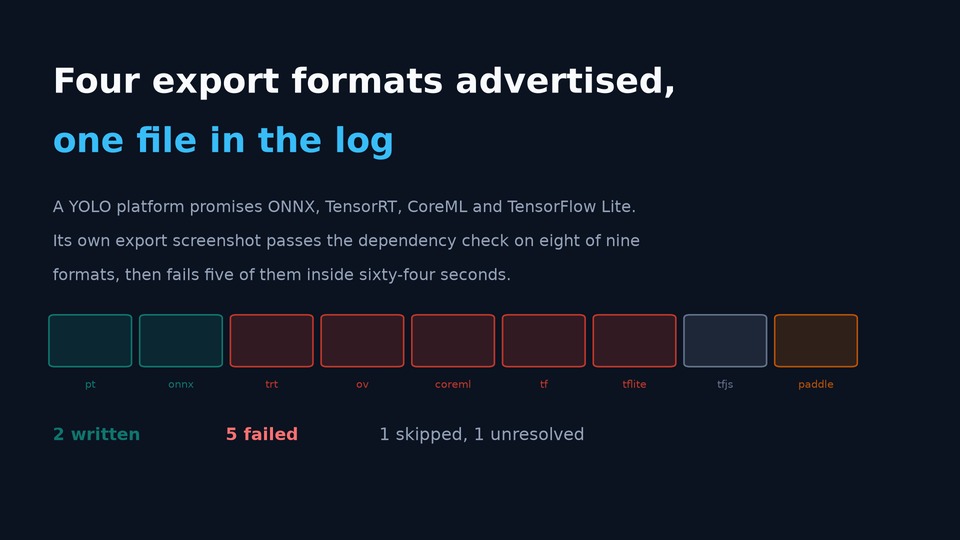
The export dialog in the launch post for YOLO Platform V1.0 queues nine model formats at once. The log underneath it scrolls for sixty-four seconds and ends with two files on disk. One of them is the checkpoint that went in.
The post is 901 characters of copy and nine images selling YOLO Platform V1.0, a Windows program that covers dataset management, a box-drawing annotator, a proportional train-validation-test split, a training launcher with live curves, an evaluation screen that compares runs, and an export panel. The spec table names four deployment formats, ONNX, TensorRT, CoreML and TensorFlow Lite, and adds that quantisation compression keeps models running smoothly on edge devices. The export screen is the sixth image, and it is where the four formats are attempted.
Five of the nine formats failed, each with a different error, and all five had passed the dependency check seconds earlier. That gap, between confirming that a package imports and confirming that a file comes out, is what this piece is about. Nothing below was run here. Every figure comes either from the post's own screenshots or from the export documentation for the three model families the post says it supports.
What makes the failures worth reading is that none of them is a coding mistake in the ordinary sense. They are four kinds of version drift wearing five error messages, they arrive within sixty seconds of each other, and they all point at the same date.
What the post is selling
The six modules are listed with one line each in the post's own table.
| Module | What the post says it does |
|---|---|
| Dataset management | preprocessing as ordered steps, workflows that can be replayed |
| Annotation | rectangle drawing, with polygons, keypoints, semantic segmentation and AI-assisted labelling deferred to V2.0 |
| Data split | proportional train, validation and test split, cross-validation set, distribution view |
| Training | YOLOv8, YOLO11 and YOLO26 families, visual parameter editing, live curves, PDF report |
| Evaluation | precision, recall, F1 and mAP, with side-by-side comparison of runs |
| Export | ONNX, TensorRT, CoreML and TensorFlow Lite in one click, quantisation, local, API or edge deployment |
Delivery is the Python source, described as neither encrypted nor cut down, on Python 3.10 to 3.13 with 3.12 recommended, on Windows 10 and 11, Linux and macOS, with NVIDIA CUDA acceleration described as optional. The claim being made is not that the program is good. It is that the chain from a folder of images to a file that runs on a device is complete and already assembled.
Two of those six lines are narrower than the module name suggests, and both matter for what comes later. The annotator draws boxes, and the other label types are explicitly a V2.0 item, which bounds the training claim: YOLO26 ships seven task heads, detection, instance segmentation, semantic segmentation, depth, classification, pose and oriented boxes, and the two older families cover five of them. A platform whose only label type is a rectangle reaches the detection checkpoint of each family. The phrase all families therefore means three model series at one task each, and the post's own V2.0 note is the acknowledgement.
The second narrow line is the split. Proportional division is a random split, and it is the module that produces the number quoted in the training screenshot below.
The check passes eight formats and the run produces two files
The export screen has two panels. The left one takes a checkpoint path, an output directory, nine format tiles and five options. The right one is a terminal widget showing the log of whatever the platform ran.
The log opens with a dependency check, one line per format, and eight of the nine come back green. TensorFlow.js is the exception: it reports a missing tensorflowjs package. Then the run starts, numbered one through nine, and the numbers stop adding up.
| Format | Pre-check | Export result | What the log says |
|---|---|---|---|
| PyTorch (.pt) | pass | written | export succeeded |
| ONNX (.onnx) | pass | written, under a second | export succeeded |
| TensorRT (.engine) | pass | failed, 2 s | pybind11 init: factory function returned nullptr |
| OpenVINO | pass | failed, instant | module openvino has no attribute runtime |
| CoreML (.mlmodel) | pass | failed, instant | CoreML export is not supported on Windows, please run on macOS or Linux |
| TensorFlow SavedModel | pass | failed after 48 s | module onnx.helper has no attribute float32_to_float16 |
| TensorFlow Lite (.tflite) | pass | failed, instant | same missing onnx.helper attribute |
| TensorFlow.js | missing tensorflowjs | skipped | dependency missing |
| PaddlePaddle | pass | started, no verdict in frame | log ends on the ninth line |
Two files exist at the end of the frame. One of them is the input checkpoint, which the log counts as an export because it writes a copy. The other is the ONNX graph. So the count is nine queued, eight ticked, five failed, two written, one skipped, and one, PaddlePaddle, whose verdict is below the bottom of the screenshot. Of the four formats in the spec table, exactly one produced a file.
The pre-check is not lying. It is answering a narrower question than the one a buyer is asking. Importing a module proves the module is installed; it does not prove the module can build this model on this machine in this version. Every one of the five runtime failures is invisible to an import test, including CoreML, whose package imports perfectly on Windows and only refuses when asked to work.
What the check did do is spend time. The first timestamp is 16:27:54 and the last tick is 16:28:42, so the pre-flight took 48 seconds, most of it inside one import that then produced a wrong answer. The ONNX export it was clearing the way for took under a second.
Five ways an export dies
| Failure class | Evidence in the log | What actually fixes it |
|---|---|---|
| Package absent | tensorflowjs not found | install it, which is the only case where install is the answer |
| Native library cannot start | pybind11 factory returned nullptr while opening the TensorRT builder | align CUDA, TensorRT and driver, or move to a machine where they already agree |
| API renamed upstream | openvino.runtime no longer exists | edit the adapter to the new namespace, or pin OpenVINO below 2026.0 |
| Format not supported on this OS | CoreML refuses on Windows | change operating system |
| Second converter out of step | onnx.helper lost float32_to_float16 | pin ONNX below 1.20, which is what the upstream project already does |
The taxonomy is the useful part, because it predicts which failures a vendor's pre-check will catch. It catches the first class, reliably, and misses the other four every time. A check that walks a list of package names will pass a TensorRT install whose builder cannot create a device context, pass an OpenVINO install that renamed its own namespace, pass a macOS-only tool on Windows, and pass an ONNX build that removed the helper the next stage calls.
Each of those four is also a different kind of support ticket. The first class is a user error. The second is a machine configuration problem. The third and fifth are the vendor's own dependency versions. The fourth is a documentation omission, since the format is genuinely supported, just not there.
The menu is a snapshot, and it can be dated
The nine tiles are more informative than the four formats in the spec table, because the tile list is a fossil of the export API that existed when the adapter was written.
TensorFlow Lite and TensorFlow.js are two separate tiles. Ultralytics merged them into a single LiteRT format in release 8.4.83, on the grounds that the same .tflite file runs on device and in the browser through LiteRT.js. The old names still work and redirect, with a deprecation warning. A menu that lists both, side by side, as different destinations was drawn against the API before that merge. The label on the tile is the older name as well; the current documentation for this format, offered to mobile, embedded, edge and browser targets, is LiteRT throughout.
OpenVINO is a harder date. Intel redesigned the Python namespace in the 2025.0 release and marked the nested openvino.runtime module deprecated for removal in 2026.0. The log's error, that the module openvino has no attribute runtime, is what an adapter written against the older path returns against a 2026 install. The deprecation ran through an entire release cycle with warnings, and the adapter did not move.
ONNX is a date in the other direction. The dtype helpers in onnx.helper began disappearing in the 1.20 line, and the same absence broke NVIDIA's onnx_graphsurgeon in the same months. Ultralytics responded by pinning ONNX below 1.20 in its own requirements, which is why a correctly installed training stack does not hit this at all. The platform's environment resolved to a build that does, which means its dependency specification and its exporter disagree with each other.
TensorRT carries no visible date, only a native library that failed to construct its builder. That is the same class of problem with a different mechanism: a compiled component that has to match the driver, the CUDA runtime and the GPU, and no pin anywhere in the product to make it match.
Four of those five signals carry a date: two tiles that upstream has since merged, a label upstream has renamed, a namespace Intel has removed, and a version ceiling upstream has added. The fifth, TensorRT, carries only the failure itself. Put together, they say the export adapter list is a 2025 snapshot running against a 2026 stack, and that the platform ships source code without the lockfile that would have frozen the versions it was written against. Source code is the one thing a buyer can read. It is not the thing that makes an export succeed.
One format is a step, the rest are chains
Counting steps explains why five of the nine fail on a machine where two succeed.
| Format | Steps from the checkpoint | Where the product's responsibility ends |
|---|---|---|
| PyTorch | none, it is the input format | nothing to do |
| ONNX | one, traced out of the training graph | the graph is written; the runtime is the buyer's |
| TensorRT | one, plus engine build on the target GPU | the engine is device and version specific, and must be rebuilt per target |
| OpenVINO | one, through the OpenVINO converter | the OpenVINO install |
| CoreML | one, through coremltools | the operating system |
| TensorFlow SavedModel | two, ONNX first, then a second converter | the ONNX build and the converter |
| TensorFlow Lite | three, ONNX, then a converter, then the TFLite toolchain | two third-party stacks |
| TensorFlow.js | three, and now a deprecated alias for LiteRT | two third-party stacks |
| PaddlePaddle | two, ONNX then a Paddle converter, FP32 only | two third-party stacks |
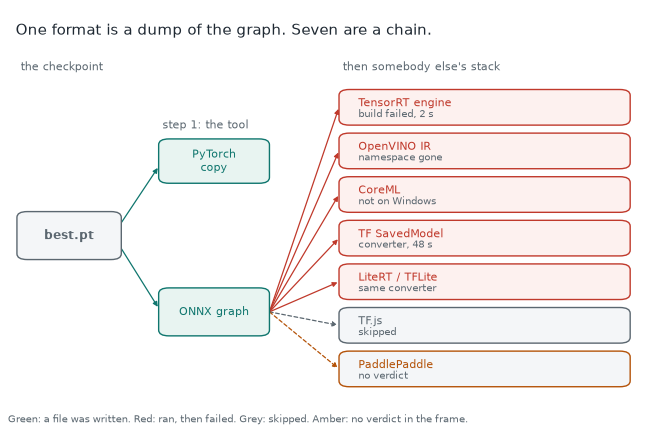
ONNX is the only format that is a pure graph dump. Everything else either needs a foreign runtime to accept the graph, or needs the graph translated into another framework first. Each translation is a place where two projects have to agree on a version, and the failure modes in the log land exactly on those joints.
TensorRT deserves its own sentence because it is the only format in that table that is compiled for one particular machine. An engine file is not a portable artifact. It is compiled for the GPU architecture and TensorRT version that built it, which is why the documentation for the format tells you to build on the deployment machine. Export once, run anywhere is true for ONNX and false for an engine. For a product aimed at people deploying to edge boxes, that distinction decides the workflow: the engine gets built on the target, during installation, with whatever TensorRT that box has.
Three quarters of the run is spent failing
The timestamps in the log turn the export into a performance profile.
| Time | Event | Cost |
|---|---|---|
| 16:28:46 | PyTorch written | instant |
| 16:28:46 | ONNX written | under a second |
| 16:28:48 to 16:28:50 | TensorRT aborted | 2 s |
| 16:28:52 | OpenVINO aborted | instant |
| 16:28:52 | CoreML aborted | instant |
| 16:28:52 to 16:29:40 | SavedModel ran, then aborted | 48 s |
| 16:29:40 | TensorFlow Lite aborted on the same missing helper | instant |
| 16:29:46 | TensorFlow.js skipped | instant |
| 16:29:46 | PaddlePaddle started | no verdict in the frame |
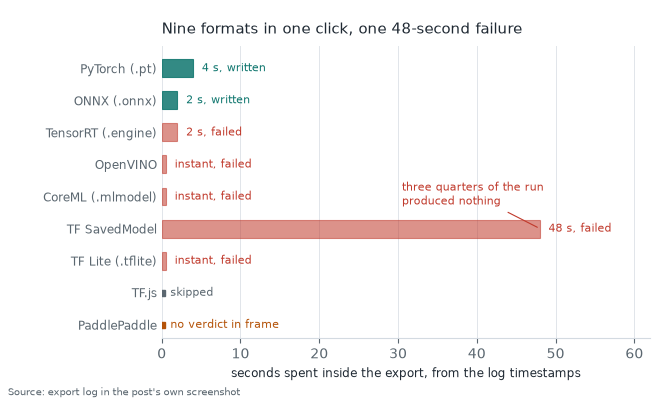
Sixty-four seconds from start to the last line, and forty-eight of them inside the one conversion that produced nothing. The SavedModel path spends its time building an ONNX graph, converting it to TensorFlow, and then dying on a helper call. TensorFlow Lite inherits the failure for free, because it runs the same conversion and then asks for the same attribute.
This is the argument for a pre-flight that resolves the chain rather than the package list. A check that imported the converter, then ran it against a two-image dummy model, would have failed in three seconds instead of forty-eight, and it would have failed before the user queued eight other formats behind it. The check as written is worse than no check, because it prints eight green ticks and five of them are wrong.
No single operating system produces all four
The spec table offers Windows, Linux and macOS, and lists four formats. Those two lists cannot both be satisfied on any one of the three systems.
CoreML export refuses on Windows, in the upstream message the log reproduces verbatim, and works on macOS and Linux. TensorRT needs an NVIDIA GPU with a matching CUDA runtime, and Apple hardware has had neither since CUDA dropped macOS support. Windows can build an engine and cannot produce a CoreML model. macOS can produce a CoreML model and cannot produce an engine. Linux with an NVIDIA card is the only place where all four formats in the spec table are reachable, and that is the one configuration that is not a consumer laptop.
The post describes CUDA as optional, which is accurate for training on a CPU and inaccurate for the one format in that table that cannot be built without it. Buyers who read optional as optional will find out at the export panel, which is where this screenshot is from.
A checkbox with no calibration data
The export options are five checkboxes and an image size: half precision FP16, INT8 quantisation, simplify the model, dynamic input size, an optimised workspace, and a size field reading 640. In the frame, simplify and workspace are ticked, the two precision boxes are empty.
INT8 is the interesting one because of what it needs upstream. A quantised export observes the dynamic range of each layer on a calibration pass over representative images, which means the converter has to be pointed at a dataset. The documentation is explicit that INT8 and the mixed weight schemes take representative data unless the target integration auto-enables a default, and that an explicit precision request either produces that precision or fails before export. The panel in front of the user has a model path, an output directory and no dataset field. Whatever the tick box calibrates on, the user cannot see it.
The precision matrix behind the menu has holes as well, and the holes are the reason one checkbox cannot honestly cover nine formats.
| Format | FP32 | FP16 | INT8 | Note |
|---|---|---|---|---|
| ONNX | yes | yes | yes | INT8 uses static quantisation and calibration data |
| TensorRT | yes | yes | yes | INT8 needs representative calibration data |
| OpenVINO | yes | yes | yes | INT8 goes through NNCF |
| CoreML | yes | yes | yes | INT8 is weight-only quantisation |
| TensorFlow SavedModel | yes | no | yes | no half-precision path |
| TensorFlow Lite | yes | no | yes | half precision is a runtime delegate, not an export |
| PaddlePaddle | yes | no | no | no export-time conversion at all |
A single INT8 checkbox that applies to a batch of nine formats is therefore wrong for at least one of them in both directions: PaddlePaddle cannot take INT8 at all, and TensorFlow SavedModel cannot take FP16. If the box is honoured per format the batch is incoherent; if it is ignored, the user is not told.
What the precision costs is documented in the same place. Against FP32, post-training quantisation costs 0.010 mAP50-95 on the smallest model and 0.038 to 0.057 on the larger ones. Quantisation-aware training costs 0.008 to 0.017 across the range, so on the smallest model it buys 0.0001 and on the other four 0.030 to 0.044. Those are measured on COCO with TensorRT engines at 640 pixels, on a dataset that is not the buyer's, but the shape of the trade is the part that transfers: calibration alone is fine for a tiny model and expensive for a large one, and the fix for the large one is a training-time change that no export panel can offer.
Three families, three output contracts
Supporting YOLOv8, YOLO11 and YOLO26 in one pipeline means decoding three different outputs, because the newest family moved the post-processing into the graph.
| Family | Head | Output tensor, 80 classes | NMS | DFL |
|---|---|---|---|---|
| YOLOv8, YOLO11 | one-to-many | 84 by 8,400 | outside the graph | yes |
| YOLO26, default | one-to-many | 84 by 8,400 | outside the graph | no |
| YOLO26, end-to-end | one-to-one | 300 by 6 | none | no |
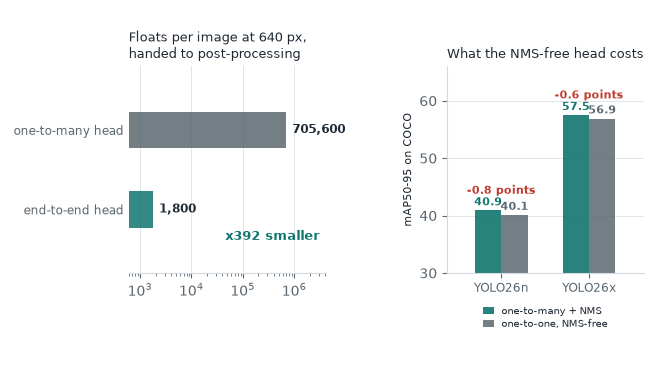
The arithmetic that matters is in that table. A one-to-many output is 705,600 floats per image at 640 pixels, and the end-to-end output is 1,800. That is a factor of 392 less data to hand to post-processing, and the sort-and-suppress loop disappears with it. The documentation calls this head the faster option and does not put a number on the CPU gain; the only quantity in the pipeline large enough to explain a gain at all is that hundred-to-one drop in the data handed to post-processing.
The end-to-end head is not free. On COCO it scores 40.1 against 40.9 for the default head on the smallest model, and 56.9 against 57.5 on the largest; the published summary is 0.6 to 0.8 points across the five scales. Between 0.6 and 0.8 mAP buys the removal of NMS. The end-to-end head also caps detections at 300 per image by construction, because 300 is the number of slots it emits; the NMS path keeps as many as the caller asks for. For eleven boxes in the demo frame it is irrelevant. For a parts-counting job on a populated board it is a design constraint that belongs in the spec table and is not in it.
None of the post's screenshots show a YOLO26 run. The evaluation screen compares yolov11 and yolov8n checkpoints, and the training report shows a loss chart with a dfl_loss curve, which is the component YOLO26 removed. The claim is a table row, not a demonstration. That is ordinary for a launch post, and it is a reason to test the claim before paying for it.
What 0.995 and 0.962 measure
The training screenshot closes with a summary panel: 101 epochs, four minutes and nine seconds, a best checkpoint of 5.95 megabytes, mAP50 of 0.9950 and mAP50-95 of 0.9624, with a best mAP50-95 of 0.9670.
Four minutes for a hundred epochs points at a small dataset, and the pair of numbers is more informative than either one alone. The ratio between them, 0.967, says the average score across the ten intersection-over-union thresholds from 0.5 to 0.95 is almost as high as the score at 0.5, which happens when the boxes are placed to within a few pixels. For a two-class hard-hat set of near-identical frames from one camera, that is what a model achieves when the validation images resemble the training images. The module that produced that split is the one labelled proportional division, which is a random split. On a dataset assembled from video, a random split puts frames from the same second on both sides, and the validation score then measures the split rather than the model.
None of this makes the number wrong. It makes it a measurement of the demo. A buyer can check it in one step: collect a few hundred images from a different site or a different week, and re-run validation on those.
What to ask before paying
The questions are the ones the log raises, and they cost nothing to ask.
Ask for the export log from a machine like the one you will deploy on, not the format list from the store page. Ask which operating system and which GPU produced it. Ask what dataset the INT8 calibration runs on, and where that path is set. Ask what the maximum detection count is on your scene and whether the path you chose can exceed it. Ask which task heads the annotator can label, since the answer bounds which checkpoints the training module can actually be pointed at.
Then read the failures as a specification of the vendor's dependency policy. A product that ships source code can be patched by its buyer, which is a real advantage, but patching four adapters is not a configuration change, and most buyers will discover the need for it after the money has changed hands. The pre-check would have been the place to spend it on their behalf, and the five green ticks that were wrong are the evidence that it was not.
The one thing the post cannot hide is the log, because a log is generated by running. A spec table lists what the platform can do. The export screen, with its numbered lines and its timestamps, shows what it did.