X-AnyLabeling: one open-source desktop app for AI-assisted data labelling, from SAM masks to YOLO boxes to VLM captions
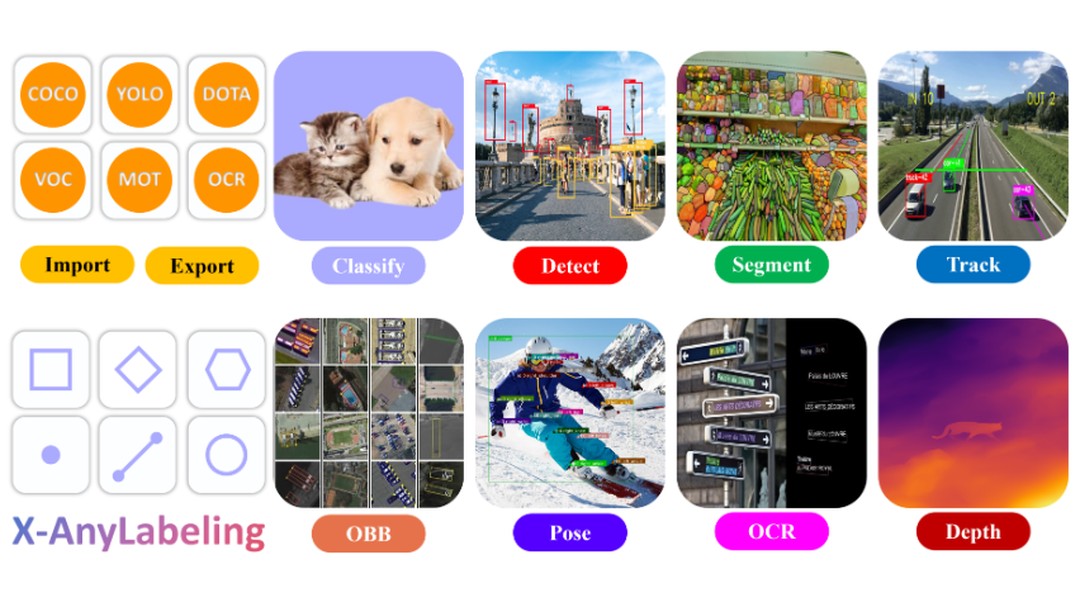
Every machine-learning project eventually hits the same wall: the model is ready, but the data is not labelled, and labelling is where the weeks disappear. The usual answer is to install one tool per task — a box tool for detection, a polygon tool for segmentation, an OCR labeller, a rotated-box labeller — and then write conversion scripts to move the output between them. X-AnyLabeling takes the opposite approach: a single desktop application that covers the annotation tasks a computer-vision team actually needs, with the models that do the labelling built in.
What X-AnyLabeling is
X-AnyLabeling is an open-source, cross-platform desktop application for AI-assisted data annotation, maintained by the CVHub team and published under the GPL-3.0 licence. The repository sits at roughly 10.3K stars and 1.1K forks at the time of writing, and the current release line is v4.0.0.
It is a desktop program, not a web service: it runs on Windows, Linux and macOS, needs no server behind it, and works offline, which matters when the images you are labelling are medical scans or a customer's production line. Installation is a Python package:
pip install x-anylabeling-cvhub
The interface ships in English, Simplified Chinese, Japanese and Korean. Models run locally through ONNX Runtime, TensorRT, OpenCV DNN, vLLM or SGLang, and an optional companion service — X-AnyLabeling-Server — can move inference to a remote machine when the workstation has no GPU.
Its task menu reads like the whole of applied computer vision: classify, detect, segment, track, orient, pose, OCR and depth, exported in whatever format the downstream training script expects.
The task coverage
The breadth is the point. Rather than one task done well, the tool aims to cover the common run of computer-vision labelling in one interface:
| Task category | What it labels |
|---|---|
| Image classification | Image-level and shape-level classes |
| Object detection | Horizontal bounding boxes (HBB) |
| Rotated detection | Oriented bounding boxes (OBB) |
| Instance segmentation | Pixel-level masks per object |
| Pose estimation | Human keypoints |
| Face estimation | Face detection plus landmarks |
| Tracking | Multi-object tracking (MOT) |
| Segment Anything | Interactive prompt-driven segmentation |
| Depth estimation | Monocular depth |
| Image matting | Foreground extraction |
| Tagging | Automatic image tags |
| OCR | Text detection and recognition |
| Layout analysis | Document structure |
| Vision-language | Visual question answering and captioning |
| Lane detection | Road lanes |
| Object counting | Dense counting |
| Visual grounding | Open-vocabulary detection |
For a team that runs several projects at once, that means one tool to install, one file format to learn and no per-task licence to track.
The model zoo
Where other tools make you bring your own model, X-AnyLabeling ships a catalogue. It spans the full YOLO line — YOLOv5 through YOLO26, plus YOLOX, YOLO-NAS, DAMO-YOLO and Gold-YOLO — with classification, segmentation, pose and rotated-head variants of each. It carries the DETR family as well: RT-DETR, RF-DETR, DEIMv2, D-FINE and RT-DETRv2-OBB.
The segment-anything line is a headline feature. SAM 1, SAM 2 and SAM 3 are all supported, alongside SAM-HQ, SAM-Med2D, EdgeSAM, EfficientViT-SAM and MobileSAM for lighter hardware. With SAM, labelling a complex object becomes a click: the model proposes the outline and you refine it, instead of tracing the boundary by hand. SAM 3 adds video segmentation, so a single labelled frame can propagate a mask through the rest of a clip.
OCR is handled by the PP-OCR family (v4, v5 and v6) plus PaddleOCR-VL for document parsing, and image tagging by RAM and RAM++, which turn an unlabelled folder into a searchable one. Open-vocabulary detectors — Grounding DINO, YOLO-World, YOLOE — let you label by naming a class in plain language rather than choosing from a fixed list.
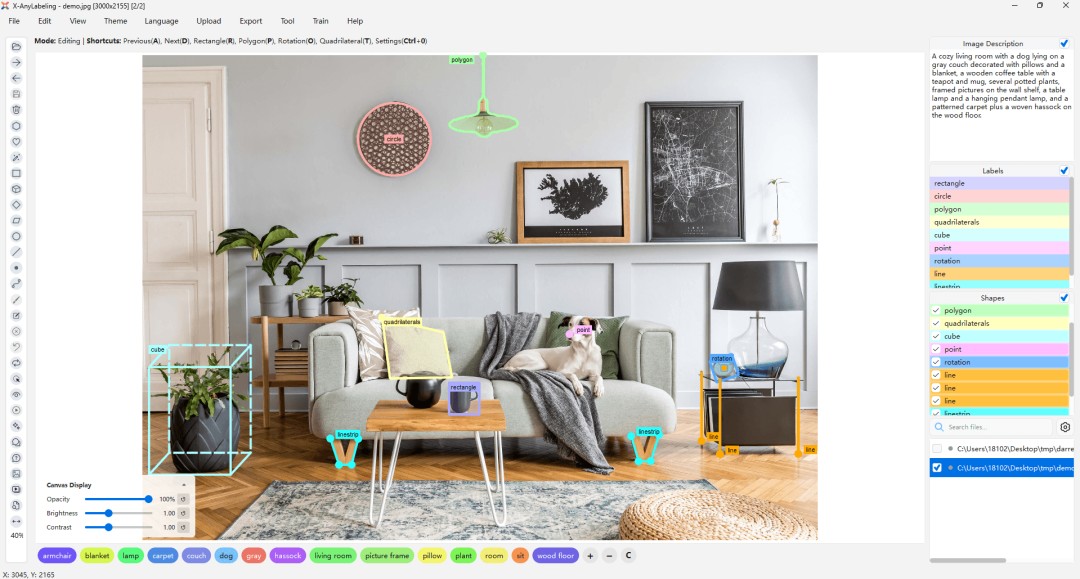
Three levels of AI-assisted labelling
The project frames annotation as three gears, and the tool supports all three:
| Level | Method | Throughput the project quotes |
|---|---|---|
| Manual | Draw boxes and outlines by hand | ~200 images per person-day |
| AI-assisted | Model pre-labels, human corrects | ~2,000 images per person-day |
| Automatic | Model predicts in bulk, human spot-checks | ~10,000 images per person-day |
Those multipliers are the project's own figures and depend heavily on the task and the hardware, but the shape of the argument holds: the model does the tedious first pass and the annotator spends their time on the cases that need judgement.
The interactive workflows are direct. For segmentation, point at the object, let SAM propose the outline, click the background once to trim the edge, then confirm to commit a polygon. For detection, pick a YOLO model, point it at a folder, run one batch inference and review the boxes it returns. A magic-wand tool, added in August 2026, builds a polygon from a region of similar colour in one click — useful for medical images and industrial inspection, where the object is a shape rather than a category.
Shapes and formats
Eleven shape types are available: polygon, rectangle, rotated box, cuboid, quadrilateral, circle, line, linestrip, point, mask and the magic wand. The cuboid is the unusual one — 3D bounding-box annotation normally needs a dedicated 3D tool, and supporting it on a 2D canvas lowers the barrier for autonomous-driving and robotics datasets.
Eleven annotation formats import and export: COCO, Pascal VOC, YOLO, DOTA, MOT, MASK, PPOCR, MMGD, VLM-R1, ShareGPT and a custom format for your own model. Format shuffling is the quiet tax of annotation work — label in one format, train in another, evaluate in a third — and native support for all of them removes the conversion scripts that so often carry a silent bug into a dataset.
The v4.0 direction: models in the loop
The newest thread is vision-language models used as labellers. X-AnyLabeling can call Qwen3-VL, Gemini, ChatGPT or GLM from inside the annotation window: ask a question about the image in natural language, receive a description or an answer, and accept it as a text annotation after review. For captioning datasets and visual-question-answering sets, this replaces a great deal of manual typing.
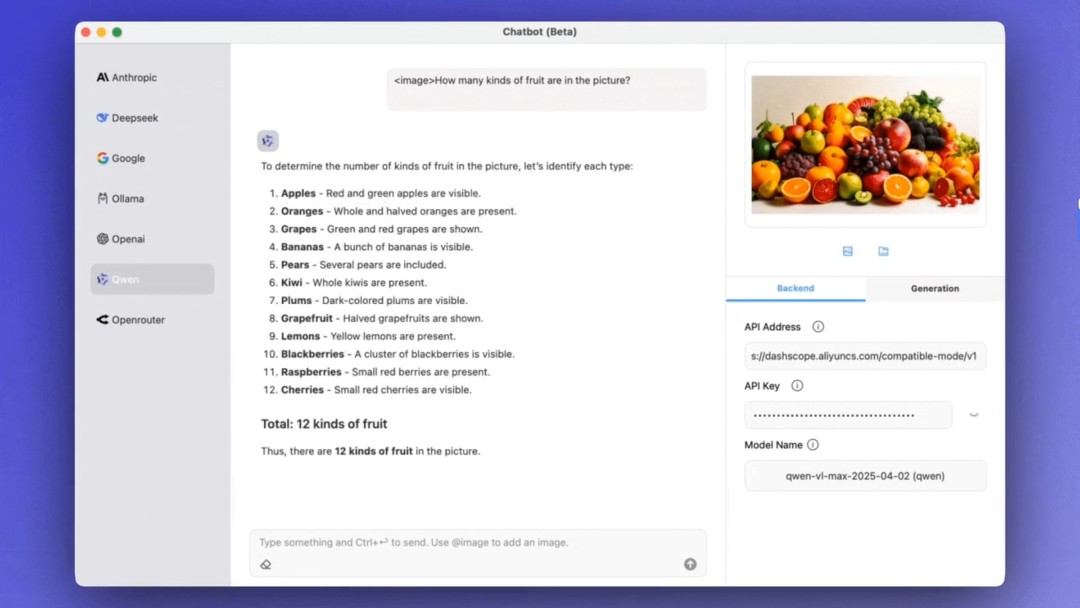
Two practical points come with that. First, a hosted model means your images leave the machine — the opposite of the offline promise that makes the local models attractive, so the choice should be made deliberately per dataset. Second, VLM output needs review as much as any other model's: the tool puts the text in front of you to accept or edit, and it should be read.
Training without leaving the tool
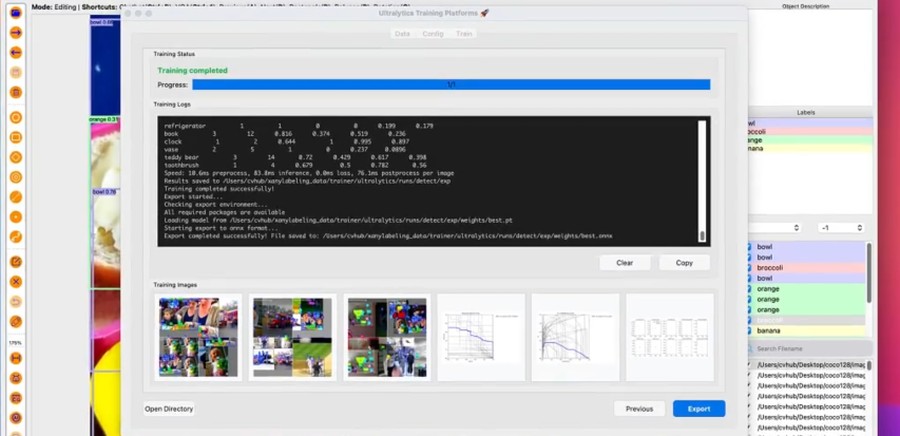
Alongside annotation, the application can launch an Ultralytics YOLO training run from inside its own window, showing the training progress, the log output and the resulting metrics plots, then exporting the trained weights. It is not a replacement for a proper training pipeline, but it closes the loop for small projects: label a set, fine-tune a detector, and test it on new images without leaving the annotator.
Who it is for
The project's own list is a fair summary: machine-learning engineers who need training data, annotation teams replacing several tools with one, autonomous-driving groups needing detection, segmentation, 3D, lane and tracking, OCR and document-AI teams, medical-imaging and industrial-vision groups, researchers labelling experimental data, and anyone building a VLM dataset who wants to export in ShareGPT or VLM-R1 format.
How it compares
| Approach | What you get | Where it falls short |
|---|---|---|
| X-AnyLabeling | One desktop app for detection, segmentation, pose, OCR, tracking, VLM labelling and in-tool training, offline | GPL-3.0, and its breadth means more bundled models to manage |
| A stack of single-task tools | Each tool is simple on its own | Several installs, several formats, and conversion scripts between them |
| A hosted annotation platform | Browser access and team review workflows | Your images leave the building; subscription cost; network dependency |
| Hand-rolled scripts over a base model | Total control of the pipeline | You build the UI, the model plumbing and the format handling yourself |
The honest caveats
- The licence is copyleft. GPL-3.0 permits commercial use, but derivative works must also be released under the same licence. If you plan to embed the tool, or its code, inside a closed product, that obligation needs a legal opinion before you start.
- The throughput numbers are the project's. The 200 / 2,000 / 10,000 figures describe an ideal case. Real speed depends on the task, the model and the GPU in the workstation.
- GPU is effectively assumed for the heavier models. SAM and the large detectors run on CPU, but slowly; on modest hardware, choose the light variants deliberately.
- Precision tasks still need people. Keypoints, oriented boxes and small-object classes are exactly where a model's pre-label is most likely to be wrong, and where review costs the most time.
- Model downloads are large. The model zoo is a choice menu, not a hard drive. Expect to fetch weights the first time you use a model, and plan for disk and bandwidth.
- In-tool training is a convenience, not a platform. The Ultralytics integration suits small fine-tuning jobs; larger training runs belong in a dedicated pipeline.
Practical notes
- Validate the loop first. Take a small dataset all the way from import to export before committing to a class taxonomy, so you learn the format quirks early.
- Freeze class names early. Renaming classes across a large dataset is expensive; settle the list and the colours before the annotators start.
- Keep a human review step. The value of pre-labelling is speed, not accuracy. Budget review time for the categories that matter most.
- Pip is the simplest install, and the project also ships Docker images and prebuilt packages for the three desktop platforms.
- Text, image, video and multimodal data are all in scope, so check the task you need against the current model catalogue before assuming support.
- Confirm the current release. The project moves quickly and adds models and tasks regularly; the star and fork counts above are a snapshot.
IOTTourChina covers open-source IoT, edge-AI and developer tooling from the China-made hardware ecosystem as part of its developer resource. This is editorial coverage, not an endorsement or an advertisement; specifications, licence terms and model support should be confirmed with the project before you rely on them.