wxTools: one cross-platform console for serial, UDP, TCP and WebSocket debugging
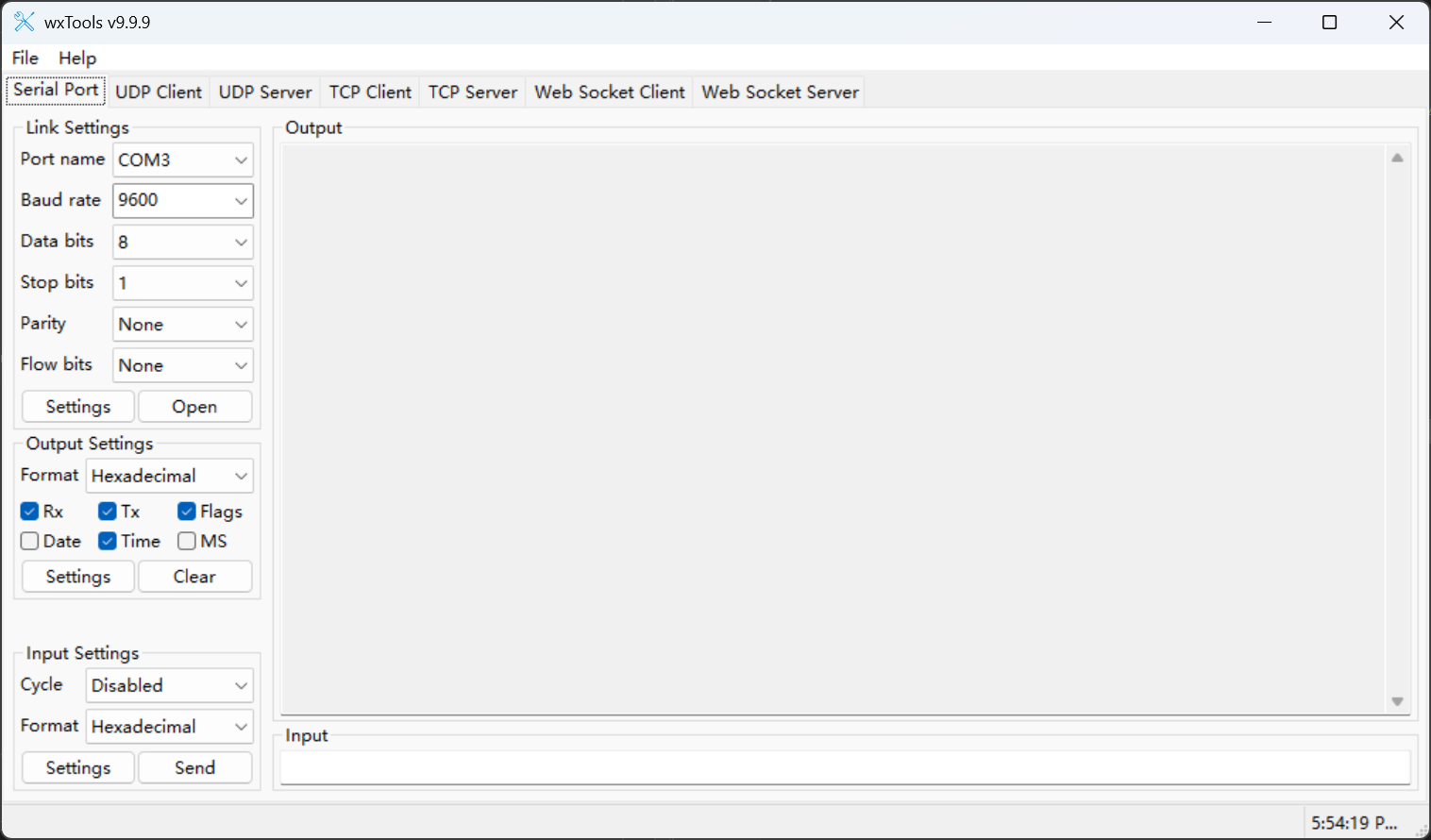
Ask an embedded developer what their desktop looks like during a normal working day and you will usually get the same answer: a serial terminal in one corner, a TCP client in another, a packet tool behind it, and a browser tab open to a WebSocket test page. None of those tools is complicated. The problem is that they are four separate programs with four different ideas of how to display a hex byte, and the device under test is the one thing that has to talk to all of them.
wxTools is an attempt to collapse that stack into one window. It is an open-source, cross-platform debug console built on wxWidgets, and it gathers serial, UDP, TCP and WebSocket debugging — client and server modes for each network protocol — into a single application, with a Lua scripting layer for anything the built-in parsers cannot handle.
Seven modules in one window
The tool ships with seven communication modules, and they cover the situations an IoT developer runs into most often.
| Module | Role | Typical use |
|---|---|---|
| Serial Port | Serial terminal for a COM/tty port | Talking to an RS-485 sensor or a development board |
| UDP Client | Sends datagrams to a remote UDP endpoint | Polling a device that speaks UDP |
| UDP Server | Listens for incoming datagrams | Simulating a UDP peer |
| TCP Client | Connects to a TCP server | Querying a device or a broker |
| TCP Server | Accepts TCP connections | Standing in for a master or a gateway |
| Web Socket Client | Connects to a WebSocket endpoint | Testing a WebSocket API |
| Web Socket Server | Hosts a WebSocket endpoint | Simulating a WebSocket device |
The serial module exposes the full link configuration — port, baud rate, data bits, stop bits, parity and flow control — so the same window that opens a 115200-baud debug console can also be set to 9600 8N1 for a Modbus sensor. The practical benefit is not that any single module is better than a dedicated tool, but that you keep one set of shortcuts, one output-format setting and one window layout across all four protocols instead of re-learning a new tool every time the interface changes.
Lua scripting: teaching the tool your protocol
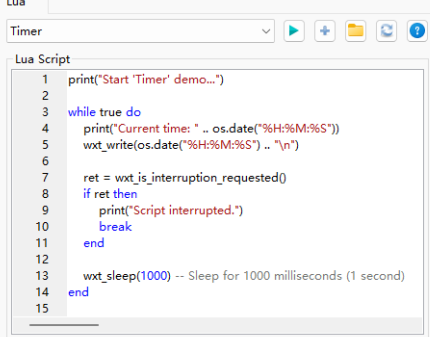
The feature that separates wxTools from a plain send-and-receive terminal is its Lua extension layer. Built on Lua 5.4, scripts run in their own thread, so a long-running or polling script does not freeze the interface.
Instead of staring at a wall of hexadecimal and counting bytes by eye, you describe the frame once and let the tool do the bookkeeping. A custom serial protocol — say a 0xAA 0x55 header, a length byte, a payload and a trailing CRC — becomes a few lines that find the header, slice out the payload, verify the checksum and print the decoded fields by name.
-- Split frames, check the checksum, and reply automatically
local HEADER = "\xAA\x55"

function on_data(data)
    local pos = string.find(data, HEADER, 1, true)
    if not pos then return end
    local len = string.byte(data, pos + 2)
    local frame = string.sub(data, pos, pos + 2 + len)
    print("frame length = " .. len)
    -- verify CRC here, then echo a canned response back to the sender
    wxt_write(frame .. "\n")
end

-- Poll the sensor once a second until the script is stopped
while true do
    wxt_write("read\n")
    wxt_sleep(1000)                     -- sleep 1000 ms
    if wxt_is_interruption_requested() then
        print("Script interrupted.")
        break
    end
end
Three helpers do most of the work: wxt_write sends data out through the active module, wxt_sleep pauses the script for a number of milliseconds, and wxt_is_interruption_requested returns true when the user has asked the script to stop. That last one matters: any script with a loop must call it, otherwise there is no way to halt the loop from the UI.
The same mechanism makes auto-reply possible. Point the tool at a device that expects a handshake and a script can compute the checksum and send a correct response frame, so you can exercise a slave device without a real master on the bench — or debug firmware with the protocol logic living in the script rather than in a second piece of hardware.
Eighteen-plus CRC algorithms, no lookup tables
Industrial and embedded protocols are built on checksums, and wxTools computes them for you. The built-in set covers the common ones and a few you will only meet in a specific corner of the industry.
| Width | Algorithms |
|---|---|
| 8-bit | CRC_8, CRC_8_ITU, CRC_8_ROHC, CRC_8_MAXIM |
| 16-bit | CRC_16_IBM, CRC_16_MAXIM, CRC_16_USB, CRC_16_MODBUS, CRC_16_CCITT, CRC_16_CCITT_FALSE, CRC_16_X25, CRC_16_XMODEM, CRC_16_DNP |
| 32-bit | CRC_32, CRC_32_MPEG2 |
| Sum | SUM_8, SUM_16, SUM_32, SUM_64 |
CRC_16_MODBUS is the one anyone working with Modbus already knows by heart, CRC_16_USB shows up in USB device descriptors, and CRC_16_CCITT appears in Bluetooth and several wireless stacks. The point of having them in a dropdown is the trial-and-error phase: when you are bringing up a new device and are not yet sure which variant it uses, trying four of them from a menu is far quicker than writing, compiling and flashing a test for each.
Data formats, terminators and escaping
The I/O layer is deliberately flexible, because the same byte stream is often read two different ways in the same session:
- Five formats in and out — binary, octal, hexadecimal, ASCII and UTF-8, switchable per pane.
- Automatic line endings —
\r,\n,\r\nor\n\r, appended to outgoing data so a device expecting a carriage return or a newline on every command stops being a source of silent failures. - Escaped input — control characters can be typed as escapes instead of hand-assembled hex, so
\r\nis a keystroke rather than four hexadecimal digits.
None of this is glamorous, and that is the point. A serial device that wants \r\n at the end of every command is exactly the kind of detail that quietly breaks an otherwise working script, and having the tool append it automatically removes a whole class of mistakes.
Platforms, packaging and licensing
wxTools is written in C++ on top of wxWidgets 3.3.x, which is what lets one codebase target all three desktop operating systems.
| Platform | Architectures |
|---|---|
| Windows | x86, x64, arm64 |
| Linux | amd64 |
| macOS | arm64 |
There are two ways to get it, and they differ only in convenience. The community edition is free from the project's GitHub Releases — download a ZIP, unpack, run; the Windows packages are under 6 MB and the Linux .deb is around 13 MB. The store edition on the Microsoft Store and the Apple App Store has exactly the same features, but installs and updates more easily, and the purchase price is a way of sponsoring the developer. On Arch Linux the tool is also packaged in the AUR. The project is mirrored on Gitee alongside GitHub, and the licence is the wxWindows Library Licence, version 3.1 — close to LGPL, and explicitly friendly to commercial use.
One detail that will matter to anyone maintaining old production equipment: the project has deliberately kept working on making Windows XP builds behave, which is the reason it can still be installed on an industrial PC that most modern toolchains abandoned years ago.
Who it is for
- Embedded developers who move between a serial port and a network socket all day and would rather do it from one window than four applications.
- IoT teams testing the TCP or WebSocket link between a device and a gateway, where having both a client and a server mode in the same tool means not installing something new on each side.
- Anyone with a private protocol who wants to split frames and verify checksums without waiting for a tool vendor to add support, or writing a bespoke parser for a single frame layout.
- Field and production engineers who need a small, self-contained console that runs on older hardware.
The project is open source, with the code and release packages published on GitHub and mirrored on Gitee.
IOTTourChina covers open-source IoT projects and China-made devices as part of its developer resource. Details should be confirmed against the project's own repository and documentation.