Edge AI SoCs
BM1688 and BM1684X Edge Inference TPU Family
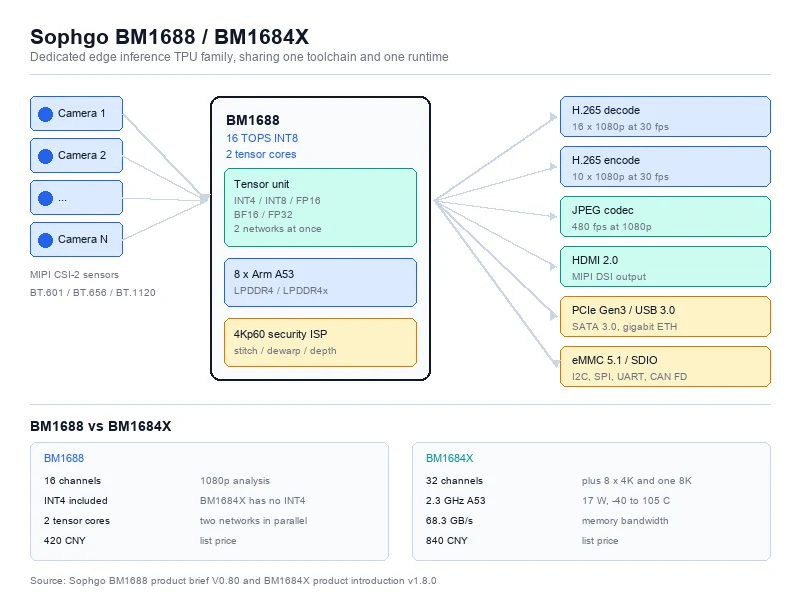
Sophgo's BM1688 and BM1684X are dedicated inference TPUs for edge video analytics, running 16 and 32 channels of 1080p H.265 analysis on one chip and sharing the TPU-MLIR compiler and bmruntime stack.
Capabilities below are vendor-documented. We have not tested this device or its integrations.
Sources checked:
Also known as: BM1688, BM1684X, Sophgo BM1688, Sophgo BM1684X, 算能 BM1688, 算能 BM1684X, SOPHON BM1688
Suitable projects
- Multi-channel camera boxes that analyse 16 or 32 video streams on one board instead of streaming frames to a server.
- Network camera and NVR designs that need hardware H.264 and H.265 encoding alongside on-device detection.
- Industrial vision gateways that read several MIPI CSI-2 sensors and run the detector where the pixels land.
- Edge appliances that ship a compiled bmodel and update it over the air rather than carrying a full framework runtime.
- Front-end nodes that pair a BM168x with an application processor: the TPU handles inference while the host keeps the network stack.
Before you buy
- Sophgo publishes no main frequency, process node, on-chip SRAM size, package size or typical power figure for the BM1688, so those fields stay undocumented rather than estimated.
- The 16 TOPS rating is peak INT8 throughput; sustained throughput on a real model depends on how many of the 150 supported operators the network maps to, and the vendor's own YOLOv5 measurement spans 56 to 162 frames per second depending on the module platform.
- BM1684X does not support INT4. The two parts are not interchangeable in the model conversion step even though they share a compiler and a runtime.
- Sophgo's BM1688 product brief V0.80 is the current document; older revisions list DDR4 support and TensorRT in the toolchain, and neither is in the current brief.
- The toolchain documentation site tpumlir.org currently serves an expired TLS certificate, so the source files in the GitHub repository are the more reliable reference.
- ModelZoo ships inside the SDK package rather than as a public repository, so precompiled models need the vendor download.
- The vendor does not publish a BLAS or standard C library layer, and the Python bindings are a ctypes wrapper around libbmrt.so rather than a native extension.
- Connector, transceiver and isolation parts for industrial fieldbuses are board-level items, not features of the processor.
Official resources
- Sophgo BM1688 product brief V0.80
- Sophgo BM1684X product introduction v1.8.0
- Sophgo BM1688 product page
- Sophgo BM1684X product page
- TPU-MLIR compiler repository
- libsophon driver and bmruntime repository
- sophon-demo sample and application repository
Related guides
- Processor
- 8 x Arm A53; BM1684X runs at 2.3 GHz
- NPU
- 16 TOPS INT8 on BM1688; BM1684X supports INT8, INT16, FP16, BF16 and FP32
- NPU cores
- 2 on BM1688, so two bmodel networks can run at the same time
- Memory
- LPDDR4 and LPDDR4x; BM1688 uses a 2 x 32-bit interface, BM1684X reaches 68.3 GB/s with up to 16 GB
- Storage
- eMMC 5.1 with a 4-bit bus, plus an SD and SDIO controller
- Video decode
- BM1688 handles 16 x 1080p at 30 fps in H.264 and H.265; BM1684X handles 32 x 1080p at 25 fps, 8 x 4K at 25 fps and one 8K H.265 stream
- Video encode
- BM1688 handles 10 x 1080p at 30 fps in H.264 and H.265; BM1684X handles 12 x 1080p at 25 fps, 3 x 4K at 25 fps and up to 8K
- Image codec
- BM1688 decodes and encodes JPEG at 480 frames per second at 1080p; BM1684X reaches 600 frames per second and 32768 x 32768
- ISP
- 4Kp60 security ISP with adjustable 3A, two-frame wide dynamic range, local tone mapping, 3D noise reduction, lens distortion correction and purple fringe correction
- Vision accelerators
- Binocular depth, image stitching and fisheye unwarp in hardware on BM1688; enhanced SORT, NMS and scatter-gather on BM1684X
- High-speed I/O
- PCIe Gen3, USB 3.0 host and device, SATA 3.0, gigabit Ethernet over RGMII, HDMI 2.0, MIPI DSI output and MIPI CSI input
- Low-speed I/O
- I2C, SPI, UART, ADC, GPIO, PWM, MCLK, and CAN FD on the BM1688 product page
- Audio
- I2S with a built-in audio codec for 16-bit voice input and output
- Security
- AES, DES, SM4 and SHA acceleration, true random numbers, secure key storage, secure boot and Trustzone; BM1684X adds RSA and ECC
- Toolchain
- TPU-MLIR compiles ONNX, Caffe and TFLite models into bmodel files; the runtime is the bmruntime C, C++ and Python API in libsophon
- Operating system
- Linux
- Power and temperature
- BM1684X is rated at 17 W and minus 40 to plus 105 degrees Celsius; Sophgo publishes no equivalent figures for BM1688
- List price
- 420 CNY for BM1688 and 840 CNY for BM1684X
Choosing between the BM1688 and the BM1684X
This profile is based on official documentation, not our own device testing.
Sophgo sells the BM1688 and the BM1684X as members of one edge inference line, and the two share a compiler, a runtime, a Docker image and a demo repository. That is the main reason they belong on one page rather than two: there is no separate BM1684X toolchain to learn, and the API surface in this site's SDK section is identical for both parts. What differs is the amount of video the chip handles and the numeric formats the tensor unit accepts.
Both are dedicated inference processors. Their CPU is there to feed the tensor unit and to run the application around it, not to carry a general-purpose workload. If a design needs a fast general-purpose CPU, these are the wrong parts.
The difference that decides most designs
| BM1688 | BM1684X | |
|---|---|---|
| Generation | High-integration edge TPU | Fourth-generation tensor processor, about twice the performance of its predecessor |
| CPU | 8 x Arm A53 | 8 x Arm A53 at 2.3 GHz |
| NPU cores | 2 | Not published |
| Numeric formats | INT4, INT8, FP16, BF16, FP32 | INT8, INT16, FP16, BF16, FP32, no INT4 |
| Video analysis | 16 channels of 1080p | 32 channels of 1080p |
| Video decode | 16 x 1080p at 30 fps | 32 x 1080p at 25 fps, 8 x 4K at 25 fps, one 8K H.265 stream |
| Video encode | 10 x 1080p at 30 fps | 12 x 1080p at 25 fps, 3 x 4K at 25 fps, up to 8K |
| JPEG | 480 frames per second at 1080p | 600 frames per second at 1080p, up to 32768 x 32768 |
| Memory bandwidth | 2 x 32-bit interface | 68.3 GB/s, up to 16 GB |
| Ethernet | One gigabit port over RGMII | Two gigabit ports over RGMII |
| Power | Not published | 17 W |
| Temperature | Not published | Minus 40 to plus 105 degrees Celsius |
| List price | 420 CNY | 840 CNY |
Three rows in that table decide a design on their own.
First, the channel count. The BM1688 analyses sixteen camera streams and the BM1684X thirty-two. A sixteen-channel box that grows to twenty-four channels does not fit the BM1688, and the step up is a doubling of the chip price rather than an increment.
Second, INT4. The BM1688 accepts INT4 and the BM1684X does not. This matters only if the model is quantised below INT8, which is a deliberate choice that buys memory bandwidth at the cost of accuracy. A design that quantises to INT8 runs on either part with the same bmodel file, but a design that wants INT4 has one option.
Third, the memory bandwidth. The BM1684X quotes 68.3 GB/s against a 2 x 32-bit interface on the BM1688, and Sophgo does not publish a bandwidth figure for the BM1688 at all. On a memory-bound detection model this is the difference between a chip that keeps up with its own sensors and one that does not.
Two NPU cores on the BM1688
The BM1688 has two tensor unit cores. The vendor's own tutorial for this part describes the arrangement as running two bmodel networks at the same time, one on each core. It is not twice the throughput of a single-core part; it is two independent network slots.
That distinction decides which designs benefit. A box that runs a detector on one stream type and a classifier on another uses the second core directly. A box that runs one model across all sixteen cameras gains nothing from the second core, because the model is already the bottleneck.
Check the official demo before designing around this. The vendor ships a two-core two-task example for YOLOv5, and it is the clearest available description of how the cores are meant to be partitioned.
The tools are the same, and that is the point
Both parts are compiled by TPU-MLIR and run under bmruntime. A bmodel built for one runs on the other as long as the numeric format is supported and the processor argument matches the target. The model conversion step names the target chip explicitly, so a project that needs to ship on both builds twice, but the runtime code and the Python bindings are shared.
The consequence for a team is that the learning curve is paid once. Anyone who has run the conversion pipeline for the BM1684X can run it for the BM1688.
What Sophgo does not publish
The BM1688 product brief leaves several fields empty, and this page does not fill them in from third-party sources.
| Field | Status |
|---|---|
| CPU main frequency | Not published for the BM1688 |
| Process node | Not published |
| On-chip SRAM size and bandwidth | Not published |
| Package type and dimensions | Not published |
| Typical power | Not published |
| Operating temperature | Not published |
| INT16 and FP16 throughput in TOPS | Not published, only the INT8 total is given |
| Maximum memory capacity | Not published at chip level |
Several of these are known for the BM1684X, which makes it tempting to assume the parts are alike. They are not close enough for that assumption to hold in either direction. Ask the vendor for the BM1688 package drawing and the electrical limits before a board design is frozen; those are the fields that stop a layout.
The 16 TOPS figure is the BM1688's peak INT8 throughput. Sophgo's own performance table for the BM1684X puts YOLOv5 at 56 to 162 frames per second depending on the module platform, and ResNet-50 between 639 and 2456 frames per second; the vendor publishes no equivalent frame-rate table for the BM1688. Treat TOPS as a ceiling and the frame rates as the planning figures.
Two supplier notes worth reading before you order
The BM1688 product brief has more than one revision in circulation. The current document is V0.80, dated March 2025. Earlier revisions list DDR4 support and include TensorRT in the toolchain column. The current brief lists only LPDDR4 and LPDDR4x, and TensorRT is gone. If a colleague sends you a PDF, check the version on the cover before quoting a memory type from it.
Sophgo is sometimes described as a Bitmain company or a Bitmain spin-off. The vendor's own history page does not say this. What it does say is that the SOPHON brand appeared in 2016, that Sophgo was founded in 2019, and that SOPHON merged into Sophgo in 2021. Treat any shareholding claim as unverified unless the vendor confirms it in writing.
How this compares with the Rockchip parts on this site
The Rockchip RK3588 and RK3572 also appear in edge AI designs, and the two families are not interchangeable.
The Rockchip parts are application processors with a general-purpose CPU, a GPU and an NPU, running a Linux distribution with a full graphics stack. The BM168x parts are inference processors with an Arm A53 cluster and a tensor unit, and no GPU in the published specification. Sophgo's own positioning is video analytics: sixteen or thirty-two channels of camera input with hardware decoding beside the inference hardware.
The toolchains differ too. Rockchip uses the RKNN toolkit with a Rockchip neural network interface on the runtime side. Sophgo uses an MLIR-based compiler that produces a bmodel file and a runtime that loads it. A team's existing RKNN knowledge does not transfer, and the reverse is also true.
Choose the Rockchip part when the product needs a GPU, a desktop-class application stack or general-purpose compute. Choose the Sophgo part when the product is a camera box whose value is in how many streams it analyses and how fast.
Modules and boards you can start from
Sophgo sells boards and servers built around these chips, which is usually a faster route than designing a carrier from scratch.
| Item | Type | Processor | List price |
|---|---|---|---|
| SM9 16-ENC-28-S | Developer kit | BM1688 | 4,209 CNY |
| SM9 8-ENC-A8-S | Developer kit | BM1688 family | 3,145 CNY |
| SM9 16-ENC-28 | Compute module | BM1688 | 4,437 CNY |
| SE9 16-BP1-11 | Micro server, 8 GB | BM1688 | 3,912 CNY |
| SE9 16-BP1-18 | Micro server, 16 GB | BM1688 | 5,150 CNY |
| SM7 32-EN4-22-S | Developer kit | BM1684X family | 7,079 CNY |
| SE7 32-BP1-11 | Micro server | BM1684X | 9,800 CNY |
The SM9 16-ENC-28-S is the natural starting point for BM1688 work. It carries 16 GB of LPDDR4, 64 GB of eMMC 5.1, two gigabit ports, two USB 3.0 ports, HDMI 2.0, three MIPI CSI-2 connectors, an M.2 slot for PCIe or SATA and a SIM slot, on a 120 by 80 by 30 millimetre board running from 12 volts.
Two of the entries above are worth a second look. The SE9 16-BP1-18 micro server is the same BM1688 platform with 16 GB rather than 8 GB, and the SE7 32-BP1-11 is the BM1684X equivalent of the same box. If the design ends up shipping as an appliance rather than a board, the micro server route removes the carrier design from the schedule entirely.
Getting a model running on a BM1688 or BM1684X
This profile is based on official documentation, not our own device testing.
Four commands and one Docker image take a trained model to a running inference process, all on a development machine with no board attached. This page is the shortest path. The model pipeline guide explains why each stage exists, the SDK page lists every flag, and the API page documents the runtime classes.
A bmodel is compiled output, not a portable model: it is bound to one target processor and one set of numeric formats.
1. Start the container
docker pull sophgo/tpuc_dev:latest
docker run --privileged --name tpu-mlir -v $PWD:/workspace -it sophgo/tpuc_dev:latest
The privileged flag is needed for device access, and the TPU-MLIR checkout has to sit at workspace slash tpu-mlir inside the container with the models directory as a sibling.
2. Convert the model
model_transform.py \
  --model_name yolov5s \
  --model_def ../yolov5s.onnx \
  --input_shapes [[1,3,640,640]] \
  --mean 0.0,0.0,0.0 \
  --scale 0.0039216,0.0039216,0.0039216 \
  --keep_aspect_ratio \
  --pixel_format rgb \
  --output_names 350,498,646 \
  --test_input ../image/dog.jpg \
  --test_result yolov5s_top_outputs.npz \
  --mlir yolov5s.mlir
The argument that fails silently is the pixel format: it defaults to BGR while most training pipelines use RGB, and a mismatch produces a model that loads, runs and returns wrong answers. Pass the test input and test result arguments so the compiler compares its output against the framework instead of letting the error reach production.
3. Calibrate for INT8
run_calibration.py yolov5s.mlir \
  --dataset ../COCO2017 \
  --input_num 100 \
  -o yolov5s_cali_table
INT8 needs a calibration table built from representative data; the vendor suggests one hundred to one thousand images. FP16 and BF16 skip this step.
4. Deploy to a bmodel
model_deploy.py \
  --mlir yolov5s.mlir \
  --quantize INT8 \
  --calibration_table yolov5s_cali_table \
  --processor bm1688 \
  --test_input yolov5s_in_f32.npz \
  --test_reference yolov5s_top_outputs.npz \
  --tolerance 0.85,0.45 \
  --model yolov5s_bm1688_int8.bmodel
The processor argument is required and names the target chip, so a model built for the BM1688 is a different file from the same model built for the BM1684X.
5. Run it
#include "bmruntime_cpp.h"
using namespace bmruntime;

Context ctx;
bm_status_t status = ctx.load_bmodel("yolov5s_bm1688_int8.bmodel");
if (BM_SUCCESS != status) { return 1; }

Network net(ctx, "yolov5s_detect");
auto &inputs = net.Inputs();
inputs[0]->Reshape({1, {1, 3, 640, 640}});
inputs[0]->CopyFrom(input_data);

net.Forward();

auto &outputs = net.Outputs();
outputs[0]->CopyTo(result_data);
The namespace is bmruntime and the classes are Context, Network and Tensor; most third-party examples use names that no longer exist. The Python wrapper is a ctypes binding with the same shape.
from bmrt import BmrtEngine

with BmrtEngine("yolov5s_bm1688_int8.bmodel") as engine:
    outputs = engine.infer({"input": input_data})
Two tensor cores, two networks
The BM1688 has two tensor cores and the vendor ships a tutorial that runs two networks at once, one per core. That is two network slots, not twice the throughput, so it only pays when the two networks are independent. The API page documents the launch call that pins a network to a core.
Before you ship
The compiler reports two similarity numbers; read both. A low quantisation figure points at the calibration set, a low deploy figure at the compiler or runtime. Then re-measure accuracy on the target board, because the numbers from the development machine do not carry over.
Older material
Commands such as bmnet, bm_test, bm_perf and sophon_test belong to the previous toolchain generation and no longer exist; the vendor published a migration appendix mapping each one to its replacement. If a tutorial refers to a command that is not in the four on this page, it is describing that older generation.
The bmruntime API on BM1688 and BM1684X
This profile is based on official documentation, not our own device testing.
The runtime is the part of the Sophgo stack that an application actually calls. It loads a compiled bmodel file, runs it on the tensor unit and moves tensors between host memory and device memory. This section documents the real interface, because the names in most third-party examples do not match the current runtime.
Where the API lives
| Component | Location |
|---|---|
| C++ wrapper | bmruntime_cpp.h in the tpu-runtime include directory of the libsophon repository |
| C interface | bmruntime_interface.h, same directory |
| Device memory layer | bmruntime.h and bmlib_runtime.h, same directory |
| Python wrapper | The bmrt module in the vendor demo repository, a ctypes binding to the shared library |
| PyTorch wrapper | The torch-tpu repository, with a BmodelModule that behaves like a torch module |
The runtime is part of libsophon, which is a separate repository from the compiler. The compiler lives in tpu-mlir and produces the files the runtime consumes.
The C++ interface
Three classes cover almost everything an application needs.
Context
The context owns the device and the loaded models.
| Method | Purpose |
|---|---|
| Context(int devid) | Open a device by index |
| Context(bm_handle_t) | Wrap an existing device handle |
| load_bmodel(const char *file) | Load a compiled model from a file |
| load_bmodel(const void *data, size_t size) | Load a compiled model from memory |
| get_network_number() | How many networks the file contains |
| get_network_names(std::vector |
Names of those networks |
| get_network_info(const char *) | Shape and type metadata for one network |
| handle() | The underlying device handle |
| trace() | Print runtime state, for diagnostics |
Network
A network is one compiled model within a loaded file.
| Method | Purpose |
|---|---|
| Network(const Context &, const char *name, int stage_id = -1) | Bind to a named network |
| Forward(bool sync = true) | Execute |
| Inputs() | Vector of input tensors |
| Outputs() | Vector of output tensors |
| Input(const char *name) | One input tensor by name |
| Output(const char *name) | One output tensor by name |
| info() | Network metadata |
The stage argument matters. When a network is created without a stage, each input needs its shape set explicitly with a reshape call before the data is copied in. When a network is created with a stage, the input shapes are already known and the data can be copied according to the stage layout.
Tensor
A tensor is one input or output buffer.
| Method | Purpose |
|---|---|
| CopyFrom(const void *) | Host to device, size taken from the tensor |
| CopyFrom(const void *, size_t, uint64_t offset) | Host to device with an explicit size and offset |
| CopyTo(void *) | Device to host, size taken from the tensor |
| CopyTo(void *, size_t, uint64_t offset) | Device to host with an explicit size and offset |
| Reshape(const bm_shape_t &) | Set the input shape |
| ByteSize() | Buffer size in bytes |
| num_elements() | Element count |
| tensor() | The underlying descriptor |
| set_store_mode(bm_store_mode_t) | Choose how the tensor is stored |
The free functions ByteSize, Count and IsSameShape are available for each descriptor type and for the Tensor wrapper itself.
A complete C++ example
#include "bmruntime_cpp.h"
using namespace bmruntime;

void run_detector(const char *bmodel_path, void *input, void *output)
{
  Context ctx;
  bm_status_t status = ctx.load_bmodel(bmodel_path);
  assert(BM_SUCCESS == status);

  Network net(ctx, "testnet");

  auto &inputs = net.Inputs();
  inputs[0]->Reshape({1, {1, 3, 640, 640}});
  inputs[0]->CopyFrom(input);

  status = net.Forward();
  assert(BM_SUCCESS == status);

  auto &outputs = net.Outputs();
  outputs[0]->CopyTo(output);
}
This is close to the vendor's own reference example. The two details worth copying are the reshape call before the copy and the stage argument when the network has multiple stages.
The C interface
The C interface exposes the same capabilities with a handle and out-parameter style. The functions fall into six groups.
Shape and type helpers:
size_t  bmrt_data_type_size(bm_data_type_t dtype);
void    bmrt_shape(bm_shape_t *shape, const int *dims, int num_dims);
uint64_t bmrt_shape_count(const bm_shape_t *shape);
bool    bmrt_shape_is_same(const bm_shape_t *left, const bm_shape_t *right);
Tensor construction and sizing:
bool    bmrt_tensor(bm_tensor_t *tensor, void *p_bmrt, bm_data_type_t dtype, bm_shape_t shape);
bool    bmrt_tensor_ex(bm_tensor_t *tensor, void *p_bmrt, int devid, bm_data_type_t dtype, bm_shape_t shape);
size_t  bmrt_tensor_bytesize(const bm_tensor_t *tensor);
size_t  bmrt_tensor_device_size(const bm_tensor_t *tensor);
Runtime lifecycle:
void*   bmrt_create(bm_handle_t bm_handle);
void*   bmrt_create_ex(bm_handle_t *bm_handles, int num_handles);
void    bmrt_destroy(void *p_bmrt);
void    bmrt_destroy_without_coeff(void *p_bmrt);
void*   bmrt_get_bm_handle(void *p_bmrt);
Model loading:
bool    bmrt_load_bmodel(void *p_bmrt, const char *bmodel_path);
bool    bmrt_load_bmodel_data(void *p_bmrt, const void *bmodel_data, size_t size);
bool    bmrt_load_bmodel_with_mem(void *p_bmrt, const char *bmodel_path, mem_info_t *mem_info);
bool    bmrt_load_bmodel_with_decrypt(void *p_bmrt, const char *bmodel_path, decrypt_func f);
Introspection:
int     bmrt_get_network_number(void *p_bmrt);
void    bmrt_get_network_names(void *p_bmrt, const char ***network_names);
const bm_net_info_t *bmrt_get_network_info(void *p_bmrt, const char *net_name);
int     bmrt_get_stage_index(void *p_bmrt, const char *net_name, bm_tensor_t *input_tensor);
int     bmrt_get_stage_size(void *p_bmrt, const char *net_name);
void    bmrt_print_network_info(const bm_net_info_t *net_info);
bool    bmrt_get_bmodel_info(const char *bmodel_path, mem_info_t *mem_info);
Execution:
bool    bmrt_launch_tensor(void *p_bmrt, const char *net_name,
                           const bm_tensor_t *input_tensors, int input_num,
                           bm_tensor_t *output_tensors, int output_num);
bool    bmrt_launch_tensor_ex(void *p_bmrt, const char *net_name,
                              const bm_tensor_t *input_tensors, int input_num,
                              bm_tensor_t *output_tensors, int output_num,
                              bool user_mem, bool user_stmode, uint32_t *core_ids);
The extended launch form is the one that matters on the BM1688, because the core identifiers argument is how a network is pinned to one of the two tensor cores when two networks run side by side.
Device memory
The BMLIB layer manages the device handle and the buffers.
bm_status_t bm_dev_request(bm_handle_t *bm_handle, int devid);
bm_status_t bm_dev_free(bm_handle_t bm_handle);
bm_status_t bm_malloc_device_byte(bm_handle_t h, bm_device_mem_t *mem, size_t size);
bm_status_t bm_free_device(bm_handle_t h, bm_device_mem_t mem);
size_t      bm_mem_get_device_size(bm_device_mem_t mem);
bm_status_t bm_memcpy_s2d_partial(bm_handle_t h, bm_device_mem_t dev, void *host, size_t size);
bm_status_t bm_memcpy_d2s_partial(bm_handle_t h, void *host, bm_device_mem_t dev, size_t size);
bm_status_t bm_memcpy_x2x_partial(bm_handle_t h, void *dst, bm_device_mem_t src, size_t size);
bm_status_t bm_mem_mmap_device_mem(bm_handle_t h, bm_device_mem_t *mem, size_t size);
bm_status_t bm_mem_flush_device_mem(bm_handle_t h, bm_device_mem_t dev);
bm_status_t bm_mem_invalidate_device_mem(bm_handle_t h, bm_device_mem_t dev);
bm_status_t bm_thread_sync(bm_handle_t h);
There is a trap here that the vendor documentation calls out explicitly. The partial copy functions take a size argument, and the output tensor of a network is usually smaller than the device buffer allocated for it. Using the whole-buffer copy instead of the partial one will overflow the destination. Copy exactly the tensor size.
The mapped memory functions are the efficient path when the same buffer is used every frame, because they avoid a copy between device memory and the runtime's own allocation.
The Python wrapper
The demo repository ships a ctypes binding with the same object model as the C++ wrapper.
class BmrtError(RuntimeError):
    pass

class BmrtEngine(object):
    def __init__(self, bmodel_path, dev_id=0): ...
    def infer(self, feeds): ...
    def close(self): ...
    def __enter__(self): ...
    def __exit__(self, *exc): ...
The feeds argument is a dictionary mapping tensor names to data. The engine also supports the context manager protocol, which is the cleanest way to make sure the device handle is released.
The PyTorch wrapper
For teams that already have a PyTorch model, the torch-tpu repository provides a module that runs a bmodel through a normal torch forward call.
from torch_tpu.tpu import BmodelModule

model = BmodelModule(bmodel_path="yolov5s_bm1688_int8.bmodel")
output = model(input_tensor)
The module reports the input and output names, supports in-place output buffers and can post-process the raw output into a chosen dtype. It is a thin layer over the same runtime, so a model that runs here runs identically through the C++ path.
Inspecting a compiled model
The compiler repository ships a tool for reading compiled files.
model_tool --info model_file
model_tool --print model_file
The print form gives the detailed dump, including the network names, the input and output shapes and the numeric types. This is the fastest way to confirm what a compiled file actually contains, which matters when a build produces a file that loads but rejects your input.
Several files can be combined into one, which is useful when a product ships two networks in a single deployment.
model_tool --combine model_a.bmodel model_b.bmodel -o combined.bmodel
The combine operation takes file paths and an output path. It is distinct from the merge weight option in the deploy step, which folds weights inside one model rather than joining two files.
Where the examples live
The vendor sample repository is organised in three directories.
| Directory | Contents |
|---|---|
| tutorial | Basic interface examples: resize, crop, blend, stitch, memory mapping, video encoding, and the BM1688 depth and wide-angle accelerator cases |
| sample | Algorithm examples with both C++ and Python directories: YOLOv5, YOLOv8, ResNet, MobileNetV4, RetinaFace, SCRFD, SAM, SAM2, segmentation models and more |
| application | Complete products: an LLM API server, a document chat tool, an audio assistant and meeting summariser |
Each sample directory holds a README, a cpp subdirectory, a python subdirectory and a scripts subdirectory. The BM1688 two-core two-task example lives under the tutorial directory and is the reference for running two networks in parallel.
The TPU-MLIR toolchain on BM1688 and BM1684X
This profile is based on official documentation, not our own device testing.
TPU-MLIR is the compiler that turns a trained model into a bmodel file. It is an MLIR-based project, meaning the intermediate representation is a first-class artefact rather than an internal detail, and the front end is a set of frameworks rather than a single one. The compiler is open source under a two-clause BSD licence, with third-party components excepted.
The four commands
Everything in the model pipeline comes down to four scripts.
| Command | Purpose |
|---|---|
| model_transform.py | Framework model to MLIR intermediate representation |
| run_calibration.py | Build the quantisation table from real data |
| model_deploy.py | MLIR to bmodel, for the target processor |
| model_runner.py | Run a bmodel, an MLIR file, or a framework model directly |
A fifth utility, model_tool, inspects and combines compiled files.
model_transform.py
The first stage takes an ONNX, Caffe, TFLite, PyTorch or Darknet model and produces an MLIR file.
model_transform.py \
  --model_name yolov5s \
  --model_def ../yolov5s.onnx \
  --input_shapes [[1,3,640,640]] \
  --mean 0.0,0.0,0.0 \
  --scale 0.0039216,0.0039216,0.0039216 \
  --keep_aspect_ratio \
  --pixel_format rgb \
  --output_names 350,498,646 \
  --test_input ../image/dog.jpg \
  --test_result yolov5s_top_outputs.npz \
  --mlir yolov5s.mlir
Arguments that shape the model
| Argument | Meaning |
|---|---|
| --model_name | Name used for the output files |
| --model_def | Path to the model file |
| --model_data | Path to the Caffe weights file, for Caffe models |
| --mlir | Output path for the intermediate representation |
| --input_shapes | Input shapes, for example [[1,3,640,640]]; multiple inputs are listed separately |
| --resize_dims | Resize dimensions, defaulting to the network input size |
| --keep_aspect_ratio | Keep the aspect ratio and pad, rather than stretching |
| --mean | Per-channel mean subtracted from the input |
| --scale | Per-channel scale applied to the input |
| --pixel_format | rgb, bgr, gray or rgbd; the default is bgr |
| --channel_format | Channel order for the layout |
| --output_names | Names given to the model outputs |
| --test_input | An image, numpy or numpy archive file used to verify the conversion |
| --test_result | Output path for the reference results, as a numpy archive |
| --excepts | Comma-separated layer names to exclude from verification |
| --debug | Keep the intermediate files |
| --input_types | Input data types |
| --pad_value | Value used for padding |
| --onnx_sim | Simulate the ONNX operator set |
| --tolerance | Similarity threshold for the verification step |
| --add_postprocess | Append a post-processing operator to the model |
The preprocessing arguments are where projects go wrong. The pixel format default is BGR while most training pipelines use RGB, and a mismatch here does not fail loudly. It produces a model that loads, runs and returns confident wrong answers. Setting the test input and test result arguments turns that into a visible numeric difference at compile time.
What the step produces
Two files. The MLIR file holds the compiled graph, and a numpy archive holds the preprocessed input that the later stages use as a reference.
run_calibration.py
INT8 quantisation needs a calibration table built from representative data.
run_calibration.py yolov5s.mlir \
  --dataset ../COCO2017 \
  --input_num 100 \
  -o yolov5s_cali_table
The vendor guidance is that the number of images ranges from about one hundred to a thousand depending on the situation. The dataset directory holds the images in the layout the tool reads.
FP16 and BF16 do not need a table. INT8 does, and a project that skips this step ends up discovering its accuracy loss much later, on the target hardware, where it is expensive to diagnose.
model_deploy.py
The last stage compiles the intermediate representation for a specific processor.
model_deploy.py \
  --mlir yolov5s.mlir \
  --quantize INT8 \
  --calibration_table yolov5s_cali_table \
  --processor bm1688 \
  --test_input yolov5s_in_f32.npz \
  --test_reference yolov5s_top_outputs.npz \
  --tolerance 0.85,0.45 \
  --model yolov5s_bm1688_int8.bmodel
Arguments that control quantisation
| Argument | Meaning |
|---|---|
| --quantize | Target numeric format |
| --processor | Target processor; this is what makes the output chip-specific |
| --calibration_table | Quantisation table, required for INT8 |
| --tolerance | Minimum similarity between the quantised and float models, as a cosine and Euclidean pair; the default is 0.8 and 0.5 |
| --correctness | Minimum similarity between the bmodel and the intermediate representation; the default is 0.99 and 0.90, or 0.99 and 0.80 when a quantisation table is supplied |
| --quantize_table | Table for mixed-precision quantisation |
| --quant_input | Strip the cast on the input |
| --quant_output | Strip the cast on the output |
| --quant_input_list | Strip the cast on the listed input indices |
| --quant_output_list | Strip the cast on the listed output indices |
| --quant_input_int8 | Force the input to int8 or uint8 |
| --quant_output_int8 | Force the output to int8 or uint8 |
| --fuse_preprocess | Fold the preprocessing into the model so the input becomes uint8 |
| --high_precision | Force specific operators to float32 |
| --asymmetric | Use asymmetric INT8 quantisation |
| --dynamic | Generate code for dynamic shapes |
| --quantize_method_list | Quantisation algorithms, for example KL or MSE |
| --part_quantize | Quantise only part of the model |
| --custom_operator | Custom quantised operators, with --custom_mode |
| --merge_weight | Merge the weights of a BM168x bmodel file |
| --model_extern | External weight data |
| --includeWeight | Include the weights in the output |
| --compare_all | Compare every operator |
| --op_divide | Divide the operators for separate compilation |
The processor argument
This is the single most consequential flag in the pipeline. The supported values are BM1684, BM1684X, BM1688, CV186X, CV183X, CV182X, CV181X and CV180X.
The same model compiled for two processors produces two files, and the numeric format support differs between them. The BM1688 supports F32, F16, BF16, INT8, INT4, W4INT8, W4F16, W8F16, W4BF16 and W8BF16. The BM1684X supports everything on that list except INT4 and W4INT8. INT16 appears in the BM1684X product brief as a chip capability but not in this quantisation set, so treat the list above as what model_deploy.py will accept. A bmodel compiled with an INT4 quantisation for the BM1684X will not deploy.
What the mixed formats mean
The W-prefixed formats apply to a subset of operators rather than the whole model. W4INT8 compresses convolution and matrix multiplication weights to four bits while leaving other operators at INT8. W4A16 and W8A16 work the same way against a sixteen-bit activation format.
This is how mixed precision is expressed in practice, and it is why the format list is per processor rather than global.
model_runner.py
The runner executes a compiled file without any application code, which makes it the fastest way to check a conversion.
model_runner.py --input ../image/dog.jpg --model yolov5s_bm1688_int8.bmodel --output out
It accepts bmodel files, intermediate representations and framework models, so the same script can compare the float model against the compiled one on the same input.
model_tool
A utility for compiled files.
model_tool --info model_file
model_tool --print model_file
model_tool --extract model_file
model_tool --combine file1 .. fileN -o new_file
model_tool --combine_dir dir1 .. dirN -o new_dir
model_tool --dump model_file start_offset byte_size out_file
The info form gives a summary, the print form gives the full dump including network names, shapes and types. Extract splits a multi-network file into single-network files, and combine merges several files back together. The dump form reads raw bytes out of a compiled file.
Note that the merge operation here is called combine and takes file paths. It is a different thing from the merge weight option on the deploy step, which folds weights inside one model.
The operator list
The compiler documents the supported operators in an appendix of its manual, generated from a script in the repository. The published version is a table with one row per operator and columns for the ONNX, PyTorch, Caffe and TOP names that map to it.
Sophgo states that the hardware implements more than one hundred and fifty operators, plus user-defined ones. The BM1684X product introduction describes support for post-training quantisation, automatic mixed-precision tuning, and distributed inference across multiple cores.
Two BM168x-specific compiler options are worth knowing. A model compression option applies to the BM1688 only and takes values for none, weight, activation or all. A split option, with values for normal, limit or custom, works on both the BM1684X and the BM1688.
The development container
The toolchain ships as a container image.
docker pull sophgo/tpuc_dev:latest
docker run --privileged --name tpu-mlir -v $PWD:/workspace -it sophgo/tpuc_dev:latest
The vendor documentation refers to a fixed version tag of v3.4 while the repository readme uses the latest tag. For a build that has to be reproducible, pin the version rather than tracking latest.
Inside the image the project has to sit at the workspace slash tpu-mlir path, with the model zoo directory as a sibling. The image is based on Ubuntu 22.04, and there are variants for the Python and CUDA Python toolchains.
Models
The compiler repository carries a regression model directory with an ONNX YOLOv5 sample that works as a smoke test for a fresh installation.
The larger model zoo is distributed inside the SDK package rather than as a public repository, and the documentation states that it sits in the models directory next to the compiler checkout. Precompiled bmodel files for the sample applications are distributed through the vendor's file service, and the tutorials fetch them with a command that takes the download URL directly.
License
The compiler is under a two-clause BSD licence with third-party components excepted. The runtime in libsophon is under the Apache 2.0 licence. The sample repository shows no standard licence identifier, so treat its contents as reference material rather than something to vendor into a product without checking.
Questions about the BM1688 and BM1684X
This profile is based on official documentation, not our own device testing.
Can one bmodel file run on both chips?
Yes, as long as the numeric format is supported by both. INT8 is the format both accept, so an INT8 bmodel compiled for one runs on the other. The compiler still needs to know the target, so a project that ships on both builds twice; the application code and the runtime do not change.
The exception is INT4. The BM1688 accepts it and the BM1684X does not, so a model quantised below INT8 has one home.
What is the difference between two NPU cores and twice the throughput?
Two independent network slots, not double speed. A box that runs a detector on one stream type and a classifier on another gains from the second core; a box that runs one model across all sixteen cameras does not, because that model is already the limit. The selection page has the reasoning.
Is the 16 TOPS figure realistic for a product?
It is peak INT8 throughput on the tensor unit, not a sustained figure. Sophgo's own measurements put YOLOv5 at 56 to 162 frames per second on the BM1684X depending on the module platform, and it publishes no equivalent table for the BM1688. The selection page compares TOPS with those frame rates and explains the gap.
What happens if the model has an unsupported operator?
The conversion fails with an error naming the operator. The operator list in the compiler documentation gives the supported set, with the ONNX, PyTorch, Caffe and TOP names that map to each entry.
Most unsupported operators have a custom-operator path. The compiler accepts a custom operator list, and the vendor states that the hardware supports more than one hundred and fifty built-in operators plus user-defined ones.
The product brief for the BM1688 lists DDR4 and TensorRT. Why does your page not?
Because there are two revisions of that document. The current one is V0.80, dated March 2025, and lists LPDDR4 and LPDDR4x with no TensorRT; an earlier revision lists DDR4 and TensorRT. Check the version on the cover before designing the memory subsystem. The selection page notes the same difference.
Is Sophgo the same company as Bitmain?
No. They are separate companies, and Sophgo's own history page states no shareholding relationship. What it does document is a timeline: the SOPHON brand appeared in 2016, Sophgo was founded in 2019, and SOPHON merged into Sophgo in 2021.
Third-party articles describe a Bitmain origin and name individual co-founders; none of that is confirmed by the vendor. Treat it as unverified, and do not repeat it as fact in a product document.
Why does Sophgo list two different founding years in different places?
Some sources say 2020. The company's own history page says 2019, and the site's own address and registration details are consistent with that. Use the vendor figure.
How many cameras can the chip actually take?
The published channel counts are 16 for the BM1688 and 32 for the BM1684X, in 1080p. Two caveats. The decode figures are for H.264 and H.265, and the sensor interface is a serial link with a limited number of lanes, so the achievable count depends on the sensor, the lane count and the resolution. And a real design that analyses every stream also needs the CPU to keep up with the decoded frames, which the vendor does not characterise.
The BM1688 development kit is the best reference: it exposes three MIPI CSI-2 connectors and the vendor describes it as a sixteen-channel analysis platform.
Does the chip have a GPU?
Not in the published specification. Both parts have an Arm A53 CPU cluster and a tensor unit. Sophgo's positioning is video analytics with hardware decoding beside the inference hardware, not graphics. This is the clearest point of difference from the Rockchip parts on this site, which do carry a GPU.
Can I run a language model on it?
On the BM1684X, yes. The compiler ships a separate conversion script for language models with arguments for the sequence length, the maximum input length, history caching, chunking and the target chip, plus options for sampling and for LoRA rank. The BM1684X product introduction lists ChatGLM3-6B, LLaMA2, Qwen and Stable Diffusion among the supported models.
The BM1688 does not appear in that list, and its data type support differs, so treat large-model deployment as a BM1684X feature.
The documentation site has a certificate warning. What should I use?
Work from the copy in the repository, under the docs directory of the TPU-MLIR source tree. The vendor's documentation host currently presents an expired TLS certificate; the repository copy is current and readable.
Where do I get the sample models?
The compiler repository carries a regression model directory with an ONNX YOLOv5 sample, which is enough to verify a working installation. The wider model zoo ships inside the SDK package, in a models directory next to the compiler checkout, and the precompiled bmodels used by the tutorials are fetched from the vendor's file service.
Can I merge several models into one file?
Yes. The model_tool utility has a combine operation that takes several files and an output path, and a combine directory variant. It also has an extract operation for the reverse direction.
Do I need an account to use the toolchain?
The compiler and the runtime are open-source repositories and clone anonymously. The Docker image pulls from a public registry without an account.
The vendor's own site requires a registration to reach some of its download and support areas, which matters if you need evaluation boards or the SDK package rather than the open-source parts.
What is the relationship between the current toolchain and the older one?
The previous generation had a different set of tools (bmnet, bm_test, bm_perf, sophon_test). Those are gone, and the vendor published a migration appendix mapping each old command to its replacement. The current set is model_transform.py, run_calibration.py, model_deploy.py and model_runner.py, with model_tool for inspecting and combining files.
Can the runtime run without the compiler?
Yes. The runtime in libsophon loads a compiled bmodel and runs it, with no dependency on the compiler. The two are separate repositories with separate licences, which is what lets a product ship a compiled model and a runtime without shipping the whole toolchain.