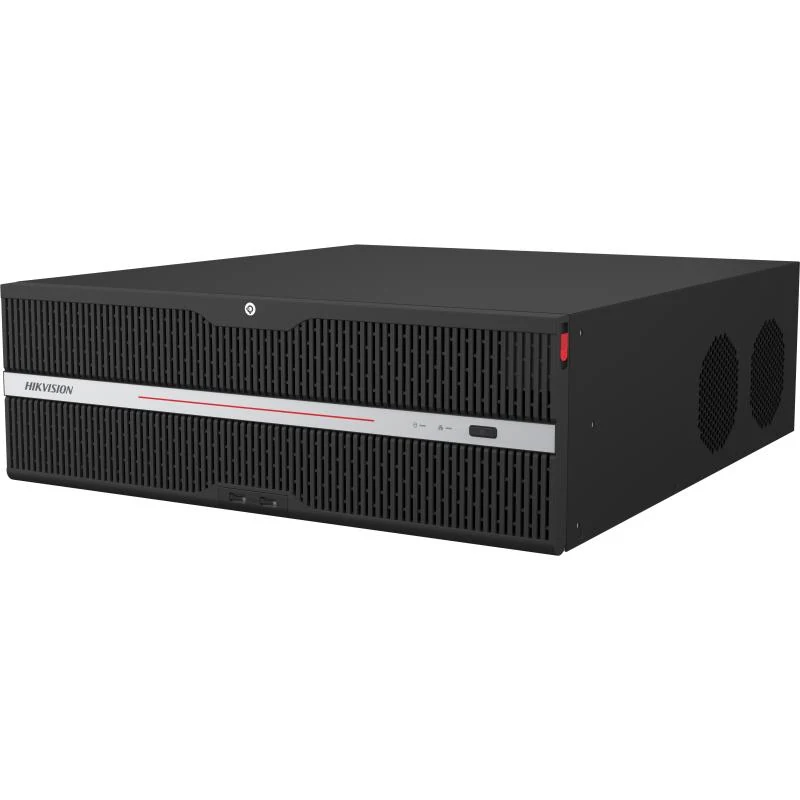
AI Network Video Recorders
Hikvision DeepinMind Pro (P series)
DeepinMind Pro recorders reserve one GPU engine for AcuSeek and add two or three adjustable engines, on 16 to 64 channels with 8 or 16 bays.
Capabilities below are vendor-documented. We have not tested this device or its integrations.
Sources checked:
Also known as: DeepinMind Pro NVR, AcuSeek NVR, iDS-9600NXI-P8, iDS-9600NXI-P16
Suitable projects
- Investigations where an operator has to find a person or a vehicle by describing it rather than by scrubbing footage.
- Sites that need both search and on-recorder detection, since the adjustable engines still run face comparison and perimeter protection.
- Projects that want text or voice search without adding a central server.
Before you buy
- The reserved AcuSeek engine does not count towards the algorithm pool, and AcuSeek will not start unless at least one engine is running in AcuSearch mode.
- The P series datasheets list nine marks without FCC, unlike the M2 and M4 sheets.
- The 32 MP input row carries the 8 channel qualifier on all three models.
- The datasheet does not state how many simultaneous search sessions the reserved engine supports.
Official resources
- iDS-9616NXI-P8 datasheet, February 2026
- iDS-9632NXI-P16 datasheet, February 2026
- iDS-9664NXI-P16 datasheet, February 2026
- Device Network SDK (HCNetSDK) V6.1.11.40, Windows 64-bit
- Device Network SDK (HCNetSDK) V6.1.11.40, Linux 64-bit
- WebSDK V3.3.1, browser-side live view and playback
Related guides
- Channels
- 16, 32 or 64 IP channels, up to 32 MP
- AI hardware
- 1 GPU engine reserved for AcuSeek and OVD, plus 2 adjustable engines on P8 and 9632-P16, 3 on 9664-P16
- Engine modes
- Each adjustable engine runs one of four: face recognition, perimeter protection, video structuralisation or AcuSearch
- AcuSeek reach
- 16 channels at 2 MP on P8 and 9632-P16, 32 channels on 9664-P16, and at least one engine must run AcuSearch
- Perimeter
- 24 channels at 2 MP without the large model and 12 with it on two engines; 36 and 24 on 9664-P16
- Drive bays
- 8 SATA on P8, 16 on P16
- HDD ceiling
- Up to 20 TB per drive
- RAID
- 0, 1, 5, 6 and 10
- Bandwidth
- 256 to 400 Mbps in, up to 400 Mbps out
- Decoding
- 2 channels at 32 MP, 16 at 4 MP or 32 at 2 MP
- Chassis
- 442 mm wide, 88 mm tall on P8 and 146 mm on P16
- Power
- 50 W or less without drives
- Working temperature
- -10 to 55 C
Choosing a DeepinMind Pro recorder
This profile is based on official documentation, not our own device testing.
What the series is
Three models carry a GPU engine reserved for AcuSeek, alongside a separate pool of adjustable GPU engines. On the product page the manufacturer describes AcuSeek as text and voice search over recorded video, built on the Guanlan multimodal model: an operator types or says what they are looking for and the recorder returns matching people, vehicles or events. The reserved engine is what makes that search run without borrowing capacity from detection.
| Model | Channels | Bays | Reserved engine | Adjustable pool | Depth |
|---|---|---|---|---|---|
| iDS-9616NXI-P8 | 16 | 8 | 1 for AcuSeek and OVD | 2 | 540 mm |
| iDS-9632NXI-P16 | 32 | 16 | 1 for AcuSeek and OVD | 2 | 498 mm |
| iDS-9664NXI-P16 | 64 | 16 | 1 for AcuSeek and OVD | 3 | 498 mm |
What the two pools do
The reserved engine does one job. The adjustable engines are ordinary algorithm engines, the same unit the M series calls an engine, and each one runs one of four modes chosen in configuration: face recognition, perimeter protection, video structuralisation or AcuSearch.
A P8 therefore holds two working engines, the same budget as a 32 channel M8, and the 64 channel model holds three. The difference between the families is not that P gives up detection. It is that P adds a reserved search engine on top of the pool, which is what a buyer pays for.
The datasheet gives the per engine figures for the pool: 8 channels of 4 MP face capture or 32 channels of picture comparison, 12 channels of 2 MP perimeter analysis or 32 channels of picture analysis, 8 channels of 2 MP structuralisation, and 16 channels of 2 MP AcuSearch. Those are the same numbers the H series produces per engine, which is why the two families can be compared directly.
AcuSeek needs more than one engine
Search is not a single engine feature, and the datasheet prices it in engines rather than in channels alone. Reaching 16 channels of AcuSeek takes one engine for target capture, one for AcuSearch modelling and one for AcuSeek modelling. Reaching 32 channels on the 64 channel model takes two capture engines plus the two modelling engines, which is the whole pool.
The sheet also states a dependency: to enable AcuSeek, at least one engine must be running in AcuSearch mode. A site that fills the pool with perimeter protection and then expects search to be available will find it is not. Plan search first if search is the reason for buying the model.
Retention and bandwidth
Every model accepts drives up to 20 TB. The P8 holds 160 TB raw across eight bays, the P16 holds 320 TB across sixteen, before RAID. Bandwidth caps at 400 Mbps on the two larger models, which is about 50 cameras at 8 Mbps.
The P8 chassis is 540 mm deep, deeper than the M8 at 458 mm despite having the same eight bays, because of the GPU card and its cooling. Check rack depth before ordering; 540 mm plus cable bend radius does not fit every 600 mm cabinet.
Where the limits are
The 32 MP input row carries the eight channel qualifier on all three models, so high resolution is limited to a handful of channels regardless of the channel count.
Perimeter protection follows the same halving as the M series: 24 channels at 2 MP without the large model, 12 with it on the two engine models, because the large model needs a second engine for its secondary pass. The 64 channel model reaches 36 and 24 respectively on three engines.
The certification row lists nine marks, CE, IC, CB, Rohs, Reach, WEEE, RCM, UKCA and LOA, and it does not include FCC. That is the same list as the M16R and different from the M2 and M4 sheets, which carry thirteen marks including FCC and UL. If FCC is mandatory, this is not the family.
Pick this series when
- The requirement is investigate rather than detect: find a person or a vehicle in recordings by description.
- On-recorder detection is also needed, since the adjustable engines run face, perimeter and structuralisation as well.
- The site has 16 to 64 channels and wants search without a central server.
Do not pick it when
- The pool already has to carry full perimeter and face coverage, in which case the reserved engine adds cost without adding detection capacity.
- FCC is a hard requirement.
- The rack is 600 mm deep and cannot take a 540 mm chassis with cables.
What we could not verify
We did not test search accuracy, response time or language coverage. The datasheet does not state how many simultaneous search sessions the reserved engine supports, and it does not expand the acronym OVD, so we have left it as written rather than guessing. We also could not confirm whether the reserved engine can be reassigned to the algorithm pool.
Getting a DeepinMind Pro recorder running
This is a bring-up sequence drawn from the Hikvision NVR user manual for firmware V5.05.650, the quick start guide and the product communication matrix. We did not run these steps on a device.
Fit the drives and check the depth
Eight bays on the P8, sixteen on the P16, 20 TB per drive. The manual states that a newly installed hard disk must be initialized before use, and the initialization is a format.
The P8 is 540 mm deep, which is deeper than the eight bay M8 at 458 mm because of the GPU card. Measure the rack before it arrives.
Activate the recorder
No operation is allowed before activation. On first access you set an admin password, and the quick start guide gives three routes: the web browser, SADP, or the client software. The same screen offers a reserved email, a Hik-Connect binding, security questions and an export of the GUID for password recovery.
Record the password somewhere outside the device. Password recovery depends on the email or the GUID you set here, and neither can be added later from a locked-out state.
Find it on the network
SADP listens on UDP 37020 and will list the recorder before it has an address you know. The communication matrix gives the rest of the surface:
| Service | Port |
|---|---|
| Web | TCP 80, enabled by default |
| Web over TLS | TCP 443, TLS 1.1 and 1.2, not enabled by default |
| SDK | TCP 8000, or 8443 over TLS |
| RTSP | TCP 554 |
| ONVIF discovery | UDP 3702 |
| SADP | UDP 37020 |
Turn on HTTPS before the recorder leaves the bench. In the matrix the TLS web row is the one marked as not enabled by default, and the plain row is the one that is on.
Turn on the search path
The manual describes the feature in chapter 15 under the name AcuSearch. It extracts face and body pictures from a live scene and lets an operator search them afterwards by supplying a picture. The algorithm can run on the camera, which it calls AI by Camera, or on the recorder, which it calls AI by NVR and which consumes engine resource.
The P series datasheet and product page use a different word for the GPU workload, AcuSeek, and describe text or voice as the input. We keep the spelling each document uses and have not assumed the two names cover identical behaviour.
Order matters here, because the datasheet states a dependency rather than an option: to enable AcuSeek, at least one engine must be running in AcuSearch mode. Configure AcuSearch first, then AcuSeek, or the second feature will not come up.
The same sheet prices AcuSeek in engines. Reaching 16 channels takes one engine for target capture, one for AcuSearch modelling and one for AcuSeek modelling; reaching 32 channels takes two capture engines plus the two modelling engines. The P8 and the 32 channel P16 each hold one reserved engine and two adjustable ones, and the 64 channel model holds three adjustable ones, so a full AcuSeek configuration appears to consume the whole machine. The datasheet does not say whether those engines can be shared with face recognition or perimeter protection at the same time. Ask before promising both on one unit.
Expect storage pressure: the extracted pictures are stored alongside the video, and the datasheet gives library limits rather than a per day picture estimate.
Before you hand it over
Change the admin password, enable HTTPS, set the time source, confirm the array is healthy, and run one search on a known event so the operator sees a real result before the system goes live.
What the manual does not answer
The manual never mentions GB28181 by name. The communication matrix lists a National Standard service on TCP 5061, the port GB/T 28181 platforms normally register on, but no document we read describes the registration procedure. If a platform connection is in scope, ask the vendor for the integration note rather than inferring it from the port list.
For what the Device Network SDK archive contains, which switches have to be enabled, and which interfaces it documents for this family, read Hikvision DeepinMind integration.
FAQ — Hikvision DeepinMind Pro recorders
Is there really only one GPU in these recorders?
No, and the wording is easy to misread. The datasheet lists one GPU engine reserved for AcuSeek and OVD, then a separate pool of adjustable GPU engines, two on iDS-9616NXI-P8 and iDS-9632NXI-P16 and three on iDS-9664NXI-P16. The reserved engine does one job; the pool runs the ordinary algorithms.
What can the adjustable engines run?
One of four modes each: face recognition at 8 channels of 4 MP capture or 32 channels of picture comparison, perimeter protection at 12 channels of 2 MP analysis or 32 channels of picture analysis, video structuralisation at 8 channels of 2 MP, or AcuSearch at 16 channels of 2 MP.
So does the P series do face comparison and perimeter protection?
Yes. A P8 holds two adjustable engines, the same working budget as a 32 channel M8, and the 64 channel model holds three. The family difference is the reserved search engine added on top, not a recorder that gives up detection.
How many engines does AcuSeek need?
Three to reach 16 channels: one for target capture, one for AcuSearch modelling and one for AcuSeek modelling. Four to reach 32 channels, because capture needs two engines at that scale. On the P8 and the 32 channel P16 that is the entire machine, so a full search configuration leaves nothing for the pool.
Will AcuSeek work if the engines are already on perimeter protection?
Not necessarily. The datasheet states a dependency: to enable AcuSeek, at least one engine must be running in AcuSearch mode. Configure AcuSearch first, and leave engine capacity for it, or search will not start rather than start slowly.
Why is the P8 deeper than the M8 with the same bays?
Because of the GPU card and its cooling. Both hold eight bays, and the P8 is 540 mm deep against 458 mm on iDS-9616NXI-M8/X. A 600 mm cabinet with cables may not close, so measure before ordering.
Is FCC on the P series datasheet?
No. The three sheets list nine marks, CE, IC, CB, Rohs, Reach, WEEE, RCM, UKCA and LOA, without FCC. That is the same list as iDS-96128NXI-M16R/X and different from the M2 and M4 sheets, which carry FCC and UL.
What does OVD stand for?
The datasheet uses the acronym without expanding it, and no other document we read defines it. We have left it as written rather than guessing at a meaning. If the answer matters for a specification, ask the vendor to confirm it in writing.