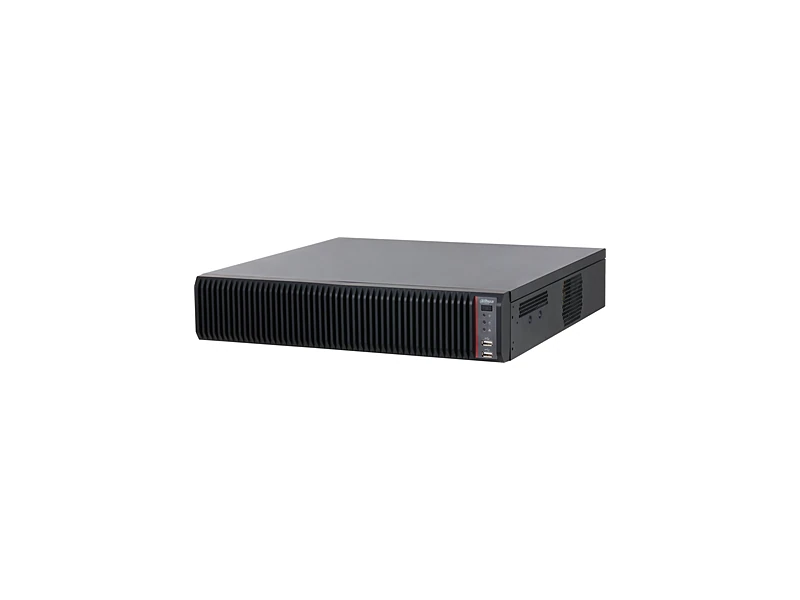
AI Network Video Recorders
Dahua IVSS71 AI surveillance servers
Five WizMind servers from 128 to 256 channels, with one to eight switchable AI cards and 16 channels of analysis per card.
Capabilities below are vendor-documented. We have not tested this device or its integrations.
Sources checked:
Also known as: IVSS71, Intelligent Video Surveillance Server, IVSS7108, IVSS7116, WizMind server
Suitable projects
- A campus or industrial park up to 128 cameras where analytics should run in the recorder rather than on each camera.
- Sites that need face lists, plate lists and metadata search in one box without moving to a server room.
- Projects where the same chassis must serve as a plain NVR today and gain four AI cards later.
- High-bandwidth sites with 4K cameras that need 768 Mbps and redundant servers, which is what the /H build is for.
Before you buy
- AI capacity is 16 channels per card, so the four-card IVSS7108-4I analyses half of its 128 inputs, not all of them.
- The IVSS7108-1I is a lower tier than the rest: 40 channels of face recognition from face-detection cameras against 80 on the two and four card builds.
- The IVSS7108/H-V2 has no AI card at all despite carrying the IVSS71 name, so it cannot run WizSeek or any recorder-side analytics.
- Only the /H model lists the N+M cluster function; the manual adds that cluster mode needs a DCS server and a third device to arbitrate when the cluster has two members.
- Dahua lists this series on the global site but the manuals behind it are V7.1.0 for IVSS generally, and that manual never uses the word WizSeek.
Official resources
- DHI-IVSS7108-4I-V2 datasheet, September 2026
- DHI-IVSS7108-1I-V2 datasheet, September 2026
- DHI-IVSS7116-8I datasheet, September 2026
- Dahua IVSS User Manual V7.1.0
- IVSS71 series product page
Related guides
- Channels
- 128 on the three IVSS7108 builds, 256 on the IVSS7116
- AI cards
- One, two, four or eight switchable cards; 16 channels of face, IVS, metadata or AcuPick analysis per card
- No-AI variant
- The IVSS7108/H-V2 carries no AI card and analyses only what the cameras send
- Bandwidth
- 512 Mbps in, out and to disk on the card models; 768 Mbps on the IVSS7116 and on the /H
- Storage
- 8 bays in 2U, 16 bays in 3U, 20 TB per drive, RAID 0/1/5/6/10/50/60
- Face library
- 100 lists and 500,000 pictures, shared with five passerby lists
- Plate library
- 50 lists and 500,000 numbers
- Search
- WizSeek text and image search with AcuPick, 16 targets per second per card given to modelling
- Power
- 105 W with drives on the 2U models, 250 W on the 3U
- Working temperature
- 0 to 45 C
Choosing an IVSS71 server
Five model numbers share one family name and one job. What separates them is how many AI cards the chassis holds, and the family hides two exceptions that a quotation will not mention.
This profile is based on official documentation, not our own device testing.
The five models
| Model | Channels | AI cards | On-board analysis | Face from AI cameras | Bays | Bandwidth |
|---|---|---|---|---|---|---|
| DHI-IVSS7108-1I-V2 | 128 | 1 | 16 channels | 40 at 2 MP | 8 | 512 Mbps |
| DHI-IVSS7108-2I-V2 | 128 | 2 | 32 channels | 80 at 2 MP, 60 at 4 MP | 8 | 512 Mbps |
| DHI-IVSS7108-4I-V2 | 128 | 4 | 64 channels | 80 at 2 MP, 60 at 4 MP | 8 | 512 Mbps |
| DHI-IVSS7108/H-V2 | 128 | none | none | 80 at 2 MP, 60 at 4 MP | 8 | 768 Mbps |
| DHI-IVSS7116-8I | 256 | 8 | 128 channels | 160 at 2 MP, 80 at 4 MP | 16 | 768 Mbps |
The card count is in the model name: the number before the I is the number of cards. That rule holds across the whole Dahua intelligent range, and it is the single most useful thing to know when reading a quotation.
One card is sixteen channels
Dahua states the per-card figure directly rather than hiding it behind an engine abstraction: 16 channels of face recognition, IVS, video metadata or AcuPick per card, at 2 MP or 4 MP. Four cards therefore cover 64 of the 128 inputs, not all of them.
That arithmetic is worth doing before the site survey, because the headline channel count and the analysable channel count are different numbers on every model except the eight-card unit, where 8 by 16 equals the 128 analysed channels but still leaves another 128 inputs unanalysed.
| Model | Inputs | Analysed | Share |
|---|---|---|---|
| 7108-1I | 128 | 16 | 12 percent |
| 7108-2I | 128 | 32 | 25 percent |
| 7108-4I | 128 | 64 | 50 percent |
| 7116-8I | 256 | 128 | 50 percent |
The rest of the inputs are recorded normally. If every camera needs analytics, the answer is more cards, a bigger chassis, or analytics on the cameras themselves.
The /H model has no AI at all
DHI-IVSS7108/H-V2 is listed inside the IVSS71 series and carries the same 128-channel, 8-bay chassis. It has no AI card, no recorder-side analysis, and no face library. The specification table drops the entire AI Applications block.
What it does have is 768 Mbps of throughput instead of 512, and an N+M cluster entry that the card models do not list. The IVSS manual explains that cluster mode needs a DCS server and, when the cluster has only two members, a third device to arbitrate which one is master. The manual also states that only some models support the function, which matches the spec sheet listing it on the /H alone.
So the /H is a high-bandwidth redundant recorder for sites that do analytics elsewhere, not a cheaper DeepinMind equivalent. A buyer who reads only the series name will assume the opposite.
The single-card model is a lower tier, not just a smaller one
Face recognition from face-detection cameras is 40 channels on the 1I and 80 on the 2I and 4I. That is not a linear card scaling, which would give 40 and 80 at one and two cards, but the 4I stops at 80 as well. The ceiling on that path is set elsewhere.
WizSeek behaves the same way: 40 channels of natural-language search on the 1I against 80 on the other two card models. If text search over a large camera estate is the reason for the purchase, the 1I is the wrong starting point regardless of how many cards are added later.
Cards are not free once installed
The datasheet says the AI card mode is switchable, and the manual shows what that means. Under Algorithm, Algorithm Management, AI Module there is a switch for area A0, the device's own CPU, between General and AI.
In AI mode the CPU runs intelligent analysis, compression and text search, decoding and display capability drop, and video quality diagnosis stops. In General mode the CPU is freed and diagnosis and heterogeneous output come back. The manual marks the switch as available on select models only.
That is a real trade in a control room: a wall that needs many decoded windows and a server that needs every channel analysed cannot both have the whole machine. Decide which one the site is for.
Where they physically belong
The 2U models draw 105 W with drives and the 3U draws 250 W, both rated 0 to 45 C. That is a comms room rather than a plant room. The IVSS51 series is the one rated to 55 C, and the IVD series goes to 55 C from -10.
Storage is 20 TB per drive across the family, with RAID 0/1/5/6/10/50/60 and a hot standby disk option in the manual. The 3U unit adds hot swap and enterprise-grade drive support, which the 2U pages do not claim.
Pick this series when
- The site has 64 to 256 cameras and analytics should be centralised in the recorder.
- Face lists, plate lists and metadata search are needed without a separate analytics server.
- Card count can be specified from the analysed channel count, which is a straightforward multiplication here.
- Redundancy is required for a plain recorder rather than an analytics box, which is the /H case.
Do not pick it when
- Every camera needs analytics: at 16 channels per card, a 256-channel site would need 16 cards and this chassis stops at eight.
- The room runs above 45 C.
- The requirement is traffic event detection, which is the TB9000 line rather than this one.
What we could not verify
The IVSS User Manual V7.1.0 never uses the word WizSeek, although the datasheets and the product pages do. The manual documents the underlying capability as text search and text-defined alarms, so the naming has not reached the document an installer will read.
The manual does not explain which card modes exist beyond the CPU AI and General switch, nor whether an analysis card can be reassigned between analysis and compression after installation. The specification table lists both loads per card, so the split is real, but the procedure is not in the document we read.
No price is published for any model in the family.
Getting an IVSS71 server running
This sequence comes from the Dahua IVSS User Manual V7.1.0 and the model datasheets. We did not run these steps on a device.
Before you power it on
Fit the drives first, in the bay count the model actually has: 8 on the three 7108 builds and 16 on the 7116. Drives are SATA up to 20 TB, and the 16-bay model adds hot swap and enterprise-grade drive support.
The 8-HDD series starts with the power button on the rear panel. Other models start as soon as power is connected, and after a shutdown from the interface a short press on the front button brings the unit back.
Find the right network port
The server has four RJ-45 ports, and they do not share an address. Port 1 to port 4 default to 192.168.1.108 through 192.168.4.108. Put the laptop on the same subnet as the port you are plugged into, then open the address in a browser.
This is the first thing that goes wrong on site: a laptop set to 192.168.1.x will never see a server plugged into port 2.
Initialize, do not log in
There is no default account to log in with. The first visit asks for the language and region, the licence agreement, and a new admin password. The policy is 8 to 32 non-blank characters containing at least two of uppercase, lowercase, numbers and special characters.
Set the time zone and time on the same screen. Facial and plate search results are time-ordered, so a wrong clock makes every investigation start in the wrong place.
Turn on the interfaces you need, and only those
Under System, Security, System Service, Basic Services there is a table of protocols. CGI is the switch a third-party platform needs, ONVIF is the switch another device needs, and Private Protocol is the switch for Dahua clients and SDK work. The manual recommends disabling each one that is not in use, and SSH is off by default.
The defaults for CGI and ONVIF are not stated in the table, so check them rather than assuming either state. Then confirm the ports you plan to document:
| Service | Default port | Where it is set |
|---|---|---|
| HTTP | 80 | Network, Port |
| RTSP | 554 | Network, Port |
| Private protocol and SDK | 37777 | Network, Port |
| ONVIF | used through the ONVIF switch | Network Application, Access Service, ONVIF |
| GB28181 | SIP server port 5060 | Network Application, Access Service, GB28181 Server |
Give the cards a job
This is the step that separates an IVSS from a plain recorder. Under Algorithm, Algorithm Management, AI Module, select Use with This Device and choose Intelligent Analysis Engine from the list. The manual notes that the engine types offered depend on the model.
Then decide the CPU mode in area A0. Switching to AI gives the CPU to analysis, compression and text search, and takes away video quality diagnosis and part of the decoding capability. General mode does the reverse. The manual marks this switch as available on select models and says a restart is needed for the change to take effect.
Do this before the cameras are configured, because the per-channel analytics menu depends on an engine being assigned.
Storage and redundancy
Create the RAID group during the initial setup wizard or later under Storage, Storage Resource, RAID. The family supports RAID 0, 1, 5, 6, 10, 50 and 60.
A hot standby disk can be created as global or private. Global covers every RAID group on the storage device, and the interface only offers disks of at least 3 TB for the role.
Cluster mode is a separate function under System, Cluster Service. The manual is explicit that it works within one network segment, needs a DCS server, and that a two-member cluster needs a third device to arbitrate. It also states that only some models support clustering, which matches the specification sheet listing N+M only on the 7108/H.
Security before handover
The device ships with a security scan under System, Security, Security Status that reports green or yellow per item and links each finding to the page that fixes it. Two settings worth changing on day one are the authentication digest algorithm under Security Authentication and the login mode, where the manual recommends security over compatibility.
Account lockout, attack defence and the password expiry interval are all on the same page group.
What the manual does not answer
The manual never uses the term WizSeek. It documents text search and text-defined alarms, which is the same capability under the name the datasheets use, but an operator reading only the manual will not find the marketing term.
It also does not say whether an analysis card can be moved between analysis and compression after commissioning, or how many cards a given algorithm mix consumes beyond the 16 channels per card figure in the specification.
For how the search and alarm features fit together, read WizSeek, AcuPick and text-defined alarms. For the protocol surface in more depth, read Connecting to a Dahua server.
FAQ — Dahua IVSS71 servers
How many cameras can one server analyse?
Sixteen per AI card, at 2 MP or 4 MP. A four-card IVSS7108-4I analyses 64 of its 128 inputs, and the eight-card IVSS7116-8I analyses 128 of its 256. Everything else is still recorded.
Does the IVSS7108/H-V2 have AI?
No. It has no AI card, no face library and no recorder-side analytics. Its advantages are 768 Mbps of throughput instead of 512 and the N+M cluster entry, and it exists for sites that run analytics somewhere else.
What does the I in the model number mean?
The number of AI cards. 1I is one card, 2I is two, 4I is four, 8I is eight. The IVSS7124DR-16I carries sixteen.
Can two models with the same channel count differ in analytics?
Yes, and the 1I is the example. It offers 40 channels of face recognition from face-detection cameras where the 2I and 4I offer 80, and 40 channels of WizSeek where they offer 80. The gap is not proportional to the card count.
Is WizSeek a paid licence?
Nothing in the datasheets or the manual describes a separate licence for WizSeek or for the AI cards. The capability is tied to the hardware, which is why the card count is the thing to specify.
Does the server work without Dahua cameras?
Yes. The pages list ONVIF, RTSP and named third-party brands including Axis, Sony, Panasonic and Pelco, and ONVIF profiles S, G, T and M. Recorder-side analysis on a third-party stream depends on the stream being decodable at the resolution the algorithm expects.
What happens to decoding when the CPU runs AI?
It drops. The manual states that AI mode reduces decoding and display capability and disables video quality diagnosis, while General mode restores both. The switch is available on select models only.
Can it be clustered?
Only the /H model lists N+M cluster on its specification. The manual adds two constraints: the cluster must sit in one network segment, and a two-member cluster needs a third device to arbitrate the master.
What are the default addresses?
Port 1 to port 4 answer on 192.168.1.108 through 192.168.4.108. There is no default password, because the first visit forces an admin password to be set under the 8 to 32 character policy.
How much does it cost?
Dahua publishes no price for this series. Ask a distributor with the exact model and card count, because the card count is what changes the price and the capability together.