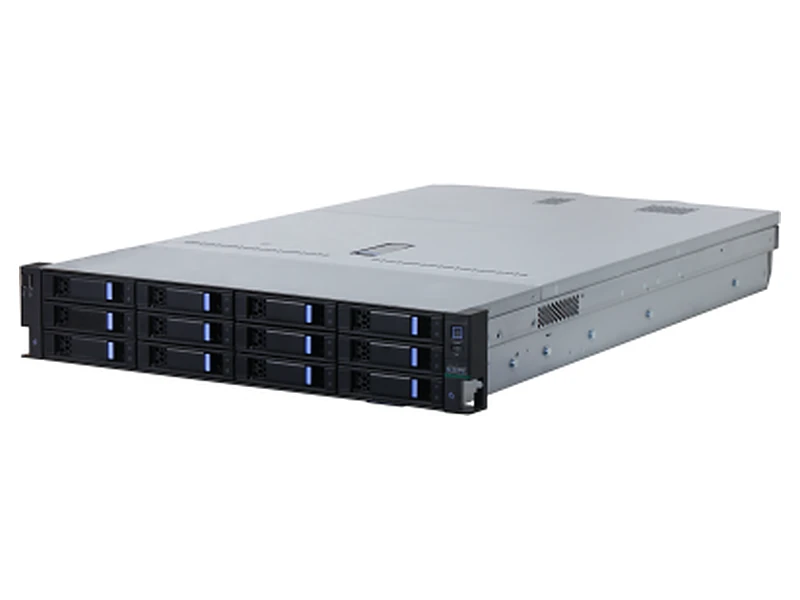
AI Network Video Recorders
Dahua IVS-TB9000 traffic analysis servers
Four x86 servers with three to six analysis cards that read traffic events from 256 camera streams for highways and tunnels.
Capabilities below are vendor-documented. We have not tested this device or its integrations.
Sources checked:
Also known as: IVS-TB9000, Intelligent Analysis Server, traffic event detection server, TB9000
Suitable projects
- Expressway, tunnel and bridge operators who need incident detection on existing camera streams.
- Traffic management centres that want congestion, queue length and flow statistics from the same box.
- Projects where the event list is traffic-specific, so a general-purpose analytics server would be over-specified.
Before you buy
- This is not an NVR for general video: the manual describes an analysis and management server, and the event list is traffic only.
- The 256-channel input ceiling does not scale with cards, so a six-card unit can analyse 192 channels at 2 MP and still only ingest 256.
- It draws 1080 W at six cards and is rated 10 to 35 C, so it belongs in a data room, not a roadside cabinet.
- The product page lists no CGI, ONVIF profile or SDK interoperability line at all, unlike the IVSS and IVD pages.
- It ships with a default admin password of admin123 per the manual, which has to be changed before the box is reachable.
Official resources
- DHI-IVS-TB9000-6K-TS2 datasheet, February 2026
- DHI-IVS-TB9000-3K-TS2 datasheet, February 2026
- Dahua Intelligent Video Analysis Server for Traffic Event Detection (TB9000-K) User Manual V1.0.0
- Event Detection Server product page
Related guides
- Channels
- 256 camera inputs on every model
- Analysis cards
- Three, four, five or six, which is what the 3K to 6K in the model number counts
- Per card
- 32 channels at 2 MP or 4 MP, or 16 channels at 8 MP, with 20 rules per channel
- Bandwidth
- 1024 Mbps in, 512 Mbps to disk, 1024 Mbps out
- Event list
- 22 traffic events from parking and congestion to wrong-way driving, debris and smoke
- Compute
- Two 12-core x86 processors, 8 by 16 GB memory, 12 drive slots
- Power
- 828 W at three cards, 1080 W at six
- Working temperature
- 10 to 35 C
Choosing an IVS-TB9000 server
This is not a general-purpose analytics box. The TB9000 reads traffic events from camera streams for road operators, and the model number counts analysis cards rather than channels.
This profile is based on official documentation, not our own device testing.
The four models
| Model | Access channels | Analysis cards | Channels at 2 MP | Channels at 8 MP | Power |
|---|---|---|---|---|---|
| DHI-IVS-TB9000-3K-TS2 | 256 | 3 | 96 | 48 | 828 W |
| DHI-IVS-TB9000-4K-TS2 | 256 | 4 | 128 | 64 | 912 W |
| DHI-IVS-TB9000-5K-TS2 | 256 | 5 | 160 | 80 | 996 W |
| DHI-IVS-TB9000-6K-TS2 | 256 | 6 | 192 | 96 | 1080 W |
The K is the card count. Each card analyses 32 channels at 2 MP or 4 MP, or 16 at 8 MP, with 20 rules per channel. The manual states the same figure in its networking description: one analysis card supports up to 32 channels of 1080P video at the same time.
The input ceiling does not scale
Every model accepts 256 camera streams, and the six-card unit analyses 192 of them at 2 MP. The remaining 64 inputs can be recorded but not analysed, and no model in the range closes the gap.
That is an unusual shape for a product family: buying more cards adds analysis capacity without adding ingest, so the largest model exists for dense analytics rather than for larger sites.
The event list is the product
Twenty-two traffic events are listed, from parking, congestion and flow statistics to wrong-way driving, illegal backing, construction, roadblock, dense fog, debris, smoke and heat. The datasheet gives detection and effective rates for most of them and marks the rest as subject to actual test:
| Event | Detection rate | Effective rate |
|---|---|---|
| Parking, pedestrian, non-motor vehicle, congestion | 90 percent | 90 percent |
| Road debris | 80 percent | 80 percent |
| Construction | 90 percent | 80 percent |
| Traffic accident, heat, smoke, speeding, underspeed | subject to actual test | subject to actual test |
The distinction matters at tender stage. A specification that requires proven detection rates for smoke or accident detection is asking for something the datasheet does not claim.
Hardware is x86, not embedded
Two 12-core processors with 24 threads at 2.1 GHz, 8 by 16 GB DDR4 with 32 slots available, a built-in SSD system disk and 12 drive slots with two 6 TB drives fitted. Four gigabit ports plus a BMC management port.
The BMC is the detail that separates this from a recorder: out-of-band management is a server feature, and it is the one to use when the unit sits in a roadside cabinet three hours away.
Power is dual-supply at 828 to 1080 W depending on card count, and the operating range is 10 to 35 C with humidity capped at 80 percent. That is a data room, not a pole.
Pick this series when
- The requirement is traffic incident detection on existing camera streams.
- Flow statistics, queue length and occupancy have to come from the same box as the alarms.
- A traffic management centre will run it, with a data room and out-of-band access.
- The camera count is at or below 256 and the analysis requirement is 96 to 192 channels.
Do not pick it when
- The requirement is face recognition, perimeter protection or retail analytics, which are the IVSS and IVD families.
- The unit has to survive a roadside cabinet, where 10 to 35 C and 1080 W do not fit.
- More than 256 cameras are in scope, which needs a second unit rather than more cards.
What we could not verify
The product page lists no interoperability line, so there is no CGI, ONVIF profile or SDK statement for this family the way there is for the IVSS and IVD pages. The manual documents ONVIF and CGI switches in the same menu structure, but the datasheet stays silent.
The datasheet gives no channel figure for recording, only for access and analysis, so the recording load of 512 Mbps is the number to design storage around.
The manual states a default admin password of admin123, which is the only default credential we found anywhere in this range.
No price is published.
Getting an IVS-TB9000 server running
The TB9000 has its own manual, Dahua Intelligent Video Analysis Server for Traffic Event Detection (TB9000-K) V1.0.0. It is a server, so bring-up is closer to a small data-centre install than to a recorder.
We did not run these steps on a device.
Before it is racked
The unit is 87.8 mm high, 446 mm wide and 794 mm deep, 21.8 to 22.7 kg depending on card count, and it needs a standard 19 inch rack with guide rails. Rated 10 to 35 C and 20 to 80 percent humidity, it belongs in a cooled room.
Power is dual redundant at 828 to 1080 W. Connect both feeds.
The default credential has to go first
The manual states that the default IP address is 192.168.1.108 and the default username and password are admin and admin123. It asks for the password to be changed on the first successful login.
Treat that as the first task, before the box is connected to anything that can reach it. This is the only default credential in the Dahua intelligent range; the IVSS and IVD devices force a new password during initialization instead.
Network
Four gigabit ports default to 192.168.1.108 through 192.168.4.108, plus a separate BMC management port with out-of-band access to the server itself. Set the application ports on the subnet the cameras will use and keep the BMC on the management network.
Storage
Twelve drive slots, with two 6 TB drives and a built-in SSD system disk delivered. RAID 5 and RAID 6 both appear in the manual's storage section.
Recording bandwidth is 512 Mbps while ingest and egress are 1024 Mbps, so the storage pool is designed for the recording figure, not the larger one.
Cameras and cards
Add the camera streams first, then allocate them to analysis cards. The manual repeats the datasheet figure: one analysis card supports up to 32 channels of 1080P video at the same time, and 20 rules can be configured per channel.
With 256 inputs and six cards, only 192 channels can be analysed. Decide which 64 are recorded without analysis before the configuration is built, because changing the split later means rebuilding rules on the moved channels.
Rules
Each traffic event is a rule with its own detection and exclusion zones, and the manual documents the parameter ranges per event, for example an alarm trigger time of 1 to 600 seconds for parking detection with a default of 10, or 1 to 300 seconds for congestion with a default of 10.
Those defaults are worth reading before a site is tuned. A ten second trigger on congestion will produce alarms that a control room ignores, and the sensitivity range of 1 to 10 with a default of 2 is equally easy to leave untouched.
Before handover
Change the password, put the BMC on the management network, confirm both power feeds, and check that the analysis channel list matches the project. Run a live test on at least one rule per event type in use, because the datasheet marks several events as subject to actual test.
What the manual does not answer
The manual does not give detection accuracy figures, and the datasheet marks accident, heat, smoke, speeding, underspeed, truck-in-prohibited-area, hazardous material and emergency-lane events as subject to actual test. A tender that requires proven rates for those events is asking for a test result, not a document.
There is no interoperability statement for this family on the product page, so nothing official describes which external platforms it talks to beyond the CGI and ONVIF switches in the menu.
For the wider picture of how the Dahua families divide up, read Dahua AI super-brain servers.
FAQ — Dahua IVS-TB9000 servers
What is this device for?
Traffic event detection on camera streams: parking, congestion, pedestrians, wrong-way driving, debris, smoke and a list of 22 events in total. Dahua positions it for expressways, urban expressways, viaducts, tunnels and cross-sea bridges.
What does the K in 3K to 6K mean?
The number of analysis cards. Three to six, which sets analysis capacity at 32 channels per card.
How many cameras can it handle?
256 inputs on every model. Analysis is 96, 128, 160 or 192 channels at 2 MP depending on card count, or half that at 8 MP.
Is it a recorder?
Not in the usual sense. It records the analysis streams it needs and stores alarms, but the manual describes an analysis and management server. Retention of the camera estate is a separate decision.
Why is the temperature range so narrow?
10 to 35 C and 20 to 80 percent humidity, because it is an x86 server with two 12-core processors and up to six analysis cards drawing 1080 W. It belongs in a data room.
Is there a default password?
Yes. The manual states admin and admin123 as the factory login and asks for it to be changed at first login. Nothing else in the Dahua intelligent range ships a default credential.
Does it support face recognition?
No. The event list is traffic only. Face, plate comparison and metadata work belong to the IVSS and IVD families.
Can it be managed out of band?
Yes, there is a BMC management port on top of the four gigabit application ports.
Are the detection rates guaranteed?
Not all of them. Most events show 90 percent detection and 90 percent effective rates from 2 MP test data, road debris shows 80, construction shows 90 detection and 80 effective, and accident, heat, smoke, speeding, underspeed and several others are marked subject to actual test.
Is there a price?
Dahua publishes none.