AI Network Video Recorders
Dahua IVS-GS8000 comprehensive analysis servers
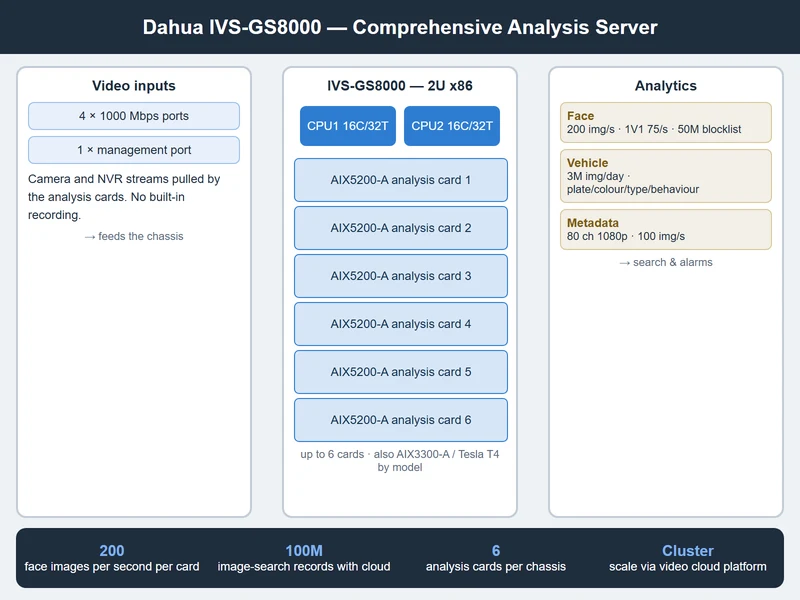
X86 2U analysis server with up to six AI cards for face, vehicle and metadata search across hundreds of camera streams, scaling by clustering.
Capabilities below are vendor-documented. We have not tested this device or its integrations.
Sources checked:
Also known as: GS8000, IVS-GS8000, Comprehensive Analysis Intelligent Server, Dahua Comprehensive Analysis Server
Suitable projects
- City or campus deployments that need face, vehicle and structured search across hundreds of streams in one box.
- Sites that already run Dahua cameras and want backend analysis without licensing the search features per camera.
- Projects that start with one or two cards and add more, or join a cluster, as the camera count grows.
Before you buy
- The published specification does not state a camera channel ceiling the way the IVSS and IVD pages do, so the analysed load is the card count times the per-card figures, not a single channel number.
- It is a 10 to 35 C data-room device, not a wide-temperature recorder, and it draws up to 1080 W, so it is not for roadside or plant-room cabinets.
- The product page lists no CGI, ONVIF profile or SDK interoperability line at all, unlike the IVSS and IVD pages, so integration is SDK and ONVIF by family convention rather than by an explicit claim.
- Card type is fixed by model: the TS2-HW line uses AIX5200-A, the discontinued 6E line uses AIX3300-A, and the GU2-HW uses Tesla T4, so a mixed cluster must use the same card family.
- No price is published for any configuration.
Official resources
- Dahua Comprehensive Analysis Intelligent Server product page
- IVS-GS8000-6E-TS2-HW product page, discontinued line
Related guides
- Form factor
- 2U rack server, x86, 794 x 446 x 87.8 mm, 22.25 kg net
- Processors
- Two 16-core, 32-thread x86 CPUs at 2.4 GHz
- Memory
- 4 x 32 GB DDR4 modules, up to 32 slots
- Storage
- 2 x 2.5 inch 480 GB SSD and 4 x 3.5 inch 6 TB HDD, up to 8 slots
- Analysis cards
- Up to six AIX5200-A cards (TS2-HW); AIX3300-A and AIC5000 on the 6E line; four NVIDIA Tesla T4 on GU2-HW
- Face per card
- 200 face images per second, 1V1 at 75 comparisons per second
- Face database
- Blocklist up to 50 million; image search up to 100 million with the video cloud platform
- Vehicle per card
- 3 million images per day at 2 to 9 MP, with plate, colour, type and behaviour detection
- Metadata per card
- 80 channels of 1080p target analysis, 100 images per second
- Network
- 4 x 1000 Mbps ports plus a dedicated management port
- Cluster
- Scales by clustering with the Dahua video cloud platform
- Power
- 100 to 240 VAC, dual redundant supply, up to 1080 W with six cards
- Temperature
- 10 to 35 C, 20 to 80 percent humidity
Choosing an IVS-GS8000 analysis server
The GS8000 is the comprehensive-analysis member of Dahua's IVS family. Where the TB9000 is built for traffic events on roads, the GS8000 is the general-purpose back-end that reads faces, vehicles and metadata from ordinary surveillance streams and makes them searchable.
This profile is based on official documentation, not our own device testing.
The card is the unit of capacity
There is no single channel ceiling on the GS8000 the way the IVSS and IVD recorders publish one. Capacity is the number of analysis cards times the per-card figures, and the card type is fixed by the model.
| Model line | Analysis card | Cards | What one card does |
|---|---|---|---|
| GS8000-TS2-HW (E, 2E, 4E, 6E) | AIX5200-A | 1 to 6 | 200 face images per second, 1V1 at 75 per second, 80 channels of 1080p metadata, 3 million vehicle images per day |
| GS8000-6E-TS2-HW | AIX3300-A | 6 (discontinued) | Same per-card class as the AIX5200-A |
| GS8000-GU2-HW | NVIDIA Tesla T4 | 4 | GPU-class analysis with the same face, vehicle and metadata features |
The base TS2-HW chassis takes up to six AIX5200-A cards. The E, 2E, 4E and 6E suffixes are the card count, so a 6E-TS2-HW is a six-card chassis and an E-TS2-HW is a single-card chassis in the same 2U box.
Work out the load from the cards, not a channel number
Because there is no headline channel count, size the box from the per-card numbers.
| Configuration | Face capture | 1V1 compare | Metadata streams | Vehicle images per day |
|---|---|---|---|---|
| 1 card | 200 images per second | 75 per second | 80 channels 1080p | 3 million |
| 6 cards | 1200 images per second | 450 per second | 480 channels 1080p | 18 million |
The blocklist can hold up to 50 million faces on a single card and image search reaches 100 million records in seconds when the server works with the video cloud platform. Those database figures are per server, not per card, when clustering is in play.
Where it wins
The GS8000 is the right choice when the requirement is search and correlation across a large population rather than recording. Face re-identification, vehicle plate and attribute search, and metadata filtering all run in the box, and the results feed alarms and the video cloud platform.
It is also the most scalable of the three families. A single chassis grows from one card to six, and beyond that it joins a cluster, so the analysed population is not capped by one server.
Pick this series when
- The project needs face, vehicle and structured search across hundreds of streams in one back-end.
- The site already runs Dahua cameras and wants the search features without per-camera analytics licensing.
- Growth is expected, so starting small and adding cards or a cluster matters more than a fixed channel ceiling.
Do not pick it when
- The need is traffic incident detection on a road network, which is the TB9000's job.
- The box has to sit in a comms cupboard or roadside cabinet, because it is rated 10 to 35 C and draws up to 1080 W.
- A recorder with storage is wanted, because the GS8000 analyses and searches but is not an NVR; pair it with an IVSS or an NVR for recording.
- An explicit CGI or ONVIF interoperability claim is required, because the page does not publish one; treat integration as SDK and ONVIF by family convention.
What we could not verify
The product page does not state a default IP scheme or a channel ceiling, so the capacity maths above is built from the per-card figures and the cluster description rather than a single quoted number. No price is published for any card configuration.
Getting an IVS-GS8000 server running
The GS8000 is a 2U x86 analysis server rather than a recorder, so first boot brings you to a Linux system with analysis cards, not a storage wizard. The steps below follow the published Dahua documentation for the Comprehensive Analysis Intelligent Server; we did not run them on a device.
Before power
The chassis is 2U, 794 by 446 by 87.8 mm, about 22 kg. Fit the drives before racking: the base build uses two 2.5 inch 480 GB SSDs for the system and four 3.5 inch 6 TB HDDs for the search database, with room for up to eight drive slots. The analysis cards are pre-installed by model, so the card count is fixed at purchase and is not something you add at install the way an IVSS AI card might be field-fitted.
Network and first login
The server has four 1000 Mbps data ports and a separate management port. Set the laptop to the same subnet as the port you connect to, then open the management interface to run first-time initialization: region, time, and an admin password. The documentation does not publish a default IP scheme for this model the way the IVSS manual does, so confirm the address with the deployment engineer or the out-of-band management port rather than assuming one.
Enable what the project needs
Under the system security settings, turn on the services the platform requires. The family uses SDK and ONVIF for third-party connection; the published page does not list a CGI line, so plan integration around the SDK and ONVIF paths. SSH and unused services should be left off until a specific need appears.
Port defaults on Dahua analysis hardware are typically HTTP 80, RTSP 554 and the private protocol and SDK port 37777, set under the network port menu. Confirm these on the GS8000's own interface, because the comprehensive-analysis server documentation does not restate them.
Point the cards at the streams
The analysis cards pull streams from the cameras or from an upstream NVR. Assign each card a set of channels to analyse, then choose which analytics run: face detection and comparison, vehicle recognition, or metadata extraction. With one card you get 80 channels of 1080p metadata or 200 face images per second; with six cards the figures scale sixfold, up to 480 metadata channels.
Build the search and alarm rules
Load the face databases, blocklist and allowlist, and set the arming threshold above 80 percent as the documentation recommends. Configure vehicle rules, such as plate, colour, type and behaviour detection, and map the results to alarms. The same cards that analyse also serve the image-search feature, so a camera counted for capture is also counted for search.
Scale with the cluster
When one chassis is not enough, join the server to a Dahua video cloud platform cluster. Clustering is documented as a video-cloud feature rather than a standalone mode, so the cluster is built in the platform, not on the box itself. Keep every member on the same card family, because the TS2-HW AIX5200-A line, the discontinued 6E AIX3300-A line and the GU2-HW Tesla T4 line are not mixed in one cluster.
Before handover
Change the default admin password, set the digest algorithm, and confirm the login mode is on security rather than compatibility. Check that the analysed and searched channels are the ones the project specified, not the first channels in the list, and that the database thresholds match the alarm plan.
What the documentation does not answer
The published material does not give a default IP scheme, a channel ceiling, or a CGI interoperability claim for this model. Treat capacity as the per-card figures times the card count, and treat integration as SDK and ONVIF by family convention until a distributor confirms otherwise.
For the search and alarm feature set across the Dahua range, read WizSeek, AcuPick and text-defined alarms.
FAQ — Dahua IVS-GS8000 servers
How is this different from the TB9000?
The TB9000 is built for traffic events on roads, with a fixed list of 22 traffic events. The GS8000 is the general-purpose analysis server for faces, vehicles and metadata from ordinary surveillance streams, and it makes them searchable. Both are IVS-family 2U x86 servers, but the GS8000's value is search and correlation, not incident detection.
How many streams can one card analyse?
One AIX5200-A card handles 80 channels of 1080p metadata, 200 face images per second, or 3 million vehicle images per day at 2 to 9 MP. Six cards scale those figures about sixfold. There is no single channel ceiling published for the server; the load is the card count times these per-card numbers.
What is the face database limit?
A single card arms a blocklist of up to 50 million faces. Image search reaches 100 million records in seconds when the server works with the video cloud platform, split as 30 million for the registration database and 70 million for the snapshot database.
Does it support clustering?
Yes, through the Dahua video cloud platform. Clustering is a platform feature, so the cluster is configured in the platform rather than on the box, and every member should use the same card family.
What protocols does it use?
SDK and ONVIF, by the IVS-family convention. The published page does not list a CGI or ONVIF-profile interoperability claim for this model, so treat integration as SDK and ONVIF rather than as a stated guarantee.
What are the card options?
The TS2-HW line uses AIX5200-A cards, in one to six per chassis. The discontinued 6E line used AIX3300-A. The GU2-HW uses four NVIDIA Tesla T4 GPUs. The card type is fixed by the model, so choose it at purchase.
Is the GS8000 an NVR?
No. It analyses and searches video but does not record it. Pair it with an IVSS or an NVR for storage and playback.
What are the power and temperature limits?
It is rated 10 to 35 C at 20 to 80 percent humidity, with a dual redundant supply and up to 1080 W draw with six cards. It belongs in a data room, not a roadside or plant-room cabinet.
Is there a price?
Dahua publishes none for any card configuration.