Autopilot Firmware
ArduCopter
Open-source multicopter and helicopter autopilot firmware with stabilised, loiter, return-to-launch and fully autonomous mission flight modes.
Capabilities below are vendor-documented. We have not tested this device or its integrations.
Sources checked:
Also known as: ArduCopter, APM Copter, ArduPilot multicopter firmware
Suitable projects
- Aerial photography and survey with stabilised hover and waypoint missions.
- Precision agriculture and mapping using autonomous grid flights.
- Research and education platforms built on affordable flight controllers.
Before you buy
- Firmware only; a compatible flight controller and peripherals must be supplied separately.
- Safe operation depends on correct calibration, tuning and local flight regulations.
Official resources
Related guides
- Vehicle types
- Multicopter, helicopter, single-copter, dual-copter, tandem
- Flight modes
- Stabilize, AltHold, Loiter, RTL, Auto, Guided, Circle, Acro, PosHold
- Position sources
- GPS, GLONASS, Galileo, BeiDou, optical flow, visual odometry
- Configured via
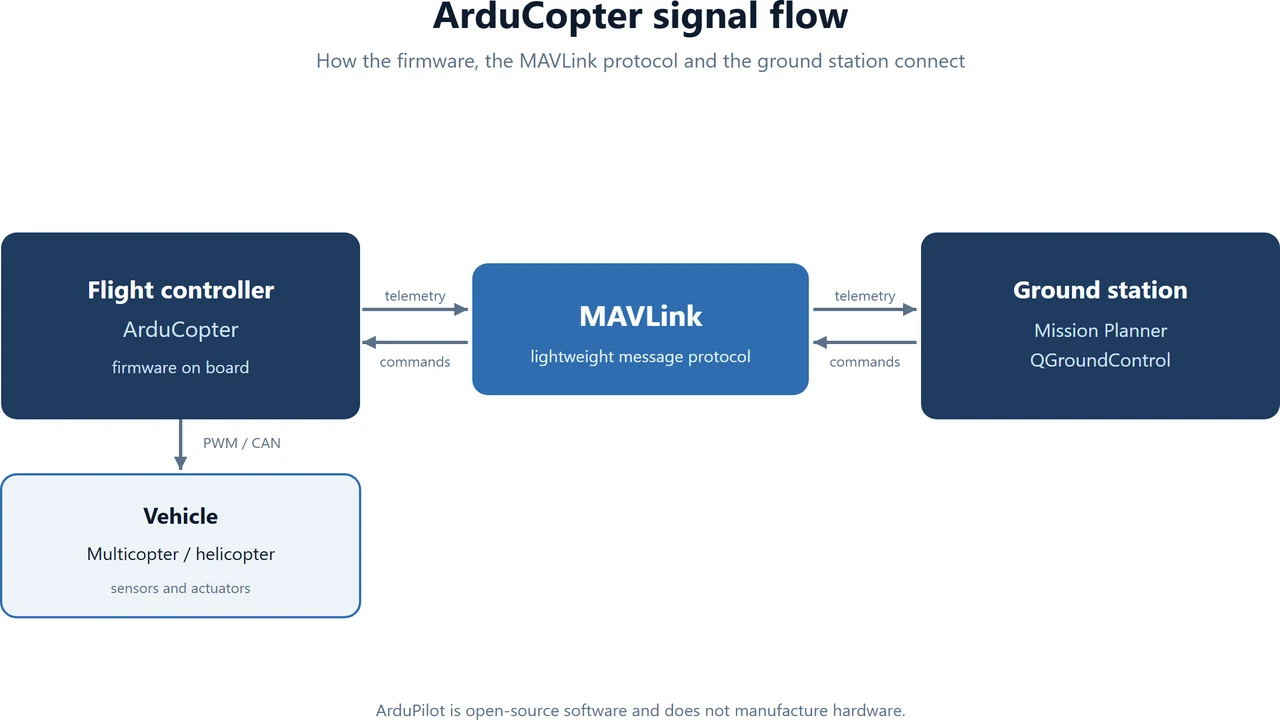
- Mission Planner, QGroundControl, MAVProxy
- Failsafes
- Radio loss, battery low, GPS loss, GCS loss, fence breach
- Licence
- GPL-3.0
Choosing ArduCopter
This profile is based on official documentation, not our own device testing.
ArduCopter is the multicopter and helicopter firmware in the ArduPilot family. Use it when your vehicle lifts off with rotors rather than wings. If you have a fixed-wing aircraft, a ground rover, a submarine or an antenna tracker, choose the matching firmware instead.
Choose your frame type
ArduCopter supports several rotor layouts. Match your airframe before you build so the firmware loads the correct mixing and stabilization.
| Frame | Best for |
|---|---|
| Quadcopter | Aerial photography, general hobby and survey |
| Hexacopter and octacopter | Heavier payloads and one-motor redundancy |
| Traditional helicopter | Scale models and training |
| Single-copter and coax | Compact thrust-vectoring designs |
| Tandem and Y6 | Specific lift or layout needs |
Choose a flight controller
ArduCopter runs on many autopilot boards. Start from the board support guide to confirm your controller is listed, then flash the build that matches the board family. Larger boards add redundant sensors and more peripheral ports.
Choose your positioning source
| Source | Notes |
|---|---|
| GNSS module | GPS with GLONASS, Galileo or BeiDou for outdoor flight |
| Optical flow | Position hold without strong satellite lock, useful indoors |
| Visual odometry | Camera-based positioning for advanced setups |
Feature checklist
- Stabilised and altitude-hold modes for assisted control.
- Loiter and position hold for station keeping.
- Return to launch and geofence for safety.
- Autonomous waypoint missions for surveys and mapping.
Confirm local flight rules before any outdoor operation.
Getting started with ArduCopter
This profile is based on official documentation, not our own device testing.
1. Gather your hardware
- A supported flight controller
- A GNSS module, telemetry radio and receiver
- Electronic speed controllers, motors, propellers and a battery
- A computer with Mission Planner or QGroundControl
2. Install the firmware
Connect the board over USB and use the ground control station to flash the Copter firmware for your board. Confirm the board family in the board support guide before flashing.
3. Connect and configure
Connect the board, select your frame type and load the default parameter set for that frame.
4. Calibrate
Follow the prompts to calibrate the accelerometer, compass and radio. Calibrate the electronic speed controllers with propellers removed and power disconnected from the motors.
5. First flight
Begin in Stabilize and confirm control directions, then try Altitude Hold and Loiter in a safe open area. Always respect local flight rules and keep a clear recovery plan.
ArduCopter FAQ
This profile is based on official documentation, not our own device testing.
Which boards run ArduCopter?
Most Pixhawk-family boards and many other autopilot controllers run it. Confirm the exact build for your board in the board support guide.
Does ArduCopter need GPS?
GPS supports outdoor navigation, return to launch and position hold. Indoor flight is possible with optical flow or visual odometry instead of satellite positioning.
Can one controller switch between Copter and Plane?
A board is normally flashed with one firmware at a time. Choose the firmware that matches the vehicle you are flying.
How do I update the firmware?
Use the ground control station to flash the latest Copter build for your board over USB.
Is it legal to fly?
Rules differ by country and region. Check local regulations before any outdoor operation.