A 30 CNY ebike navigation HUD: ESP32 plus a 0.96-inch OLED, no GPS, no maps
The video promised a navigation screen for an ebike for about 30 CNY, and more than sixteen hundred people liked it. The appeal is not the novelty. It is that the thing is genuinely used on the road: a small screen on the handlebar shows only which way to turn and how far, while the phone stays in a pocket.
It does not need GPS and it does not need a map
The first thing worth stating is what this design deliberately avoids, because most people hearing "build your own navigation" immediately think of buying a GPS module, downloading map tiles and computing a route. None of that is needed.
The phone already does the routing. Gaode, Baidu and Google Maps handle path planning, live traffic and voice prompts. What the handlebar display needs is just one sentence, the upcoming turn, moved from the phone to the bars.
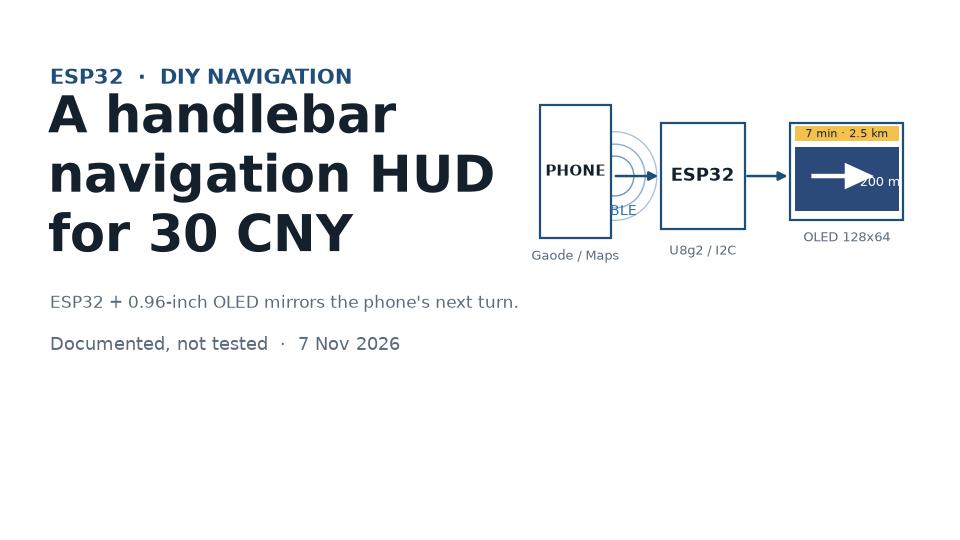
So the division of labour is clean. The phone does routing, positioning and voice. A wireless link carries two pieces of information, the turn direction and the distance. The board draws an arrow and a number. The board never knows where it is and never knows the route. It only displays. That is exactly why the cost lands near 30 CNY: no GPS, no SD card, no map data.
Three parts, taken apart
How the phone gives up the navigation text. Navigation apps do not expose an interface. Google Maps and Gaode offer no public API that returns the current turn instruction, which is industry standard because the data is their core asset. The open-source projects solve this with a blunt but effective trick: they read the notification.
On Android, an active navigation session keeps a persistent notification whose text reads something like "turn right in 300 m, onto XX Road". An app holding the Notification Access permission captures that text, a regular expression pulls out the turn and the distance, and the values are sent to the board. The navHUD project by Shreyas does exactly this: a Kotlin Android app reads the notification, parses the text and sends it to an ESP32 over Bluetooth Low Energy. A second project, atenboro-nav, released open source under the MIT licence in late September, takes a simpler route: the phone opens a hotspot, the board joins it and an HTTP POST pushes the turn data.
Both paths have trade-offs. BLE saves power but forces you to handle packet fragmentation. Wi-Fi is simpler but the phone must keep a hotspot running.
The transport. There is a specific trap everyone hits: a BLE packet holds only 20 bytes by default. A phrase like "turn right in 200 m, onto Jianshe Road" plus a separator easily exceeds 20 bytes. navHUD splits the string into numbered segments, sends them and the board reassembles them once the set is complete. It sounds fiddly but it is the most common pattern in embedded work, and once written it is reusable everywhere.
What the board draws. A 0.96-inch OLED at 128 by 64 pixels. The resolution is miserably low, and exactly enough. These panels have a fixed hardware split: the top 16 rows are yellow, the bottom 48 rows are blue. It is not a software partition, it is physical, and you cannot change it. That sets the layout. The yellow zone, the top strip, shows remaining time and total remaining distance, such as 7 min and 2.5 km. The blue zone shows a large arrow and a short distance like 10 m. The text must be large because you are riding and your eyes get one glance. Do not try to fit a map; it will not fit and it should not.
What 30 CNY buys
The bill of materials is almost embarrassingly short.
| Part | Specification | Price |
|---|---|---|
| Main board | ESP32-DevKitC, WROOM-32E module, Type-C, headers soldered | 21.33 CNY |
| Display | 0.96-inch OLED, SSD1306, 128x64, yellow-blue dual colour, I2C 4-pin, unsoldered | 8.3 CNY |
| Wiring | Dupont female-to-female, 4 wires enough | by the pack |
| Power | Power bank or 18650 cell holder | self-supplied |
| Enclosure | Waterproof box, zip ties, hot glue | self-supplied |
The board and the screen come to 29.63 CNY. The wires, box and power bank most people already have in a drawer. Note that the OLED sold here is the unsoldered version; the four pins must be soldered yourself, or buy a pre-soldered one for a few CNY more.
Why OLED and not a colour screen
The first instinct is a 1.8-inch TFT that could show a map thumbnail. It was abandoned after half an hour for three reasons. Sunlight readability: the screen faces up while riding, and a normal TFT is a white-out at noon. The OLED is self-emissive, black background with white text and high contrast, which wins outdoors even though its absolute brightness is low. Power: black pixels draw no current, and a 90 percent black interface draws far less than a same-size TFT, which matters on a power-bank supply. Price: 8.3 CNY, and it will get knocked around on the bars.
Build it: six steps
Wire it. Four wires, do not cross them. OLED VCC to ESP32 3V3, never 5 V unless the module silkscreen allows it and most support 3.3 V. GND to GND. SCL to GPIO 22. SDA to GPIO 21. The I2C address is normally 0x3C. Run an I2C scan first and only continue once the address appears.
Flash the firmware. Arduino IDE or PlatformIO both work. Install the U8g2 library, which does all the text and arrow drawing. First flash a fixed frame, a right arrow plus 200 m, to verify the screen and wiring before touching the phone.
Install the phone side. Build the Android app from the repository, install it, and in settings grant it Notification Access. This permission is buried under Settings, Apps, Special access, not in the normal permission list.
Pair. The phone discovers the board over Bluetooth and pairs. Some projects use BLE and pair directly inside the app without system settings.
Capture one notification. Start navigation, route anywhere, and watch whether the app receives the notification text. This step will almost certainly need a regular-expression edit, because every map app formats its notification differently, some say "turn right", some say "bear right", and some write the distance as 200m while others write 200 m.
Tune on the road. Ride two loops around the block first. Check three things: arrow direction is correct, distance updates keep up, and a bump does not drop the connection.
Five pitfalls, confirmed from the source
iPhone will not work. This is a hard limit. iOS does not let a third-party app read another app's notifications, and there is no Android-style Notification Access. So this design serves Android users only. An iPhone user must fall back to a phone mount.
Notification formats differ per app. As above, the regex needs tuning, and when a map app updates its notification wording your regex may break. This is the most fragile part: the design parasitises someone else's notification text.
Still dim in strong backlight. The OLED has high contrast but low absolute brightness. At noon with the sun behind you, you lean down and squint. A proper sunlight-readable panel, transreflective, costs far more.
Vibration loosens the Dupont wires. Handlebar vibration is harsher than you expect. Plug-in Dupont connectors can go intermittent after two rides and the screen starts flickering. Solder them or hot-glue them; do not take the shortcut.
Do not treat it as navigation. It shows only the next step, not the whole route, and has no voice. You still listen to the prompts you should listen to. Its job is to save one phone reach at an intersection, not to replace navigation.
What it can and cannot do
It can help an ebike, bicycle or motorcycle commuter glance at the next turn before a junction. It can show remaining distance on a long ride without stopping to pull out the phone. And it is a good first project that exercises BLE fragmentation, I2C driving and U8g2 graphics all at once.
It cannot serve iPhone users, because of the system limit. It cannot show a map, because 128 by 64 will not and should not. It cannot run fully offline, because its data comes entirely from the phone. And it cannot be a speedometer, because without GPS it cannot measure speed unless you add a module yourself.
Is it worth it
Thirty CNY, one screen, one board, and one fewer phone reaches while riding. That trade looks fair. The more interesting idea is underneath: instead of fighting for a data interface, pull the information out of the interface a human already sees. That is the same move as the screen-watching agent from the previous article, take the interface, not the API.
Rough, but it really works. It will not replace navigation, but it will go on the handlebar. Every time the arrow lights up, that is one fewer phone reaches at a junction.
Source: Hardcore Electronics DIY (Zhao Hongtao), WeChat, 7 November 2026.